IT Department Audit Checklists & Templates
Library of FREE IT audit checklists and report template: data center checklists, IT infrastructure and hardware audits, maintenance, safety and other audit checklists for IT departments
Streamline IT Audits with FREE IT Audit Checklists & Report
📃: Eliminate paperwork with digital checklists
⏳: Save time in inspection
📈: Generate reports & actionable insights
Enhance the efficiency, security, and compliance of your IT operations with our extensive library of IT audit checklists. These free PDF templates cover all critical areas of IT management, empowering you to conduct thorough audits, streamline processes, and safeguard your IT infrastructure.
The key benefits of incorporating IT audit templates into your operations include:
- Mitigate risks with comprehensive security, compliance, and operational checks.
- Ensure compliance with industry standards, regulations, and best practices.
- Streamline processes by standardizing IT audit workflows.

Template Library > IT & Data Center Audits
IT Audit Checklists: Top Downloads

NEW! Try generating a custom checklist with our free AI tool:
What are IT or ICT Audit Checklists?
An IT audit checklist, also called a technology audit checklist or technical audit checklist, is a structured tool used to guide the auditing process of an organisation’s IT systems, infrastructure, and practices. It ensures the audit is comprehensive, consistent, and aligned with established standards or regulations.
But before diving deeper, let’s understand what an IT audit is. Simply put, an IT audit is a systematic evaluation of an organization’s IT environment. It assesses everything from compliance with regulations and standards to operational efficiency, security controls, and risk management practices.
IT audit templates help auditors stay organized and ensure that every critical aspect—from data security to system performance—is reviewed.
Importance of IT Department Audit Checklists
IT systems are the backbone of operations, and audits ensure that they remain secure, efficient, and compliant. Here are a few key reasons why IT audits are indispensable:
- Risk Mitigation: Identifying vulnerabilities in your IT infrastructure before they become threats.
- Regulatory Compliance: Ensuring adherence to laws like GDPR, HIPAA, or ISO standards.
- Operational Efficiency: Improving processes, reducing downtime, and enhancing productivity.
So, why should you use an information technology audit template for these audits?
Using an IT audit template enhances this process by providing a clear framework that:
- Promotes consistency and thoroughness in audits.
- Helps auditors stay organized and focused on critical tasks.
- Serves as a memory aid, ensuring no essential areas are overlooked.
- Establishes accountability among team members involved in the audit process.
Types of ICT Audits Checklists
Different aspects of IT operations require different types of audits. Here are some common types of ICT audit checklists:
- Compliance Audits: Ensure that your IT systems and processes adhere to applicable laws, regulations, and standards, such as GDPR, HIPAA, or PCI DSS. These audits are crucial for avoiding legal penalties and maintaining customer trust.
- Security Audits: Evaluate the safeguards in place to protect your organization’s digital assets. They focus on vulnerabilities, firewalls, antivirus solutions, and user access controls to ensure that sensitive information is secure.
- Operational Audits: Assess how well IT systems are functioning to support business goals. The IT operations checklist examines performance metrics, resource utilization, and overall IT efficiency.
- IT General Controls (ITGC) Audit: Review the foundational controls in IT, including access management, system changes, and data backups. ITGC audits are essential for organizations that rely heavily on automated processes.
- Application Controls Audits: Focuses on the specific controls within software applications, ensuring they process data accurately, securely, and reliably.
- IT Governance Audits: Analyzes the alignment of IT operations with organizational goals and strategies. These audits evaluate whether the IT department is structured to deliver value and drive innovation.
- Disaster Recovery and Business Continuity Audits: Assess the organization’s preparedness for unforeseen events, ensuring robust recovery plans and continuity strategies are in place.
What Should be Included in an Information Technology Audit Checklist Template?
An effective IT audit checklist template ensures that every critical area of your IT infrastructure is evaluated systematically, leaving no room for oversight. While the exact items on the IT audit templates may vary depending on the size and scope of your organization, the following components are essential for any comprehensive IT audit.
Asset Inventory
Your IT internal audit checklist should start with a detailed inventory of IT assets, including hardware, software, and data. This inventory helps ensure that all resources are accounted for and managed effectively. Key items to include in the ICT asset audit checklist template are:
- Servers, routers, firewalls, and other network hardware.
- Operating systems, enterprise applications, and third-party software licenses.
- Data storage systems, including cloud services.
- End-user devices, such as laptops, desktops, and mobile devices.
👉 Software Due Diligence Checklist: Use this free template to assess software quality, identify risks, and ensure compliance before acquisition.
Hardware Audit
Beyond simply listing hardware in your asset inventory, an IT hardware audit checks the condition, lifecycle stage, and performance of physical equipment. Key items to include:
- Server age, warranty status, and end-of-life or end-of-support dates.
- Physical condition of servers, network switches, and routers, including signs of overheating or wear.
- Capacity and utilisation, whether hardware is under-provisioned, over-provisioned, or approaching its limits.
- Documentation of firmware versions and outstanding firmware updates.
- Environmental conditions for hardware, including temperature, humidity, and power supply stability.
👉 Preventive Maintenance Computer Checklist: Use this template to keep hardware audits on a consistent maintenance schedule rather than a one-off check.
Access Management
Access controls are crucial for safeguarding sensitive data and preventing unauthorized access. Your IT audit questionnaire should include:
- Verification of user access levels to ensure roles align with job responsibilities.
- Review of password policies (e.g., complexity, expiration, and 2FA).
- Examination of privileged access controls and admin accounts.
- Assessment of procedures for onboarding and offboarding employees.
Data Security Measures
Data is one of the most valuable assets for any organisation, which is why information security (or InfoSec) is one of the most heavily scrutinised areas of any IT audit. Key security measures to audit:
- Encryption protocols for data at rest and in transit.
- Backup policies and frequency of backup testing.
- Antivirus and anti-malware software effectiveness.
- Network security features, such as firewalls, VPNs, and intrusion detection systems.
- Physical security measures for data centers include biometric locks and surveillance.
👉 Privacy Risk Assessment Template: Here’s a template to assess privacy risks associated with data handling, onward transfers, security, and data integrity.
👉 Security Audit Checklist Template: A dedicated 101-question template covering the full range of information security controls in detail.
Incident Response and Disaster Recovery
Preparation for unexpected events is a hallmark of a resilient IT strategy. Your IT checklist should evaluate:
- The existence and adequacy of an incident response plan.
- Processes for reporting and mitigating data breaches or cyberattacks.
- Recovery Time Objectives (RTOs) and Recovery Point Objectives (RPOs).
- Disaster recovery testing, including recent test outcomes.
- Availability and functionality of redundant systems.

👉 IT Incident Report Template Checklist: Use this IT incident log template to register any incidents such as loss of data.
Change Management Controls
Effective change management minimizes risks associated with system updates or modifications. Audit items include:
- Policies for initiating, approving, and documenting changes.
- Review of logs for recent system changes.
- Testing procedures for updates before deployment.
- Rollback strategies in case of failed changes.
Application Controls
Your business applications should be audited for their ability to process data securely and accurately. Include in your IT manager checklist:
- Input controls to validate data integrity.
- Processing controls to ensure accurate computations.
- Output controls for generating reports and alerts.
- Access permissions specific to each application.
Network Infrastructure and Performance
The backbone of IT operations is your network infrastructure. Ensure your internal audit checklist for the IT department covers:
- Network performance metrics (latency, uptime, bandwidth utilization).
- Configuration of routers, switches, and firewalls.
- Monitoring systems for detecting unusual traffic or anomalies.
- Security of wireless networks, including encryption and guest access controls.
👉 IT Infrastructure Assessment Checklist Template: Use this template to assess and maintain your network infrastructure with regular backups, power checks, documentation, etc.
IT Governance and Policy Adherence
Good IT governance ensures that IT aligns with business goals and operates efficiently. Your IT checklist should examine:
- IT strategy alignment with organizational objectives.
- Review of policies regarding acceptable use, BYOD (Bring Your Own Device), and cybersecurity.
- Training and awareness programs for staff.
- IT budget allocation and resource optimization.
Third-Party Vendor Management
Third-party vendors play a significant role in IT operations, and their compliance impacts your security. Key considerations in the computer system audit checklist include:
- Vendor agreements and service level agreements (SLAs).
- Regular assessments of vendor cybersecurity policies.
- Measures for data sharing and access controls with vendors.
Compliance Requirements
IT audits often include a focus on compliance with industry standards and legal regulations. Your IT assessment checklist should address:
- Specific regulatory requirements applicable to your industry, such as GDPR, HIPAA, PCI DSS, or SOX. If card payments are in scope, note that PCI DSS v4.0.1 is the current standard, and since 31 March 2025 all of its previously future-dated requirements are mandatory, so assessments carried out now are judged against the full v4.0.1 requirement set rather than the older v3.2.1 baseline.
- Evidence of adherence to ISO standards, if applicable.
- Records of data protection impact assessments (DPIAs).
- Documentation of third-party vendor compliance.
Financial institutions and banks face additional scrutiny under regulations like SOX and, depending on jurisdiction, banking-specific IT control frameworks. If you’re auditing IT systems for a bank or financial services organisation, start with the SOX Compliance IT Checklist, and pair it with the general controls and access management sections above, since regulators typically expect both to be demonstrably in place.
For healthcare organisations, it’s worth tracking the proposed HIPAA Security Rule update, which would mandate encryption, multi-factor authentication, annual penetration testing, and full asset inventories, removing the current “addressable” flexibility. Important caveat: this is still a proposed rule, not final law. The final rule has been pushed back to a July 2027 target and could still be revised or withdrawn. The existing Security Rule remains in force, but since these controls reflect current security expectations anyway, building them into your audits now is sensible regardless of the rulemaking outcome.
👉 Useful Resource: Free IT Compliance Checklists
Here are the most important IT compliance checklist template to help you get started:
» Use These Checklists: Sign up with our 14-day free trial to have these checklists customized.
Documentation and Record-Keeping
Accurate documentation ensures traceability and accountability during audits. Your information system audit questionnaire should include:
- Updated IT policies, procedures, and guidelines.
- Logs of system activities, user access, and security incidents.
- Records of prior audits and corrective actions.
- Asset maintenance and software patching records.
Emerging Technology Risks
As organizations adopt new technologies like AI, IoT, and cloud computing, risks evolve. Your audit should adapt accordingly:
- Assessment of AI or ML system controls and data training processes.
- IoT device security, including firmware updates and network segmentation.
- Cloud service configurations and provider compliance reviews.
Auditing the Modern Frontier: AI & Cloud Risks
As your tech stack evolves, your audit must adapt. Static checklists from five years ago won’t catch today’s most expensive vulnerabilities.
- AI Governance & Shadow AI: Are employees feeding proprietary code or sensitive customer data into public LLMs? Your audit should verify that an AI Acceptable Use Policy is in place and that data egress to unapproved AI tools is monitored.
- Cloud Infrastructure & S3 Misconfigurations: The leading cause of modern data breaches is a misconfigured bucket. Ensure your checklist includes a deep dive into Storage Permissions (S3/Azure Blobs) and IAM (Identity and Access Management) roles to prevent public data exposure.
- IoT & Edge Security: Every smart sensor is a potential entry point. Audit for firmware update schedules and network segmentation—IoT devices should never live on the same VLAN as your core database.
How to Conduct IT Audits Using an IT System Audit Checklist?
Conducting an IT audit is a step-by-step process that requires careful planning, execution, and follow-up. Here’s a detailed guide to using an IT assessment checklist template effectively:
Plan for the IT Audit
Decide whether you’ll conduct an internal audit or hire an external auditor. Internal audits are cost-effective and foster continuous improvement, but external auditors bring an unbiased perspective and specialized expertise.
Prepare for the Audit
Define the objectives of the audit. Are you checking for compliance, security, or operational efficiency? Once the goals are clear, define the scope, prepare the IT audit templates, and schedule the audit to minimize disruptions.
Conduct Audit
Execute the audit systematically. Use the information system audit template to review each item, collect evidence, and document findings. Collaboration between IT staff and auditors is key to uncovering hidden vulnerabilities.
Create an Information Technology (IT) Audit Report Template
Every IT audit should end with a clear, well-structured IT audit report, sometimes called an information system audit report, documenting your findings in an actionable format. Highlight strengths, areas of improvement, and high-risk issues that require immediate attention.
» IT Infrastructure Audit Report Template: Here’s what an IT audit report generated with the GoAudits mobile app looks like.
Follow Up
Audits don’t end with reporting. Implement the recommended changes, and schedule follow-up audits to ensure that corrective actions have been effective.
To ensure your findings actually improve security, categorize every “failed” item by its risk level and set strict deadlines:
- 🔴 CRITICAL (Fix within 24 Hours): Immediate threats like unencrypted backups, open S3 buckets, or active accounts for terminated employees.
- 🟠 HIGH (Fix within 7 Days Hours): Significant vulnerabilities such as outdated firewall firmware, missing security patches, or a lack of MFA.
- 🟡 MEDIUM (Fix within 30 Days): Process improvements like incomplete asset documentation or minor policy updates.
Why Most IT Audits Fail (and How to Avoid It)
Even the most thorough managers can fall into these three common traps:
- The “Check-the-Box” Syndrome (Lack of Evidence): Simply marking a task as “Yes” in your IT assessment checklist isn’t an audit; it’s a guess. Solution: Require auditors to attach a screenshot, log file, or photo to every critical item. If there’s no proof, it’s a “No.
- Using Legacy Checklists for a 2026 Tech Stack: Auditing a hybrid-cloud environment using a 2020 on-premise template leaves massive gaps. Solution: Review and update your audit templates quarterly to include new software, APIs, and AI tools.
- The “Ownership Gap”: Audits often identify “No” items but fail to assign a “Who.” Solution: Every failed audit point must be assigned to a specific owner. Without a name attached to the fix, the vulnerability will still be there in next year’s audit.
FAQs
Is there a free IT audit checklist available?
Yes. Every IT and data centre audit checklist in this library is free to download as a PDF, and can also be customised and used digitally in the GoAudits app during a free trial.
What’s the difference between an IT audit and an IT security audit?
An IT audit is broader, covering infrastructure, compliance, governance, and operations. An IT security audit (or information security audit) focuses specifically on protecting data and systems from unauthorised access, breaches, and cyber threats, and is typically one component within a full IT audit.
How often should an IT audit be conducted?
Most organisations run a full IT audit annually, with more frequent reviews (quarterly or after any major system change) for high-risk areas like access controls, security patching, and compliance-critical systems. Given how quickly technology changes, audit templates themselves should also be reviewed regularly rather than reused unchanged year after year.
What should be included in an IT audit checklist for a small business?
Small businesses should prioritise the highest-risk areas first: access management, data backup and recovery, patch management, and basic security controls like firewalls and antivirus. A full enterprise-scale checklist can be scaled down, but these core areas shouldn’t be skipped regardless of company size.
Streamline Your IT Audits With Digital Checklists
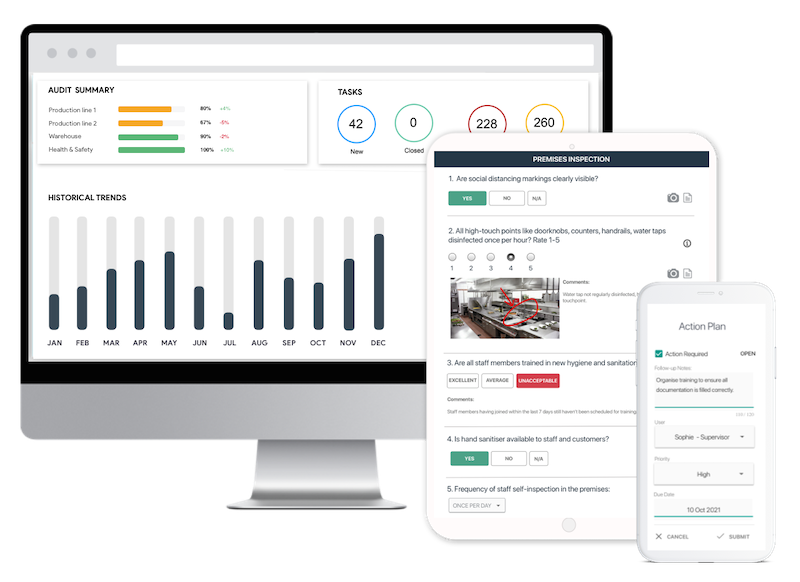
GoAudits is a leading audit and inspection software designed to simplify IT audits and enhance operational efficiency. Conduct paperless audits of your IT systems using mobile or tablet devices.
Store all audit data securely on the cloud for future reference and compliance purposes. Generate and share detailed IT audit reports with stakeholders instantly, ensuring swift decision-making and corrective actions.
With the GoAudits IT inspection and audit app, you can:
- Schedule and manage all types of IT audits in advance.
- Customize IT audit templates to suit your organization’s unique requirements.
- Ensure compliance with industry standards, data protection laws, and IT governance policies.
- Identify and share noncompliance issues with your team and initiate immediate resolutions.
With a rating of 4.8 stars on Capterra, GoAudits is trusted by leading names across industries for audits and inspections.» GoAudits Reviews: Read how other businesses leverage GoAudits to meet security and operational standards.
Easy start with digital checklists
- Capture photos as proof of compliance or areas needing attention
- Instantly generate and share detailed reports after the inspections
- Assign follow-up tasks and track completion on a centralized dashboard