- Library
- IT & Data Center
- Security Audit Checklist Template
Security Audit Checklist Template
101 questions in 21 sectionsInteractive preview: try the answers
Section 1 of 21 · 3 questionsConfiguring For Least Functionality
Are firewall rules set?
Are unnecessary ports closed, and unnecessary protocols and services blocked?
Are functions such as APIs and admin privileges segmented?
Section 2 of 21 · 3 questionsGeneral
Is a security email address set up and forwarded to the developer's group?
Are regular system vulnerability sweeps performed?
Are security policies created, documented, and held in a specific folder, either digitally or on paper?
Section 3 of 21 · 2 questionsIncident Response Plan
Is there preparation for a ransomware attack, including establishing a response team, creating an emergency contact list, considering cybersecurity liability insurance, and determining the limit you're willing to pay?
Is an incident response plan created that outlines responsibilities and steps for detecting, reporting, and responding to an incident?
Section 4 of 21 · 3 questionsIntrusion Detection
Is the dark web monitored for a data breach (e.g., PhishLabs)?
Is a host-based IDS used (e.g., OSSEC, Wuzah, Tripwire, Hunter)?
Is a network-based IDS used (e.g., Suricata, Snort, Bro)?
Section 5 of 21 · 2 questionsPentesting
Has a bug bounty program started (e.g., HackerOne, Bugcrowd)?
Is a third-party tool used for pen-testing (e.g., Cobalt, Securisea)?
Section 6 of 21 · 3 questionsPersonnel
Is onboarding for employees and contractors completed with background checks?
Is access provisioning ensured to have necessary approvals and tracking?
Are NDAs completed as necessary?
Section 7 of 21 · 2 questionsRisk And Vulnerability Management
Is a comprehensive internal risk assessment and annual review conducted?
Are regular vulnerability scans and remediation performed?
Section 8 of 21 · 6 questionsDevice Security
Are all devices, such as laptops and hard drives, encrypted (e.g., FileVault on Mac)?
Are device restrictions applied to stop backups to personal cloud storage, etc.?
Is consideration given to providing employees with mobile devices for business purposes with remote wipe capabilities?
Are potentially dangerous apps and websites blocked?
Are users prevented from installing software?
Is endpoint verification turned on?
Section 9 of 21 · 15 questionsApplication Security
Is transfer lock enabled (default for most services)?
Is the website scanned using a tool like Mozilla Observatory?
Does everything pass in the website scan except for the Content Security Policy?
Is a code analysis conducted?
Are there no credentials present in the code?
Are the dependencies scanned for vulnerabilities using tools like GitHub, bundle-audit, npm audit, yarn audit, or CodeClimate?
Is a static code analysis performed using tools like Brakeman, CodeClimate, or others?
Are secure password hashing methods such as bcrypt or Argon2 used?
Is MFA required for admin accounts (e.g., Google Authenticator)?
Is rate-limiting added?
Are users notified of email and password changes, with notifications sent to the old email?
Are login attempts recorded?
Are measures in place to protect against account takeovers?
Are accounts locked after too many failed login attempts?
Are accounts locked after a successful login from a credential-stuffing IP?
Section 10 of 21 · 4 questionsEmail Security
Is the Sender Policy Framework (SPF) configured?
Are Domain Keys Identified Mail (DKIM) settings in place?
Are Domain-based Message Authentication, Reporting & Conformance (DMARC) configured?
For inactive domains, has a null SPF record been created with “v=spf1 –all”?
Section 11 of 21 · 11 questionsSoftware Security
Is there a list of current system security software (e.g., firewalls, AV, SIEM tools, etc.)?
Is data loss protection software considered?
Is MFA required for all third-party services such as Slack?
Is MFA required for all third-party services such as GitHub?
Is MFA required for all third-party services such as Heroku
Is MFA required for all third-party services, including others?
Is a team password manager set up?
Are all software and operating systems checked to be fully patched and updated to the latest versions?
Is an inventory/patch management tool considered (e.g., Fleetsmith)?
Is auto-renew on for domain names?
Are primary domains bought for 5-10 years (optional)?
Section 12 of 21 · 10 questionsData Storage
Is a list of personal data created, detailing where it’s stored and its sensitivity level?
Are the database fields (and other data stores) containing personal data identified?
Are files containing personal data identified and listed?
Are third-party services storing personal data identified and documented?
Is storage level encryption enabled for data at rest?
Is encryption enabled for the Database?
Is encryption enabled by Elasticsearch?
Is encryption enabled for S3 storage?
Is application-level encryption applied to database fields and file uploads?
Is authenticated encryption used, such as AES-GCM or Libsodium?
Section 13 of 21 · 2 questionsData Storage & Processing Security
Is an employee offboarding checklist in place to disable all accounts (or automate the process)?
Is encryption enforced for all data transmissions?
Section 14 of 21 · 2 questionsBusiness Intelligence Tools
Is personal data restricted from being accessible?
Are auditing and logging mechanisms implemented to track access and usage of Business Intelligence tools and related data?
Section 15 of 21 · 5 questionsData In Transit - External
Is HTTPS enabled everywhere, including subdomains?
Is the HSTS header implemented?
Is the domain included in the HSTS preload list (if possible)?
Are secure ciphers being used?
Are SSL certificates valid and not expiring soon?
Section 16 of 21 · 3 questionsData In Transit - Internal
Is PostgreSQL configured with sslmode=verify-full?
Is Elasticsearch configured to use HTTPS?
Is Redis configured to use SSL?
Section 17 of 21 · 6 questionsData Leakage Checks
Are logs generated and maintained for activities?
Is there a system in place for reporting and monitoring errors?
Are Business Intelligence tools instrumented to gather performance metrics and usage data?
Are third-party analytics tools integrated securely?
Are cache stores (if used) secured and monitored to prevent data exposure?
Are email inboxes monitored and secured to prevent unauthorized access or data leakage?
Section 18 of 21 · 2 questionsDatabase Users
Are passwords greater than 32 characters?
Are separate roles used for migrations, the app, and analytics?
Section 19 of 21 · 5 questionsInternal Threats
Is user activity logged?
Are SSH/console logins logged?
Are SSH/console commands logged?
Have admin privileges been separated among multiple personnel/teams?
Are approval gates implemented for administrative actions?
Section 20 of 21 · 3 questionsUser Management
Is the list of admins for all services verified every 3 months?
Is the list of users for all services verified every 3 months?
Are inactive accounts removed every 3 months?
Section 21 of 21 · 9 questionsPhysical & Environmental Security
Are server rooms locked to limit physical access to servers?
Is there a logbook or video surveillance system to monitor physical access to server rooms?
Are security access levels documented for personnel, and is access periodically reviewed?
Are employee badges and keys logged, and is access terminated promptly for departing employees?
Are means for connecting external drives and devices disabled on servers?
Is temperature and humidity monitored, with alerting thresholds set?
Is there monitoring for water detection in server rooms?
Are backup power, lighting, and fire suppression systems in place and tested regularly for emergencies?
Checklist by GoAudits. This checklist is an example: we do not guarantee compliance with the laws applicable to your territory or industry. Seek professional advice to adapt it to your workplace or jurisdiction.
Free PDF
Download the Security Audit Checklist Template
By downloading this checklist you agree to the GoAudits privacy policy and terms of service.
NEW! Try generating a custom checklist with our free AI tool:
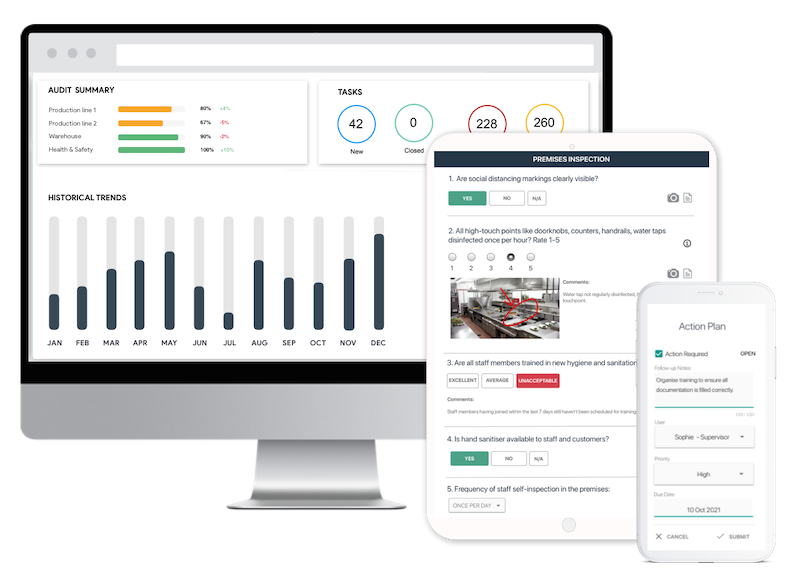
Easy inspection app for your digital checklists
- Conduct inspections anytime, anywhere - even offline
- Capture photos as proof of compliance or areas needing attention
- Instantly generate and share detailed reports after the inspections
- Assign & track follow-up tasks, view historical trends on a centralized dashboard