Key Takeaways
- Field reports are essential for on-site accountability, documenting conditions, and ensuring safety, quality, and compliance.
- Manual reporting is time-consuming and is susceptible to inaccuracies and delays.
- Field inspection apps with digital checklists and instant reporting features allow inspectors to generate accurate and professional reports on-site.
An effective field inspection report bridges the gap between what happens on-site and what is understood in the office. Whether you’re an inspector, a project manager, or a team lead, knowing how to create a clear, comprehensive, and actionable field report is a skill that directly impacts your bottom line.
Explore the key elements of a comprehensive field report, download a free field report template PDF, and learn how to streamline reporting with digital tools.
What is a Field Report?
A field report is a document created by an individual or a team to record observations, findings, and activities during a visit to a specific location, or ‘in the field.’ In short, it’s a written record of what was seen and done on-site, often called field reporting.
Unlike a general report, it focuses on firsthand observations and detailed data collected on-site. The information captured is often used to assess a situation, track progress, identify issues, or ensure compliance with standards and regulations.
Field reports are crucial across a wide range of industries where on-site verification and documentation are non-negotiable. Common industries where field reports are frequent include:
- Construction: Documenting project progress, safety compliance, and material quality. See our complete guide to construction site visits and field reports for construction-specific templates and best practices.
- Architecture: Recording design compliance, site conditions, and observations during construction administration site visits. See our guide to architect field reports and site visit reports for the specific format architects use.
- Manufacturing: Conducting quality control inspections and machine maintenance checks.
- Facilities Management: Documenting maintenance tasks and assessing building condition.
- Hospitality: Conducting audits of hotels, restaurants, and food outlets for consistent service quality, safety, and hygiene.
- Retail Stores: Auditing retail stores to maintain brand consistency, assess merchandising, and ensure safety and security.
- Safety & Health: Reporting on hazards, accidents, and compliance with safety regulations.
- Utility Services: Inspecting infrastructure like power lines, pipelines, and water systems.
- Oil & Gas: Performing equipment audits and safety protocol checks.
- Environmental Services: Recording site conditions, pollution levels, and cleanup progress.
The scope of a field report can vary widely, from a quick checklist for a routine inspection to a detailed, narrative-based document for a complex investigation.
What’s the Purpose of a Field Observation Report?
The primary purpose of a field observation report is to provide a reliable, objective record of what was seen and done in the field. This objective record serves several critical functions:
- Documentation: It creates a formal record of conditions at a specific time and place. This is essential for tracking changes over time and can serve as legal documentation if needed.
- Decision-Making: The data collected in a report provides management with the information they need to make informed decisions about resource allocation, corrective actions, and project strategy.
- Compliance & Safety: For many industries, regular field reporting is a requirement for regulatory compliance. It ensures that safety protocols are followed and helps identify and mitigate potential risks before they lead to an incident.
- Progress Tracking: Reports allow project managers to monitor the status of a project against its timeline and goals, highlighting potential delays or areas where work is ahead of schedule.
- Accountability: They assign responsibility for tasks and findings. When an issue is identified, the report can clearly state who is responsible for addressing it and what actions have been taken.
- Communication: A well-written report serves as a universal communication tool, ensuring everyone, from on-site staff to remote stakeholders, understands the situation.
Case Study: How Woodside Homes leverages a field inspection app to manage inspections and reporting.
How is It Different from a Field Service Report?
A field report mainly documents on-site observations, inspections, and data collection. Its focus is answering, “What was seen and found?” serving as a reliable analysis and documentation tool.
In contrast, a field service report centers on describing a specific service or task performed, detailing the actual work conducted, and is frequently used after client-related activities. In short, it answers the question, “What work was completed?”
Both types of reports are vital, but their emphasis is different: one is for documenting findings (inspection), and the other is for documenting actions (service). A field inspection software, like GoAudits, offers features and templates suitable for both types of reporting.

Free Field Report Template/Sample PDF
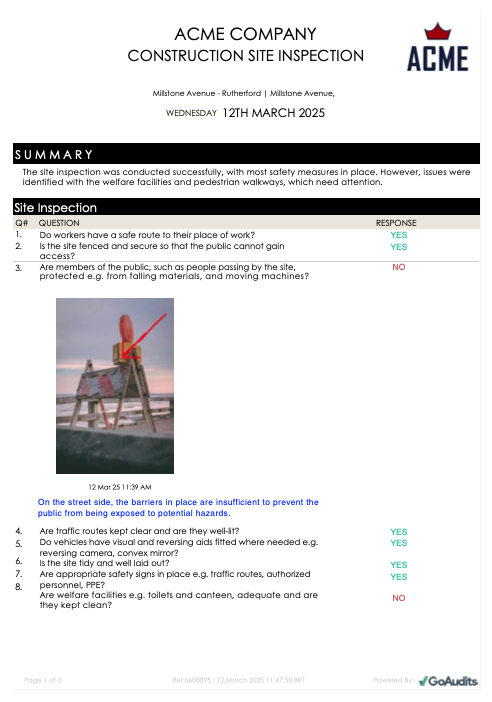
This field inspection report sample was generated instantly using the GoAudits mobile app. The user simply filled out the construction site inspection checklist on their mobile device during the inspection. All the observations, photos, and comments were automatically compiled into the final PDF.
Here’s a free field report sample in PDF format that you can download and use as a reference. This field inspection report example shows what a professional construction report looks like, complete with findings, photos, and an executive summary.
Generate a report in minutes using our customizable digital checklists. Here are a few FREE checklist examples from the GoAudits library:
- Manufacturing Quality Control Checklist
- Walkthrough Checklist Template
- Facility Maintenance Checklists
- Safety Walkthrough Checklist
- Quality Control Checklists
- Restaurant Visit Report
- Store Visit Checklist

How to Write a Field Inspection Report?
Writing an effective field inspection report isn’t just about listing facts; it’s about presenting information in a clear, organized, and useful way. The process can be broken down into the following simple steps:
- Prepare Your Checklist and Tools: Before you reach the site, have a clear plan of what you need to inspect.
- Document as You Go: Take detailed notes and capture visual evidence, like photos and videos, for every observation.
- Organize Your Findings: Back in the office, structure your notes into a logical report format, categorizing your findings and adding clear, actionable recommendations.
- Review and Share: Double-check your report for clarity and accuracy.
Field Report Format: Key Elements of a Field Inspection Report
A comprehensive field visit report template should be structured to efficiently capture all necessary information. While the specifics will vary by industry, most effective field observation report templates include these core sections:
- Header Information: This is the basic “who, what, where, when” of the report. It should include:
- Report Title (e.g., “Construction Site Inspection Report”)
- Report Number or ID
- Date and Time of Inspection
- Location (Site Name, Address)
- Inspector/Auditor Name and Contact Information
- Client/Customer Logo
- Executive Summary/Overview: A concise summary of the key findings, including the purpose of the inspection, the main conclusions, and any critical issues found.
- Detailed Findings: This is the core of the report. It should be broken down into sections based on the areas inspected. For each finding, you should include:
- Finding Status: Is it a Pass, Fail, or a Non-Applicable item?
- Specific Observation: A clear, objective description of what was seen (e.g., “On the street side, the barriers in place are insufficient to prevent the public from being exposed to potential hazards.”)
- Photos & Videos: Visual evidence is non-negotiable. It proves your findings and adds critical context.
- Risk Level: Is it high, medium, or low risk?
- Corrective Action/Recommendations: What needs to be done to fix the issue, by whom, and by when? (e.g., “Erect additional barriers to protect the public from the street side.”)
- Comments & Action Plan: A summary of the overall state of the site, a list of critical actions required, and any broader recommendations for improvement.
- Signatures: Signatures from the inspector and a site representative confirm that the report is accurate and has been reviewed on-site.
Common Mistakes to Avoid in Field Reports
Even a well-structured field report template can fall short if these common pitfalls creep in:
- Vague descriptions: “Damaged pipe” tells the office far less than “1-inch PVC pipe, cracked at the joint near the north entrance.” Specific detail is what makes a finding actionable.
- Overcomplicated templates: Cramming in every possible field overwhelms inspectors and slows down every single report. Keep templates focused on what’s actually relevant to the task.
- Missing photos or evidence: A written description alone leaves room for dispute; visual proof settles it.
- No clear owner or deadline on corrective actions: A finding without an assigned person and a due date rarely gets fixed.
- Inconsistent formatting between inspectors: When each person structures their report differently, comparing data across sites or time becomes difficult; standardizing the template solves this.
Use a Field Inspection Software for Instant Field Reports On-site
Looking for the right field report app or software? The traditional method of field report writing often involves a clipboard, a pen, and a camera.
- Take notes and photos manually.
- Go back to the office.
- Transcribe handwritten notes into a word processor or spreadsheet.
- Organize and insert photos.
- Try to remember details you may have missed.
- Format the report and share it.
This manual process has several drawbacks. It is time-consuming and prone to error. Inspectors rely on paper checklists, which have a high chance of getting misplaced or damaged. Drafting reports manually takes up several hours of inspectors’ time, which causes delays in sharing and critical actions. Lastly, such reports often lack a consistent format, making it difficult to compare data over time.
This is where a mobile inspection and reporting software like GoAudits helps. Instead of a static paper form, you work with a dynamic digital checklist on a mobile device.
- Capture Data On-site: Use a tablet or phone to complete the checklist.
- Add Rich Media: Take photos and add annotations directly within the app.
- Automate Reporting: After the inspection, generate a pre-filled, well-formatted professional report within the app, and share it instantly with stakeholders.
A field inspection app like GoAudits saves hours on manual reporting, ensures the shared report is error-free, and reduces delays in corrective actions. See our comparison of the top field reporting software if you want to weigh GoAudits against other options before deciding.
Case Study: How FiberRise Streamlines Field Reporting With GoAudits
The FiberRise team relied on spreadsheets and paper forms to collect inspection data across all their construction sites, and captured and tracked photographs separately. The company spent a lot of time compiling all the findings.
With features like mobile inspections, photo capture, GPS tagging, offline audits, and automated reporting, GoAudits’ field inspection software equipped them to conduct faster and more streamlined inspections.
A big win for us was the speed at which we can conduct an audit and produce a report: the entire process is now much faster.
Stacy Steward, Program Director, FiberRise
Read Complete Story: How FiberRise simplifies construction quality control processes with GoAudits.
Streamline Field Inspections and Reporting With
GoAudits is a field inspection & reporting software that allows project managers to do their best work while meeting the safest and highest quality control standards. Its scalable features enable managers to streamline processes, eliminate communication bottlenecks, enhance resource utilization, and handle multiple projects.
With GoAudits, you can:
- Create custom field inspection checklists.
- Schedule all types of inspections and field visits.
- Perform checks using the GoAudits mobile app, even in locations with limited internet connectivity.
- Assign corrective actions and ensure their on-time completion.
- Make sure all stakeholders stay updated through instant on-site reporting.
- Monitor adherence to all safety, quality, and operational standards.
With a rating of 4.8 stars on Capterra, GoAudits is trusted by some of the biggest names in the industry.
» GoAudits Reviews: Read how companies leverage GoAudits to meet standards in their operations and quality.
FAQs
There’s no fixed length; it should be as long as it takes to communicate the findings clearly, and no longer. A routine daily site check might be a one-page checklist with a few photos, while a complex investigation could run several pages with detailed narrative sections. If a report needs padding to look thorough, that’s usually a sign the template has the wrong fields, not that it needs more length.
Paper forms and manual write-ups are the bottleneck here; the report physically has to travel back before anyone can act on it. Offline-capable digital forms solve this: the technician completes the full report on-site with no connection at all, and it syncs and reaches the office automatically the moment a signal is available, instead of waiting for someone to return, transcribe notes, and email a file.
Standardize the same checklist and scoring criteria across every site, then compare results side by side, average scores, common failure points, and how quickly issues get resolved. This only works if every location is genuinely using the same template; inconsistent formats between sites make comparison unreliable, which is one reason digital, centrally-managed checklists work better than paper forms for multi-site operations.
If your reports list problems but don’t assign who’s responsible and by when, there’s no real accountability, and issues quietly roll over from one report to the next. The fix is to make every finding trigger an assigned corrective action inside the report itself, one that someone has to actively close out, rather than leaving it as a line item nobody owns.
If reports are scattered across paper files or separate spreadsheets, nobody’s cross-referencing old findings against new ones, so a slowly worsening fault goes unnoticed until it fails outright. Centralizing every inspection in one system lets you compare the same asset’s condition over time and catch a declining trend, a recurring minor fault, or a slipping score while it’s still a cheap fix rather than an emergency repair.
A dispute usually comes down to insufficient evidence at the time of the visit; a vague note without a photo, timestamp, or exact measurement leaves room for someone to argue later. Going forward, treat every finding as something that might be challenged: capture GPS location, a timestamp, a specific measurement rather than a general description, and get a signature from someone on-site before you leave. A digital report generated the same day is far harder to dispute than a handwritten note typed up a week later.