Key Takeaways
- Construction photo documentation software helps field teams eliminate the scattered camera rolls, email chains, and manual uploads that cost supervisors hours every week.
- The top tools for construction photo logs combine offline capture, GPS metadata, checklist integration, and one-click PDF reporting.
- A construction photo app with checklists lets you enforce required photo fields per task, meaning crews can’t mark work complete without visual proof attached.
- For legal and insurance purposes, only timestamped, GPS-tagged photos with an unbroken audit trail carry full evidentiary weight; casual camera roll photos do not.
According to Autodesk’s 2025 Construction Spotlight Report, field teams spend an average of 13 hours per week just looking for project data. When photos are scattered across personal devices, email chains, or unorganized folders, supervisors waste valuable field time, and critical visual evidence gets lost.
A construction photo documentation software fixes this by giving field teams a simple, consistent way to capture jobsite evidence, link it to tasks, and generate professional reports instantly. Below, we compare the top-rated apps, outline the essential features to look for, and share a free construction site report template you can use right away.
- Top-Rated Photo Documentation Software & Apps for Construction
- What is Construction Photo Documentation Software?
- How to Document Photos Using a Construction Photo Report App
- Free Construction Photo Report Template
- Key Features to Look for in a Construction Site Photo Documentation App
- How GoAudits Checks Every Box (The All-in-One Solution)
- FAQs
Top-Rated Photo Documentation Software & Apps for Construction
Here’s an overview of the best job site photo documentation apps for construction in 2026:
| Photo Documentation App | Paid Plan | Free Trial | Instant Reporting | Offline Functionality | Cloud Storage |
| GoAudits | $10/user/month | ✅ | ✅ | ✅ | ✅ |
| Procore | Quote upon request | ❌ | ✅ | ✅ | ✅ |
| CompanyCam | $19/user/month | ✅ | ✅ | ✅ | ✅ |
| Fieldwire | $39/user/month | ✅ | ✅ | ✅ | ✅ |
| OpenSpace | Quote upon request | ❌ | ✅ | ✅ | ✅ |
1. GoAudits: Best for Audits, QC, and Photo-Heavy Reports

GoAudits construction inspection and audit software helps digitize and standardize critical jobsite photo documentation. It’s an ideal tool for construction supervisors and site inspectors who need detailed, photo-rich, auditable records for every activity.
With GoAudits, you can conduct routine safety checks, perform QA, track corrective actions, and generate professional construction photo reports instantly.
Key Features:
- Custom Digital Checklists: Use custom forms and checklists to link photos directly to specific inspection criteria.
- Photo Annotation & Metadata: Use a contractor photo app to capture photos with automatic date, time, and location stamps, and add annotations instantly.
- Automated Report Generation: Instantly generate a branded PDF report complete with all photos, scores, and an audit trail, ready to share with stakeholders.
- Mobile App (iOS and Android): Conduct full inspections, capture unlimited photos, and manage defects even without internet connectivity.
- Corrective Action Tracking: Flag defects or non-conformances with photos, assign them to team members, and track resolution status to closure using the contractor picture app.
GoAudits also functions as a jobsite environmental audit app with photo documentation, enabling safety and environmental compliance teams to capture evidence offline.
Our teams use GoAudits to make incremental inspections for the network. Anytime we are in the field working, we can use the tool to report on network inventory or construction status.
Stacy Steward, Program Director, FiberRise
The platform is very good, but the main reason that we are working with GoAudits is their team! They were always ready to answer our questions and made sure that we had everything we needed.
👉 Read Full Story: How FiberRise works with GoAudits to manage field service photo documentation and QC processes.

2. Procore: Best Jobsite Photo App for Large-Scale Enterprises
Procore is a comprehensive, enterprise-level project management platform designed to connect all project stakeholders across the entire construction lifecycle. It provides centralized tools for design, financial tracking, and field execution, including robust construction project photo documentation capabilities.
Key Features:
- Centralized photo repository
- Project timelines
- Integration with project tools
3. CompanyCam: Best Contractor Site Photo App for Real-Time Communication
CompanyCam is a specialized construction photo documentation app focused on making visual capture and sharing fast, simple, and collaborative for field teams. It is built to minimize friction, ensuring teams spend minimal time documenting and maximum time working.
Key Features:
- Rapid photo capture
- Galleries & sharing
- In-app communication
4. Fieldwire: Best Job Site Photo Documentation Tool for Field and Task Management
Fieldwire is a mobile-first field management solution that connects blueprints, tasks, and teams directly on the jobsite. While its primary focus is task management, its job site photo documentation capabilities are integrated into task tracking and punch lists.
Key Features:
- Photo linking to tasks
- Plan integration
- Instant reporting
👉 Fieldwire Alternatives: Discover more apps like Fieldwire with robust photo documentation features.
5. OpenSpace: Best Jobsite Picture App for 360° Photo Capture
OpenSpace offers an automated way to capture the entire jobsite using 360° cameras and uses AI to map the imagery to project plans. It creates a visual, historical record of the site, ideal for tracking progress and photo documentation.
Key Features:
- Automated 360° capture
- AI-powered progress tracking
- Remote site access
👉 Useful Resource: Free Construction Inspection Templates
Here are some important construction checklists to help you conduct inspections at different stages of the project:
→ Post Construction Cleaning Checklist Template
→ Construction Site Risk Assessment Checklist
→ Building Handover Inspection Checklist
→ Construction Site Security Checklist
→ Daily Crane Inspection Checklist
→ Operational Readiness Checklist
→ Construction Safety Checklists
→ Construction SOP Template
→ Scaffold Inspection Form
» Use These Checklists: Sign up with our 14-day free trial to have these checklists customized.
What is Construction Photo Documentation Software?
A construction photo documentation software is a digital tool designed to help construction supervisors and site inspectors capture, organize, and report visual information from a construction site. It moves photo management from scattered files to a centralized, structured database.
Visual proof is the most objective form of evidence. Proper photo documentation in construction is critical for:
- Verifying Work: Confirming work completion for payment applications and closeouts.
- Protecting Against Claims: Providing evidence against liability, damage, or schedule disputes.
- Tracking Progress: Giving remote stakeholders a clear, auditable timeline of construction progress through photo documentation.
Construction Photo Documentation vs. General Project Management Software
Construction visual documentation software and general project management platforms often overlap in features, but they serve distinct primary purposes — and confusing the two leads to teams paying for capabilities they don’t use while missing the field workflow they actually need.
General project management platforms (like Procore or Autodesk Build) are built around financial tracking, scheduling, submittals, and RFI management. Their construction management software photo capabilities exist to support the project record: attaching images to RFIs, linking photos to punch list items, adding site imagery to daily logs. They are not designed around photo capture and organization as the primary field workflow.
Purpose-built job site photo documentation tools – contractor photo apps, jobsite photo apps, and field-first platforms, like GoAudits, are designed around the capture workflow first. The primary action is a field worker taking a photo and immediately giving it context: linking it to a checklist item, adding a markup, capturing GPS and timestamp, and submitting it into an organized report. Everything else (task assignment, report generation, client sharing) flows from that central capture action.
Construction Project Photo Documentation Examples
The following are the most common types of construction visual documentation and construction picture documentation found on an active project:
- Before and After: Photos of a specific task location before work begins and after it’s completed, such as a utility tie-in or foundation prep.
- Concealed Work: Photos of rebar placement, plumbing rough-in, or electrical conduits before the concrete or drywall is installed.
- Quality Control (QC) Issues: Capturing defects, material damage, or incomplete work with annotations and location markers for punch lists.
- Safety Compliance: Visual records of required PPE usage, stable scaffolding, or safety hazard warnings in place. Check out our rankings for the top construction compliance software.
Construction Inspection Software: Explore how GoAudits caters to all types of on-site photo documentation.
How to Use Construction Photo Documentation Software for Roofing, Restoration, and Specialty Trades
Construction photo documentation software isn’t limited to general contractors. For commercial jobs, multi-site contractors, roofing crews, restoration companies, telecom field teams, and utility contractors, each has distinct documentation requirements — and the right app handles them all.
- Roofing contractors need a roofing inspection photo documentation tool that enforces required shot lists: before-and-after photo documentation of gutters, siding, flashings, and adjacent surfaces, so field crews can’t close out a job until every angle is captured. Insurance adjusters reviewing roofing claims expect timestamped, GPS-tagged images that confirm the location, sequencing, and scope of damage. A roofing app with photo documentation that auto-stamps metadata at capture eliminates adjuster follow-up requests and protects against pre-existing damage disputes.
- Restoration and remediation teams need room-by-room documentation tied to project phases, water damage before mitigation begins, during drying, and after remediation is complete. Construction site photos software for insurance purposes needs to produce phase-tagged before-and-after comparisons that export cleanly to PDF for carriers. The documentation trail has to be continuous and auditable, not assembled manually at the end of a job.
- Telecom and utility field crews doing pole inspections, conduit runs, or network builds need pole photo documentation software and utility photo documentation software that ties evidence to specific asset IDs and GPS coordinates. Telecom photo documentation software must support offline capture and automatic sync — field techs working in remote or underground locations can’t wait for connectivity before documenting a completed task. A construction field reporting platform with photo capture and offline sync eliminates the manual file-sorting that costs teams hours per week.
- Public works and local government inspection teams need a public works inspection app with photo upload capabilities, timestamped evidence for infrastructure condition records, and audit trail reporting that satisfies compliance requirements. Road condition surveys, drainage inspections, and utility access documentation all fall into this category.
GoAudits jobsite field reporting platform supports all of these workflows through customizable checklists with mandatory fields. Field teams can be required to capture photos at specific checklist items before they can mark a task complete, ensuring coverage is consistent regardless of which crew member is on site.
Benefits of Using a Construction Photo Documentation App
Moving from analog methods (digital camera + manual filing) to a dedicated construction photo documentation app provides instant, tangible benefits that directly impact your bottom line and risk profile:
- Secure & Unlimited Photo Storage: Unlike relying on camera rolls or local drives, these apps provide centralized, cloud-based storage, often with unlimited capacity. This ensures every photo is securely archived, instantly backed up, and easily retrievable years later.
- Mitigate Risks: GPS-tagged construction photos and time-stamped construction site photos provide irrefutable evidence that drastically reduces your exposure to costly legal disputes and liability claims.
- Improve Efficiency: Field staff stop wasting time sorting and uploading photos. The app organizes the images automatically by project, location, and date.
- Boost Accountability: When photos are linked directly to inspection findings, it becomes crystal clear who is responsible for what and whether a fix has been verified.
- Enhance Communication: Stakeholders, including clients and office teams, get real-time visual updates without needing to visit the jobsite, streamlining decision-making and preventing delays.
How to Document Photos Using a Construction Photo Report App
Traditionally, documenting the jobsite was a cumbersome, two-part process. A construction supervisor would first use a separate digital or mobile camera, take notes on paper, and hope to remember the context. Later, they would manually upload the images to a computer, organize them into files, and type up the report – a time-consuming and highly error-prone process.
A construction photo report app consolidates this entire workflow into a simpler, on-site task:
- Open the App & Select Checklist: The user opens the mobile app (like GoAudits) and selects the relevant digital checklist (e.g., “Daily Progress Check” or “Pre-Pour Inspection“).
- Capture and Contextualize: As you walk through the site, tap on the photo field within the checklist to snap a photo. Add markups, arrows, notes, and comments directly onto the image to provide instant context. The photo gets automatically tagged with the question it relates to, the date, time, and GPS location.
- Complete Inspection: Continue through the checklist, capture visual proof for completed items, or flag defects and assign tasks with photos attached.
- Instant Report Generation: The moment you hit “Submit” on the app, all the collected data, text, scores, assigned tasks, and, most importantly, the high-quality, organized photos, are instantly compiled.
- The result is a prefilled, professional construction site visit report with all the details, including photos, which you can share and email to colleagues in one click.
Free Construction Photo Report Template
Below is an example of what your finished construction site inspection report, along with photo documentation, would look like:
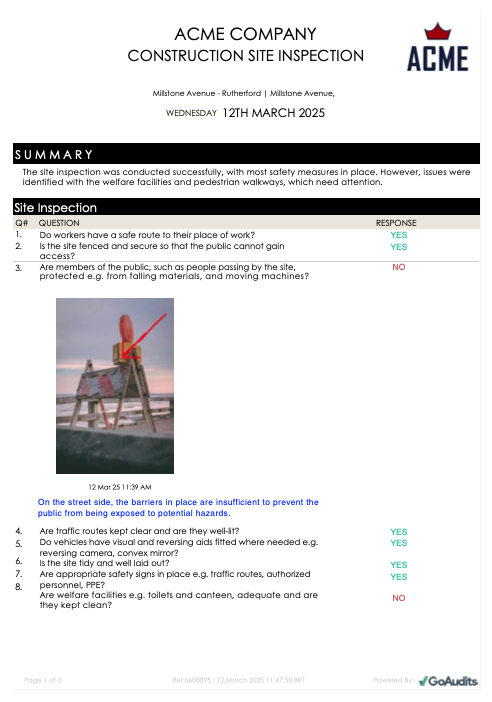
This construction report template with photos was generated within the GoAudits mobile app using the construction site inspection checklist. You can tailor the checklist by adding specific fields for photos, signatures, dropdown menus, and more, ensuring the output meets the precise requirements of any client, audit, or project type.
GoAudits was a game-changer for us. We really appreciate the ease of using the mobile app for our Quality Control checks, adding photos and auto-emailing results to all necessary parties.
Ciaran Mullins, General Superintendent, Woodside Homes
👉 Read Full Story: How Woodside Homes leverages GoAudits to streamline their inspection and photo documentation process.
Key Features to Look for in a Construction Site Photo Documentation App
When selecting the best construction site photo documentation app for your team, don’t settle for basic photo sharing. Look for tools that genuinely enhance productivity, provide solid proof, and streamline compliance.
- Mobile App with Offline Functionality: A construction site visual documentation software with offline capabilities allows you to perform entire site inspections, capture photos, and complete reports while disconnected. Once you are back online, the app should sync all your data, preventing data loss and workflow disruption.
- Built-in and Customizable Templates: A construction checklist software with photo capture should offer pre-built templates (like daily logs, snag lists, or QC forms) that you can easily customize or create from scratch.
- Markup and Annotation Tools: The app should function as both a job site photo annotation tool and a job site photo reports app — letting you draw arrows, circles, and text directly onto photos, then compile everything into a professional report in one click.
- Metadata Capture Capabilities: For any photo to be legally defensible, it needs verifiable metadata. Use a site audit app with time-stamped photos that automatically captures the date, time, and GPS coordinates at the moment of capture.
- Comment and Notes Features: These sections, linked to each photo, allow field workers to provide essential details and clarification on site status or issues without relying on memory later.
- Tagging or Mention Features: Look for a mobile inspection app with photo tagging that lets you @tag team members directly on a photo for immediate task assignment or further discussion.
- Integration With Workflows: The best tools link photos directly to core construction workflows, such as defects, punch lists, RFIs, and overall construction project photo documentation checklists.
- Cloud Storage and Real-time Cloud Sync: To maintain a single, accessible record, you need construction photo documentation solutions with cloud storage integration. This central repository ensures all stakeholders have access to the latest visual data from any location.
- Automated Report Generation with Photos: Construction photo documentation software with automated site report generation compiles all captured images, notes, and checklist data into a professional PDF report with one click. Check out our rankings for the best construction reporting software.
How GoAudits Checks Every Box (The All-in-One Solution)
GoAudits’ construction audit app is equipped with all of these features, making it the ideal all-in-one solution for photo documentation, quality, and safety. With GoAudits, you can:
- Customize construction checklists to include sections for photos, notes, and other relevant details.
- Perform walkthroughs using the GoAudits mobile app, even in locations with limited internet connectivity.
- Capture high-quality photos, along with all the metadata, which gets stored on cloud.
- Generate and share a professional photo report instantly, on-site.
- Assign corrective actions and ensure their on-time completion.
- Monitor adherence to all safety, quality, and operational standards.
With a rating of 4.8 stars on Capterra, GoAudits is trusted by some of the biggest names in the construction management industry.
» GoAudits Reviews: Read how companies leverage GoAudits to meet standards in their construction operations.
How to Set Up a Photo Documentation System for Your Construction Crews
Centralizing field notes and jobsite photos into one system requires more than downloading an app. Without clear protocols, field crews default to their own habits — some capture everything, others capture nothing, and office teams are left with an unusable archive.
Here’s how to standardize the process:
- Define required photo types per job phase. Create a checklist for each project phase (pre-construction, foundation, framing, MEP rough-in, closeout) that specifies exactly which photos are mandatory. Pre-pour concrete requires rebar photos. Electrical rough-in requires conduit routing photos. Closeout requires before-and-after comparisons. The right construction software lets your crews check off tasks with photo proof before marking them complete — turning required fields into a quality gate, not just a suggestion.
- Assign photo responsibilities by role. The best mobile app for foremen to do dailies and photos on site isn’t one that puts all documentation burden on a single person. A construction notes and photos app with role-based access lets each crew member own the documentation for their specific tasks, with foremen reviewing and submitting the combined record. Apps that allow multiple users per project, each with appropriate permissions, make this scalable across sites.
- Enforce minimum metadata standards. Any photo submitted to the documentation system should carry GPS, a timestamp, and a link to the checklist item it documents. A construction field reporting platform with photo capture offline handles this automatically — enforcing metadata capture even when field crews are working without connectivity, then syncing everything when they return to range.
- Establish a tagging convention. Even in apps with automatic construction photo organization software features, consistent manual tags by trade, phase, location, or room make retrieval fast when a dispute arises months later.
- Set up automated reporting. Manual photo compilation is the biggest time sink in field documentation. Configure your app to auto-generate a PDF report at the end of each inspection or site visit, with photos organized by checklist section. This report becomes the standard deliverable shared with clients, subcontractors, and insurers, produced in seconds rather than assembled manually over hours.
GoAudits supports all five steps through its checklist builder, required photo fields, role-based user permissions, and one-click PDF report generation.
How to Choose Construction Photo Documentation Tools for Site Management
Here are the steps you should take to choose the right construction project photo documentation software:
- Compare Features of Leading Solutions: Start with a side-by-side comparison of the core features listed above. Do not just focus on who takes the best picture. Focus on construction photo documentation applications that offer the most robust reporting and easy integration with your existing QC and compliance workflows.
- Evaluate Cost & ROI: Estimate the time saved on manual documentation, reduced rework costs from early issue detection, and avoided costs from successful liability defense.
- Read User Reviews: Check reliable, third-party review sites (like Capterra or G2) to see what other construction professionals are saying. Pay attention to feedback regarding ease of use in the field, customer support quality, and the stability of the construction photo documentation app, especially its performance with photo uploads and offline use.
- Request Demos and Use Free Trials: Always request a personalized demo and put the tool to the test on your own construction site photo documentation workflows using a free trial.
- Assess Scalability: Will the software handle a multi-year project with thousands of photos? Can it accommodate growth from a small team to a large enterprise? Ensure the system offers enough cloud storage and flexible user management to scale from one site to fifty.
- Check Support & Training: Select a solution that offers comprehensive training resources, responsive customer service, and dedicated support to help your field teams get up and running quickly and maximize the value of your new construction photo documentation software.
FAQs
Construction photo documentation is the process of capturing, organizing, and cataloging visual proof of jobsite conditions, progress, quality of work, and safety compliance throughout a construction project’s lifecycle.
Most contractor photo report software, including GoAudits, Fieldwire, and CompanyCam, offer free trials or demos. You can download the mobile app and test the full functionality of the app for a limited period before committing.
For large, complex, and enterprise-level projects, look for software that provides full integration with financial, scheduling, and RFI modules.
Platforms like GoAudits offer flexible, cost-effective plans that scale well, providing enterprise-grade reporting and QC features without the high initial investment.
Offline-capable construction photo documentation apps allow field crews to complete full inspections, capture photos, annotate images, and fill out checklists without an active internet connection. All data is stored locally on the device and syncs automatically to the cloud once connectivity is restored. This is essential for underground work, remote sites, and any environment with unreliable cellular coverage.
Yes. Most construction photo documentation apps support before-and-after photo capture, either through time-stamped sequential photos linked to the same task or through dedicated before/after comparison features. Before-and-after documentation is particularly valuable for roofing, restoration, renovation, and any work where the original condition of the site or structure needs to be on record.
The most efficient way to organize construction photos is through an app that automatically links each photo to a project, checklist item, location (via GPS), and date at the point of capture, eliminating the need for manual filing afterward. For teams not yet using dedicated software, the minimum manual convention is to name files with the project ID, date, and subject (e.g., “ProjectX-2026-06-04-foundation-rebar”) and store them in subfolders by phase.