Key Takeaways
- Restaurant SOPs are written, step-by-step instructions that keep every task consistent across shifts, staff, and locations.
- Each SOP needs five parts: title, purpose, scope, procedure steps, and responsibilities, with measurable detail in the steps.
- An operations manual is the full reference that collects all your SOPs, while a single SOP covers one task.
- Build SOPs from free templates, then digitize them into mobile checklists so staff follow them on shift, and managers track adherence.
Running a restaurant isn’t always easy, especially when it comes to maintaining consistent service across different locations or with new staff. Restaurant SOPs can help you ensure tasks are performed consistently.
According to the 2024 State of the Restaurant Industry report, 47% of restaurant owners expect tougher competition compared to previous years. It means retaining customers will depend on delivering a reliable, high-quality experience at all times. While great food and inviting decor are important, it’s the consistent delivery of these elements that keeps guests coming back. Without clear guidelines, maintaining high standards becomes difficult.
This article explores how to effectively create and implement restaurant SOPs to ensure exceptional standards and enhance customer satisfaction.
- What are Restaurant SOPs?
- What Should a Restaurant SOP Template Include?
- How to Create and Implement Restaurant SOPs?
- Digitize Your Restaurant SOPs Into User-Friendly Checklists with GoAudits
- Top 10 Free Restaurant SOP Templates
- What are the Different Types of SOPs for Restaurant Services?
- Implementing Restaurant SOPs: Common Mistakes & How to Avoid Them
- FAQs
What are Restaurant SOPs?
Restaurant standard operating procedures are guidelines and instructions for performing everyday tasks in an eatery. These rules extend beyond how food is prepared and handled. Restaurant SOPs cover all aspects of restaurant operations and customer service, ranging from food safety and quality practices to financial operations, staff dressing or personal hygiene, and premises cleanliness.
Why are SOPs Important in Restaurants?
Implementing restaurant SOPs is essential for maintaining high standards and ensuring smooth operations. Here’s how SOPs can benefit your establishment:
- Clear procedures for handling, storage, and preparation help meet health regulations and reduce food safety risks.
- SOPs ensure uniform food quality and service standards across all shifts and staff.
- Documented processes shorten training time and lower onboarding costs for new hires.
- SOPs provide performance benchmarks, making it easier to identify and correct service gaps.
- Consistent execution delivers reliable dining experiences that drive repeat visits and positive reviews.
- Streamlined workflows reduce errors, eliminate confusion, and help staff work more efficiently.

What is a Restaurant Operations Manual, and How is It Different from an SOP?
A restaurant operations manual is the single document that holds all your standard operating procedures, policies, staff roles, and training guides in one place. An SOP covers one task. The operations manual collects every SOP, plus the context that ties them together, into a reference your whole team can follow.
Here is the practical difference:
- A restaurant SOP is a step-by-step instruction for one task, such as opening the kitchen or processing a refund.
- A checklist confirms a task was done. It answers “did we do it?” rather than “how do we do it?”
- A restaurant operations manual is the full reference. It includes your SOPs, checklists, company overview, job descriptions, health and safety rules, and emergency procedures.
Most operators build the operations manual once, then keep it current as procedures change. A digital format makes that easier: updates reach every location at once, and staff can open the manual on a phone during a shift instead of hunting for a binder.
For an example of a restaurant operations manual, start from a free restaurant operations manual template, adapt it to your menu and locations, and export it to PDF for staff who want an offline copy.
What Should a Restaurant SOP Template Include?
Here are the key components that should be in an SOP for restaurant services.
- Food Safety and Hygiene Standards: Establish protocols for proper food storage, handling, and preparation to prevent contamination and ensure compliance with health regulations.
- Food Preparation, Cooking, and Handling Standards: Define standardized recipes, cooking methods, and portion sizes to maintain consistency in taste and presentation.
- Customer Interaction and Service Protocol: Outline procedures for greeting guests, taking orders, serving food, and handling customer complaints to ensure a positive dining experience.
- Employee Roles and Responsibilities: Clearly delineate duties for each position, from kitchen staff to front-of-house employees, to ensure accountability and efficient workflow.
- Cleaning and Sanitation Procedures: Detail daily, weekly, and monthly cleaning and sanitation tasks to maintain a hygienic environment, including the proper use of cleaning agents and equipment.
- Protocols for Equipment Use: Provide instructions for the correct operation and maintenance of kitchen appliances and other equipment to ensure safety and longevity.
- Procedures for Workplace Safety: Implement guidelines to prevent accidents and injuries, including fire safety measures and emergency response plans.
- Inventory Management (Stock Monitoring and Waste Management): Establish systems for tracking inventory levels, ordering supplies, and minimizing waste to control costs and ensure ingredient availability.
Watch this 1-minute video for a quick summary on Restaurant SOPs:
What Does a Single Restaurant SOP Include?
Every effective restaurant SOP has five core parts. Together, they turn a vague instruction into something a new hire can follow on their first shift.
- Title: the task the SOP covers, written plainly, such as “Fryer Startup and Shutdown.”
- Purpose: why the procedure matters, like food safety, consistency, or equipment care.
- Scope: where and when the SOP applies, including which roles and which areas of the restaurant.
- Procedure steps: the exact sequence, with measurable detail. Write “cook chicken to an internal temperature of 165°F,” not “cook until done.”
- Responsibilities: who performs the task and who signs off on it.
The detail in the procedure steps is what separates a working SOP from a policy statement. Specific numbers, temperatures, and times remove guesswork and give managers a clear standard to inspect against. This structure also speeds up SOP development: once your team agrees on the five parts, every new procedure follows the same format.
How to Create and Implement Restaurant SOPs?
Restaurant standard operating procedures are critical for businesses that desire to enjoy a high rating among customers. However, the specific details of each restaurant’s SOP will vary from one establishment to another. Despite this, there are well-established steps that all restaurants must follow when drafting their standard operating procedures.
1. Define Objectives
Start by clearly outlining the goals of your SOPs. Identify what you want to achieve—whether it’s improving customer service, maintaining food safety, or ensuring operational consistency. Establishing clear objectives ensures everyone in the restaurant understands the purpose of the SOPs and how they contribute to overall success.
2. Review Routine Activities
Conduct a thorough review of daily operations to identify key tasks that need standardization. Assess areas such as food storage, staff hygiene, kitchen operations, and customer service. This helps pinpoint any inefficiencies or potential areas of improvement that need to be addressed in the restaurant SOPs.
3. Research Industry Best Practices
Benchmark your operations against industry best practices. Use checklists and standards from reputable organizations like ISO and LQA to ensure your procedures meet recognized quality and safety standards. Tools like ISO 9001 audit checklists can highlight gaps and opportunities for improvement.
4. Consult with Employees for Feedback
Involve staff from all departments in the SOP creation process. Their insights are valuable for identifying challenges and potential improvements. By consulting employees, you’ll gain practical feedback that ensures the SOPs are realistic, efficient, and tailored to daily operations.
5. Choose a Format & Draft the SOP
Select a clear and organized format for your restaurant SOPs, whether it’s a digital document, checklist, or manual. Ensure it’s easy to follow, with clear steps and guidelines. Consistency is key, so make sure the format is suitable for all team members to access and understand.
6. Use a Digital Tool to Digitize Your SOPs
Use digital tools or templates to create detailed checklists. These tools help streamline the implementation of restaurant SOPs, making it easier to track compliance. A well-structured checklist ensures consistency and reduces the risk of errors or missed steps.

7. Train Employees
Train your staff on the newly created restaurant SOPs. Regular training sessions ensure employees understand and follow the procedures. Training helps ensure everyone stays aligned with the expectations, especially as new team members join.
8. Monitor Compliance
Continuously monitor how SOPs are being implemented. Track compliance regularly and address any inconsistencies or issues promptly. Use audits, performance reviews, and feedback loops to ensure your team adheres to the SOPs consistently.
9. Update Regularly
The restaurant industry is constantly evolving, so restaurant SOPs must be reviewed and updated regularly. Stay current with changing industry standards and customer expectations to ensure your procedures remain relevant and effective.
Digitize Your Restaurant SOPs Into User-Friendly Checklists with GoAudits
Simplifying the way you implement SOPs in your restaurant starts with digital checklists. GoAudits makes this process more efficient by transforming traditional paper-based SOPs into user-friendly checklists that your staff can access anytime, even offline. The GoAudits restaurant inspection app supports real-time data collection, helping you monitor compliance and identify issues quickly. By automating inspections, you can reduce administrative tasks, improve business standards, and ensure your team remains aligned with brand standards.
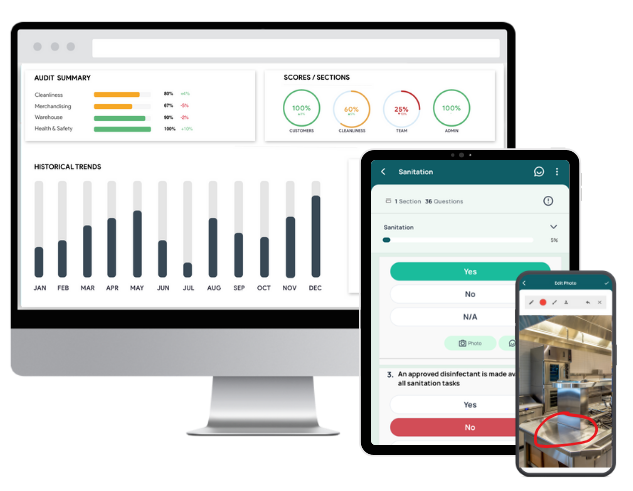
- Transform your paper-based SOPs into digital checklists tailored to your restaurant’s specific needs. GoAudits offers a user-friendly drag-and-drop interface for creating these checklists. Alternatively, you can provide your existing checklists, and we’ll digitize them for you at no extra cost.
- Conduct audits and inspections up to 5 times faster anywhere, anytime, using the GoAudits mobile app. It works both online and offline on smartphones and tablets, allowing your team to access and complete inspections on the go.
- Instantly generate professional reports upon completing inspections. These reports are customizable to reflect your brand and can be automatically shared with relevant team members.
- With GoAudits’ smart dashboards, gain insights into your operations and audit performance, helping you identify trends and areas for improvement.
- Assign corrective actions during inspections to specific team members, ensuring accountability and timely resolution of issues.
- Set up custom workflows to share reports, send reminders, and monitor task completion, facilitating seamless collaboration among your staff.
The Independent Food Company, a UAE-based hospitality group managing over 25 locations, used to spend “3-4 days to conduct the audit, submit the report, and get the appropriate actions to be taken.”
👉 With the GoAudits mobile inspection app, its team can now submit reports immediately after inspections, enabling them to address 90% of action plans within 1-2 days, a fourfold increase in efficiency. Additionally, the management team can easily review branch performance and analyze audit findings with real-time reports and dashboards. This has significantly enhanced its team’s efficiency, ensuring food safety, hygiene, and quality standards are consistently upheld across all locations.
We are now able to submit reports immediately after the visit, and the Operations team is able to respond to 90% of the action plans within 1-2 days. – Eliane E., Quality & Hygiene Manager at The Independent Food Company
Top 10 Free Restaurant SOP Templates
Checklists are one of the best formats for implementing SOPs in restaurants. For decades, the leading businesses in this industry have used this tool to manage their numerous branches and enforce quality control. If you want to start incorporating standard operating procedures, here are the top 10 restaurant SOP template checklists you can download for free.
1. Restaurant Operations Checklist
Review and optimize restaurant operations with efficiency, from purchasing, receiving, storing, service standards, and more. This checklist is an example of a simple way of outlining SOPs in an accessible format. Rather than a bulky document to be stored in a drawer, all SOPs can be included in one or several digital checklists accessible from any device, including mobile phones.
2. Food Safety Hygiene Checklist
This checklist is helpful for restaurants seeking to comply with global best practices in safety and hygiene. The Food Safety Hygiene Checklist is comprehensive, comprising up to 179 questions addressing food and environmental safety. It is split into 30 sections, including maintenance, food storage and preparation, staff hygiene, and cooking and reheating.
3. Personal Hygiene Checklist
Restaurants can use the Personal Hygiene Checklist to ensure that every staff member is well-groomed and maintains the pre-defined standards for cleanliness. You can use this list to ascertain that your employees are appropriately dressed and healthy.
4. Bar Cleaning Checklist
This checklist can be used to conduct frequent inspections and ensure quality assurance for restaurants with a bar or drinking area. It covers the cleanliness of the small fridge and cold rooms, dishwasher, and refuse bins.
5. Bathroom Cleaning SOP Checks
The Bathroom Cleaning SOP Checklist is a short and straightforward inspection guide that can be used to implement standard operating procedures in your restaurant. Cleaning staff in your eatery can incorporate this SOP to ensure that the floor tiles, mirrors, and drainage are always tidy.
6. Food Contact Surfaces Cleaning Log
Neatness is a vital requirement for restaurants that want to have high ratings. This checklist helps your staff sanitize all utensils, cooking equipment, sinks, and dishwashers to comply with acceptable health standards.
7. Restaurant Opening and Closing Checklist
A Restaurant Opening checklist can be used before each morning shift to ensure all necessary tasks are carried out before your restaurant opens for business. It encompasses various responsibilities such as switching on the POS system, refilling receipt papers, or filling water pitchers.
Similarly, the Restaurant Closing Checklist is valuable for ensuring compliance with standard operating procedures for the end of each workday. It can help staff remember tasks such as refilling condiments, restocking essential materials, or sanitizing surfaces.
With this specific kitchen closing checklist, employees can guarantee that all kitchen equipment is unplugged and in good condition before closing for the day. It also ensures that kitchen staff sanitize the fridges, empty the fryers, and sanitize the cooking area at the end of their shifts.
8. Restaurant Manager Checklist
Restaurant managers have an endless list of tasks to keep up with. In addition to unexpected issues to resolve as they arise, there are recurrent tasks and SOPs that a checklist can help remember. It can include a wide range of items such as opening/closing the premises, reviewing payroll, managing the emails and calendar, menu updates, promotion rollouts, adherence to SOPs by specific staff members, etc.
9. Employee Dress Code Inspection
Appearance is critical, particularly for employees working at the front desk or as servers. You can download this checklist to enforce your SOPs for employee attire and appearance across all departments.
10. Food Receiving Checklist
Restaurants can use the Food Receiving Checklist to log all food items obtained from suppliers and determine if they are in optimal condition. It is comprehensive and addresses issues such as pest infestation, preservation, and expiration of food items.
👉 You can also provide these checklists to your employees on a user-friendly SOP app & software.
Additional Restaurant SOP Templates
You can also explore some of the other restaurant checklists GoAudits offers.
- Restaurant Visit Report
- Restaurant Inspection Checklist
- Restaurant Employee Training Checklist
- Restaurant Mystery Shopper Checklist
- Restaurant Kitchen Cleaning Checklist
- Restaurant Safety Checklist
- Restaurant Audit Checklist
- Restaurant Employee Performance Review Template

What are the Different Types of SOPs for Restaurant Services?
The table below lists the different types of SOPs for restaurant services and what they essentially cover.
| SOP for restaurant operation | Provides a comprehensive overview of daily operations, integrating all individual SOPs to ensure cohesive functioning |
| SOP for restaurant kitchen | Covers all back-of-house operations, including food prep, cooking procedures, and kitchen safety protocols |
| SOP for restaurant staff | Encompasses guidelines for both front-of-house and back-of-house employees, detailing expected behaviors and responsibilities |
| SOP for restaurant waiter | Specifies steps for order taking, serving, and customer service to ensure a consistent guest experience |
| SOP for restaurant manager | Outlines managerial duties such as staff supervision, inventory control, and handling customer feedback |
| Restaurant cleaning SOP | Cleaning SOPs detail cleaning schedules and methods for all areas of the restaurant to maintain cleanliness and compliance with health standards |
| Restaurant opening and closing SOP | Lists procedures for opening and closing daily restaurant operations, including equipment checks and security measures |
Restaurant SOP Examples
Here are three restaurant SOP examples you can adapt for your own operation. These standard operating procedure examples for restaurants cover front-of-house (FOH) and back-of-house (BOH) tasks, and each follows the same structure: a clear task, ordered steps, and a measurable standard.
Opening SOP (front-of-house):
- Unlock the premises and disable the alarm.
- Switch on lights, POS terminals, and dining-area equipment.
- Clean and set tables with cutlery, napkins, and menus.
- Check restrooms for stock and cleanliness.
- Confirm the floor is service-ready before doors open.
Kitchen SOP example (fryer maintenance, back-of-house):
- Drain the oil once it cools to a safe handling temperature.
- Clean the drain valve, basket, and heating elements.
- Test oil quality with test strips, then filter or replace as needed.
- Refill to the marked line and record the date and time.
Service SOP (waiter):
- Greet the table within two minutes of seating.
- Present menus and take drink orders.
- Take the food order and confirm any allergies.
- Check back once after the food arrives.
- Present the bill and invite the guest to return.
These examples show how a restaurant’s standard operating procedure turns a routine task into a repeatable standard. Build each one with the five parts above, then load them into a digital checklist so staff can follow the steps on a phone during the shift.
Implementing Restaurant SOPs: Common Mistakes & How to Avoid Them
Creating effective SOPs is crucial for maintaining consistency and efficiency in your restaurant operations. However, several common mistakes can undermine their effectiveness. Here’s how to avoid them:
Not Involving Relevant Stakeholders
When developing SOPs, excluding key team members can lead to procedures that are impractical or overlooked. Engage chefs, servers, and other staff in the creation process to ensure the SOPs are realistic and comprehensive. Their insights can help identify potential issues and enhance the practicality of the procedures.
Inadequate and Insufficient Training
Introducing SOPs without proper training leaves staff unprepared, resulting in inconsistent application. Incorporate SOP training into both onboarding and ongoing education to ensure all employees understand and adhere to the procedures. Regular training sessions can reinforce the importance of SOPs and keep staff updated on any changes.
Overcomplicating Procedures
Overly detailed SOPs can confuse staff and hinder compliance. Keep procedures clear and concise, using straightforward language and bullet points to facilitate easy understanding and execution. This approach helps employees quickly grasp and follow the procedures without unnecessary complexity.
Not Updating Them Regularly
Outdated SOPs can lead to inefficiencies and non-compliance with current regulations. Establish a routine review schedule to update procedures, reflecting changes in operations, technology, or health and safety guidelines. Regular reviews ensure that SOPs remain relevant and effective in guiding staff.
Neglecting User Feedback
Ignoring feedback from those who use SOPs daily can result in impractical procedures. Encourage staff to provide input and make adjustments based on their experiences to improve the effectiveness and acceptance of SOPs. This collaborative approach fosters a sense of ownership and increases adherence to procedures.
Lack of Clarity and Accessibility
If SOPs are hard to understand or access, staff may disregard them. Ensure procedures are written clearly and stored in easily accessible locations, such as a centralized digital platform, to promote consistent use. Providing digital access allows for quick reference and ensures that all staff can easily find the information they need.
👉 GoAudits restaurant management software helps you address these common pitfalls and develop effective restaurant SOPs that enhance your restaurant’s operations, ensuring consistency, compliance, and high-quality service.

Best Practices for Restaurant SOPs Across Locations and QSRs
The best practice for restaurant SOPs is to keep each one short, specific, and easy to find during a shift. Operators who run several sites, multi-location chains, or a quick-service restaurant (QSR) brand have a harder consistency problem, so a few extra habits help.
- Standardize the format and processes across every location, so a procedure reads the same in every unit.
- Store SOPs in one place that head office controls, so an update is pushed to all sites at once.
- Tie each SOP to a digital checklist that staff complete during the shift, which gives managers proof of adherence and accountability.
- For quick service restaurants (QSRs), focus on setting up SOPs for the procedures that affect speed and food safety first, then keep improving SOP adherence shift by shift.
- Review SOP adherence with audit data, not memory, so you can see which sites and which steps slip. Digital tools handle compliance tracking automatically, so nothing depends on a manager’s recall.
Multi-location operators gain the most from digital SOPs because head-office teams get real-time visibility into operational performance at the unit level. SOP management software gives restaurant chains central control: head office updates one procedure, every site follows it, and managers monitor adherence from a single dashboard. Instead of waiting for a site visit, you can see which locations follow procedures and step in early where standards drop.
FAQs
Review your restaurant SOPs at least once or twice a year, and update them sooner whenever a menu item, piece of equipment, or regulation changes. A fixed review schedule keeps procedures accurate and stops staff from following outdated steps. Many operators tie reviews to quarterly audits, so any procedure that no longer matches reality gets flagged and corrected on a set cadence.
The easiest way to create restaurant SOPs is to start from a template, adapt it to your tasks, and load it into a mobile checklist app. Templates give you a proven structure, so you are editing rather than writing from scratch. A digital tool then lets staff follow each procedure on a phone, while managers track who completed what across every location.
Document your core procedures as SOPs, then turn them into checklists your team completes during each shift. This gives staff a clear standard to follow without you in the room, and it gives you a record of what was done. With a digital system, you can review completed checklists and audit results remotely and step in only where standards slip.
Use a digital inspection platform that feeds completed checklists and audits into a central dashboard. Managers and head office then see operational performance at the unit level in real time, rather than waiting for site visits. This makes it easy to compare locations, spot which sites slip on procedures, and assign corrective actions before small issues affect guests.
Standardize your SOPs so every location follows the same procedures, then audit against them on a regular schedule. A digital platform lets head office push one updated procedure to every site at once and check adherence without manual effort. Consistent checklists, instant reports, and corrective actions keep brand standards aligned across locations without you chasing each unit by hand.
A restaurant manager should run opening and closing checks, food safety and hygiene logs, and a regular operations audit covering service, cleanliness, and stock. Following up on these as often as each shift keeps standards from drifting. Digital checklists make this routine fast, and the resulting reports show exactly where a site is on track and where it needs attention.
Yes. GoAudits offers free restaurant SOP template checklists you can download and adapt, covering operations, food safety, cleaning, opening and closing, and more. Use them as the building blocks of a full operations manual, customize each one to your menu and locations, and export to PDF for staff who prefer an offline copy alongside the digital version.