Are you tired of cumbersome, paper-based inspections that consume valuable time and resources? Digital inspection software has now transformed how you assess your internal processes. You can digitize your inspection checklists, conduct inspections anywhere and on any device, and gain real-time visibility into compliance and quality issues.
Let’s dive into how mobile inspection software enhances efficiency, safety, quality, and regulatory compliance.
5 Best Digital Inspection Software in 2026
Here are our top 5 picks of the best digital inspection apps:
1. GoAudits Mobile Inspection App & Software
GoAudits all-in-one digital inspection software centralizes audits and inspections, quality checks, and compliance into one streamlined platform. You can replace manual paperwork with a mobile-first workflow and capture field data quickly, even without connectivity. Automated reporting, actionable findings from inspection data, and configurable dashboards help you move from reactive oversight to proactive quality management. With the GoAudits digital inspection app, you get faster inspections, fewer errors, and clearer visibility into operational risks and performance trends.
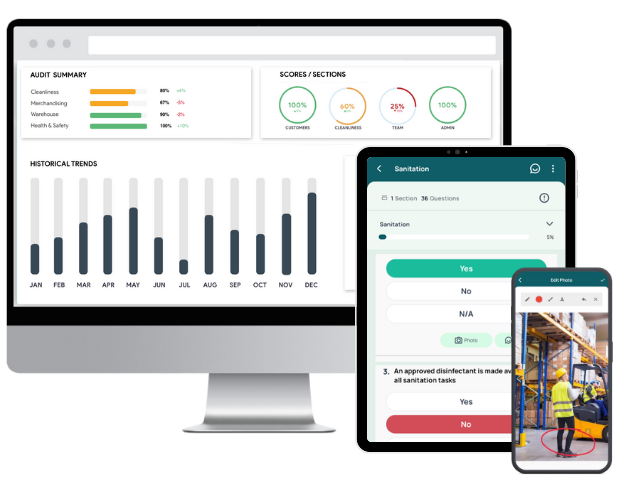
- Use existing inspection checklists, build from scratch via drag-and-drop, or submit your existing forms for quick conversion at no additional cost.
- Conduct inspections up to 5x faster on any device, online or offline, with intuitive data capture, photo annotation, and built-in accountability tools.
- Generate professional inspection reports instantly after each inspection, complete with photos, timestamps, geolocation, and assigned actions.
- Assign tasks during inspections with clear ownership, priorities, and due dates, then track completion in a centralized dashboard.
- Automate report distribution, approvals, reminders, and escalations aligned to your organizational hierarchy.
- Monitor scores, trends, recurring issues, and action status across locations and teams through smart dashboards.
- GoAudits mobile inspection app is also available in six languages.
GoAudits takes pride in delivering quick and reliable support to customers, with a response time of under one minute. This ensures that any issues are addressed promptly for faster problem resolution.
I’d estimate that in the last 12 months, we saved over $8k by performing digital inspections, not printing documentation of daily huddle meetings, etc.
– Kristin Ingram, Regional Director of Resort Operations, Latour Hotels & Resorts

2. FastField Digital Inspection Software
FastField enables you to capture, validate, and distribute inspection data with greater accuracy and speed. Its drag-and-drop form builder, offline mobile app, and automated reporting streamline the inspection lifecycle while supporting compliance and operational transparency. It reduces manual effort, shortens turnaround times, and offers real-time insights for faster issue resolution.
Key Features of FastField:
- Create inspection, checklist, and audit forms with built-in rules and validation
- Collect photos, videos, audio, GPS tags, and timestamps on any device, even offline
- Apply skip logic, scoring formulas, and business rules to simplify data entry
- Generate tasks from submitted inspections and assign them with priorities and due dates
- Distribute reports and analyze inspection data through customizable dashboards
👉 FastField Alternatives: Check out similar apps that simplify digital and mobile forms.
3. VLX Digital Inspection Software
VLX centralizes your inspection workflow with templates to capture accurate field data, real-time task management, and rapid PDF report generation. With enterprise-grade security, configurable forms, and seamless integrations, VLX ensures inspections are executed consistently, even across large or distributed teams.
Main Features of VLX:
- Dynamic form building that adapts to any inspection type through customization
- On-site media capture with annotations and drawings to highlight conditions
- Instantly convert mobile inspections into PDF reports
- Integrated task and work-order management to assign, track, and close out field activities
- Connect VLX to CRM, ERP, and other core systems via API
4. Plutomen Digital Inspection Software
Plutomen is designed for field inspections, enabling you to capture asset conditions, photos, videos, and annotations. With built-in SOPs, geo-verified reporting, and AR-driven remote support, it ensures every inspection is consistent, compliant, and easier to execute, and offers real-time visibility into on-site activities. It shortens the inspection lifecycle and resolution time.
Main Features of Plutomen:
- Digital checklists guide inspectors through standardized, step-by-step procedures
- AR-enabled remote assistance for instant issue escalation and collaboration
- Automated report creation with geo-fencing verification
- Centralized knowledge base stores videos, documentation, and past inspection data
- Integrated scheduling with alerts for planned and unplanned inspection tasks
5. Intouch Insight Digital Inspection Software
Intouch Insight enables you to build checklists quickly, capture field data accurately, and sync results in real time. Strong security controls, resilient offline functionality, and built-in automation help you maintain standards. You gain clear operational visibility through dashboards, trend reporting, and standardized data that drive improvements.
Main Features of Intouch Insight:
- Streamline form creation with a dynamic, drag-and-drop checklist builder
- Automated workflow engine for assigning tasks, following up routes, and sending alerts
- Integrated issue management with case tracking and progress updates
- Continue inspections uninterrupted with offline mode and sync once reconnected
- Convert field data into actionable, ready-to-share compliance reports
| What it’s best for | Pricing | Free trial | |
| GoAudits | Immediate audit visibility, consistent compliance across locations, fully customizable checklists, built-in corrective action management, and real-time performance trends | $10 USD per user per month (billed annually) | ✅ 14-day free trial and personalized demo |
| FastField | Rapid form creation, offline inspections, automated work order routing, multimedia evidence capture, and enterprise-grade workflow automation | $24 USD per month per user | ✅ |
| VLX | Offline data capture and auto-sync, conditional logic and scoring, priority feature development for enterprise clients | $19 per user per month (billed annually) | ✅ |
| Plutomen | Faster inspection cycles, consistent execution across teams, lower error rates, and real-time issue resolution | Custom pricing, available on request | Demo available |
| Intouch Insight | Advanced security with SSO and MFA, Bluetooth-enabled temperature capture, multi-location syncing with CRM/ERP systems | Contact for pricing | Dedmo available |
Free Inspection Checklists & Templates
GoAudits offers an extensive library of digital inspection checklists tailored for various industries, including food, healthcare, manufacturing, construction, hospitality, retail, and more. You can sign up for free and start using these checklists:
- SOP Checklists
- Hygiene Audit Checklists
- Workplace Inspection Checklists
- OHS Inspection Checklists & Templates
- Quality Control Checklists Template
- PPE Inspection Checklists & Forms
- Construction Safety Checklists
- Hotel Maintenance Checklists
- Restaurant Opening Checklists & Restaurant Closing Checklists
- GMP Audit Checklists
- CQC Inspection Checklists & Templates
- HACCP-Based SOP Templates
- Food Safety Audit Checklist Templates
- OSHA Checklists & Audit Templates
- ISO Audit Checklists & Templates

What is Digital Inspection Software?
Inspection software is designed to facilitate the seamless execution and management of audits and inspections within an organization. It acts as a centralized platform for planning, conducting, and documenting inspections across various operational facets. Digital inspection software empowers businesses to move beyond traditional, manual inspection methods. It offers a digitized approach that not only ensures accuracy and consistency but also provides actionable insights for continuous improvement.
Main Benefits of Mobile Inspection Apps & Software
Digital inspection software is packed with a number of features and benefits that simplify inspections.
- Enhanced accuracy and compliance: Digital inspection software ensures precise and consistent data collection with standardized forms and checklists. It minimizes human error, aligns with industry regulations, and meets compliance standards, safeguarding against overlooked issues.
- Operational efficiency and cost reduction: By automating the inspection process, digital inspection software streamlines workflows, reduces paperwork, and cuts operational costs. This improves resource allocation and scheduling efficiency.
- Improved customer satisfaction: Timely and accurate inspections, enabled by mobile inspection software, enhance product and service quality. This leads to faster issue resolution and fosters positive customer experiences, boosting satisfaction and loyalty.
- Seamless integration and centralized data management: Digital inspection software easily integrates with existing business systems, offering a unified view of data. This centralization simplifies data management, enhances decision-making, and facilitates historical data analysis.
- Collaboration and knowledge sharing: Real-time data sharing and collaborative features in digital inspection software encourage teamwork and continuous improvement. This fosters a culture where knowledge is shared, and collective expertise is harnessed.
- Mobile inspection capabilities: With mobile inspection software, inspectors conduct on-the-go inspections, eliminating manual data entry and saving valuable time. Offline capabilities ensure uninterrupted productivity, even in remote areas.
- Customizable and standardized inspection processes: Tailor-made inspection forms meet specific organizational needs while maintaining standardization in procedures. This ensures data accuracy, comparability, and high-quality inspections.
- Streamlined inspection management: Centralized tools for managing, scheduling, and tracking inspections enhance operational efficiency. Automated notifications ensure timely completion and maintain accountability.
- Increased productivity with automated tasks: The automation of repetitive tasks frees up inspectors to focus on more critical activities. This boosts productivity, reduces inspection times, and enhances operational efficiency.
Choosing the Best Inspection Software: Features & Factors to Consider
With numerous options available, selecting the right inspection software can be a daunting task. To assist you in making an informed decision, here are the top 10 factors to consider:
Desktop and Mobile App Compatibility
When choosing digital inspection software, prioritize one with a user-friendly interface that’s accessible on both desktop and mobile devices. This ensures that your team can perform and access inspections and reports, whether they’re in the field or at the office. The mobile inspection software you choose should simplify complex tasks with features like direct photo attachments, simple annotation tools, e-signatures, and time and geolocation stamps. This not only streamlines the inspection process but also enriches the quality of the data collected.
Cloud-Based Digital Inspection Software
Select cloud-based software that incorporates advanced navigation tools. Look for features like color-coded response buttons and sections grouping related questions, which make the software more intuitive. Additionally, the software should minimize errors by providing text or image instructions for each question and allowing for mandatory fields, ensuring that all necessary data is captured accurately and efficiently.
Instant Inspection Reports
Choose mobile inspection software that instantly generates comprehensive reports at the end of each inspection. These reports should be automatically populated with essential details such as attached photos, assigned actions, timestamps, and geolocation. This feature not only saves time in report generation but also provides immediate, actionable insights. Customizable report templates that align with your brand and specific needs add a professional touch and make the reports more relevant to your organization.

Corrective and Preventive Action Functionality
The digital inspection software should allow you to assign corrective actions during inspections, ensuring accountability and effective communication. Features that enable the task owner to submit details of the action taken, request more information, or ask for additional time enhance this process. The ability to track task completion and receive overdue task reports in a centralized dashboard is crucial for maintaining high standards of compliance and operation.

Tasks and Workflow Automation
The ideal digital inspection software should have capabilities for setting up workflows and rules for report distribution, task assignment, and reminders. This ensures that the right people are involved at the right time and that no task falls through the cracks. Automatic notifications to approvers and task owners with immediate access to audit reports streamline the process and ensure timely action.
Real-Time Analytics
Your mobile inspection software should provide real-time analytics through flexible dashboards, offering a comprehensive view of audit scores across various parameters like locations, teams, or topics. The ability to drill down from trend graphs into individual inspection reports allows for a deeper understanding of your operational health. This feature enables you to make informed decisions quickly, based on the latest data.

Efficient Scheduling
The digital inspection software should allow for easy scheduling and assigning of inspections by individual or location, along with configurable notifications. The ability to track and review the status of audits, including completed, in-progress, or overdue tasks, as well as approvals and rejections, provides a clear overview of your operations and ensures that inspections are carried out timely.
Offline Functionality
Ensure that the digital inspection software you choose can function effectively offline. This feature is crucial for uninterrupted work in areas with poor or no internet connectivity, allowing the collection and storage of data locally. Once back online, this data should sync seamlessly with the main system, maintaining the continuity and integrity of your data.
Comprehensive Checklists Library
Digital inspection software offering a comprehensive library of customizable checklists is highly beneficial. The ability to start with pre-designed templates or build your own checklists using a simple drag-and-drop interface caters to the unique needs of your operations. The option to have the service provider create custom checklists for you, based on your existing formats, adds convenience and ensures that the software fits seamlessly into your existing processes.

Cost-Effectiveness
Lastly, the inspection software should offer cost-effective solutions without compromising on quality and functionality. Look for a system that provides tailored solutions, such as customizable inspection reports that reflect your brand and meet your specific business requirements. This not only ensures that the software is an effective tool for your organization but also provides a high return on investment. You should also enquire about the ‘free trial’ functionality.
Prior to using GoAudits, we used a basic form of standards accountability for our 11 hotels. We used Excel spreadsheets, PowerPoint and Word document checklists. After extensive research we found that GoAudits was not only cost-effective, but was perfect for what we needed. The audit tool was customizable to our requirements.
Ruben A., Regional Director Of Operations, Total Management Systems
How to Perform Inspections with Mobile Inspection Software?
Performing inspections can be a daunting task, especially when managing multiple assets, locations, or compliance requirements. However, inspection software can streamline and simplify the inspection process, enabling you to conduct efficient and effective inspections.
Here’s a step-by-step guide to help you get started:
Step 1: Establish Inspection Parameters
Begin by defining the scope and objectives of your inspection. Clearly outline the specific areas, assets, or processes that need to be inspected. Determine the frequency of inspections and assign roles and responsibilities to team members involved in the process.
Step 2: Plan Your Audits
Create a detailed inspection plan for each audit. This should include the date and time of the inspection, the location, the specific items to be inspected, and the inspection criteria. Assign qualified inspectors to conduct the inspections and ensure they have access to the necessary resources and equipment.
Step 3: Conduct On-Site or Remote Inspections
Depending on the nature of the inspection, you can conduct it on-site or remotely. Use inspection software that allows you to capture data, observations, and findings in real-time. Take photos, record videos, and add voice annotations to provide comprehensive documentation.
Step 4: Generate Reports & Track the Findings
Inspection software enables you to generate detailed inspection reports with ease. These reports should include the inspection date, location, findings, and any corrective actions required. Share these reports with relevant stakeholders and track the progress of corrective actions to ensure compliance.