Are you still relying on manual paperwork, emails, and spreadsheets for compliance audits? This outdated approach often proves time-consuming and tedious, requiring multiple rounds of validation, review, and team communication. As a result, it frequently leads to delays in delivering results. Traditional methods also demand significant resources, making audits both costly and prone to human error. They can increase the risk of non-compliance, compromise data security, and create obstacles in consolidating information across systems. Over time, such issues can cause financial setbacks and negatively impact business performance. Compliance audit software reduces manual effort, ensures accuracy, and improves collaboration across teams.
This blog will explore what compliance audits are, the digital tools available for conducting these audits, and the benefits of using compliance audit software for conducting compliance audits.
Top 5 Compliance Audit Management Software
Compliance audit software comes in several forms, depending on how organizations manage inspections and regulatory requirements. Some platforms focus on mobile inspections and operational audits, others specialize in governance, risk, and compliance (GRC) management, while some are built primarily for field data collection and workflow automation.
In this list, we focus on practical compliance audit management tools that help teams conduct inspections, capture audit data on-site, generate reports automatically, and track corrective actions, making them ideal for organizations looking to streamline operational compliance.
1. GoAudits Compliance Audit App
GoAudits is an affordable and easy-to-use operational compliance audit software designed for teams that need a practical solution without heavy implementation or training. You can conduct safety inspections, quality checks, and compliance audits, attach evidence, and instantly generate professional reports once an inspection is completed.
GoAudits also helps you ensure that issues identified during inspections are tracked and resolved. By combining mobile inspections, automated reporting, and performance analytics in one platform, GoAudits helps organizations reduce administrative work, improve compliance visibility, and maintain consistent operational standards across locations.
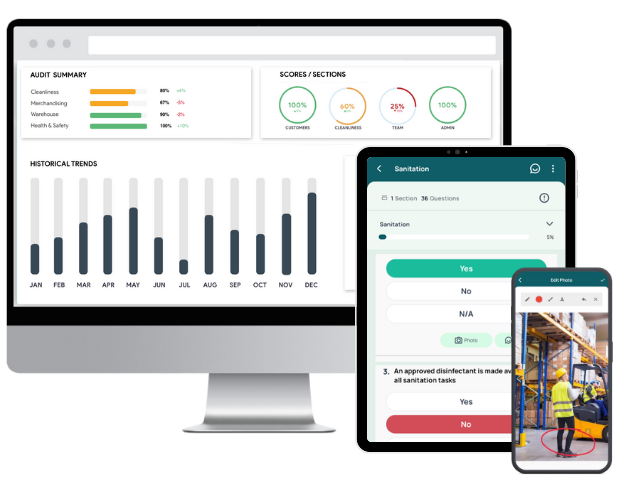
Key features & benefits of GoAudits:
- Access a library of ready-to-use audit templates, customize them, create your own, or convert existing forms into digital checklists.
- Conduct inspections and compliance audits up to 5x faster on smartphones or tablets, even offline, and automatically sync data once connectivity is restored.
- Instantly generate audit reports after each audit, including photos, timestamps, geolocation, and auditor details.
- Assign tasks during inspections, track their completion status, and monitor overdue actions through a centralized dashboard.
- Automate report distribution, approvals, reminders, and task assignments to ensure the right stakeholders are involved at each step of the audit process.
- Visualize inspection results, recurring issues, and compliance scores across locations, teams, or audit categories.

2. Lumiform
Lumiform is a mobile-first audit and inspection platform that replaces paper checklists with digital workflows. It allows teams to run compliance audits, capture evidence in the field, and generate automated reports. The platform centralizes audit data, corrective actions, and analytics to help organizations track compliance performance and resolve issues quickly.
Key features:
- Custom digital audit checklists and templates
- Automatic compliance report generation
- Corrective action tracking and task assignment
- Offline mobile inspections with data sync
- Analytics dashboards for compliance insights
3. Falcony
Falcony is a governance, risk, and compliance (GRC) platform designed to manage internal audits, inspections, and operational checks. It digitizes audit workflows from planning to follow-up, enabling organizations to capture findings, track corrective actions, and monitor compliance performance across departments.
Key features:
- Audit planning and scheduling tools
- Mobile inspections with photo and evidence capture
- Automated task creation from audit findings
- Centralized documentation for compliance records
- Reporting dashboards for audit performance
4. TrueContext
TrueContext is a mobile workflow and data collection platform used to digitize inspections, field audits, and compliance documentation. It guides technicians through structured forms, captures field data with media evidence, and syncs results with enterprise systems for reporting and compliance monitoring.
Key features:
- Guided mobile forms for inspections and audits
- Photo, video, barcode, and signature capture
- Automatic audit documentation and reporting
- Offline-first data collection
- Integrations with CRM, ERP, and field service tools
5. monitorQA
monitorQA is an inspection and compliance management platform that helps organizations monitor operational standards across multiple locations. It digitizes audits, tracks corrective actions, and provides analytics to identify compliance risks and operational gaps.
Key features:
- AI-powered audit and inspection form builder
- Mobile inspection tools with media capture
- Corrective action management workflows
- Self-inspection capability for internal audits
- Real-time dashboards and operational analytics
| Tool | Best for | Pricing | free trial & demo |
| GoAudits | Affordable pricing, minimal training required, fast checklist digitization support, customizable audit reports, visibility into recurring compliance issues, ideal for multi-location operational audits and routine compliance inspections | $10 per user per month; billed annually | ✅ 14-day free trial and personalized demo |
| Lumiform | Large template library, multilingual support, integrations with BI tools, suitable for ISO/HACCP/OSHA compliance frameworks | Starting from $112 per month | Only demo |
| Falcony | Improves audit cycle time, enhances cross-team collaboration, supports quality, cybersecurity, and environmental audits in a single system | Contact for pricing | Only free trial |
| TrueContext | SOC 2 and HIPAA compliance readiness, strong integration ecosystem, ideal for field service and asset-intensive industries | $25 per license per month; billed annually | ✅ |
| monitorQA | Multi-location compliance management, AI assistant, white-label deployment options, optimized for regulated industries and distributed teams | Contact for pricing | ✅ |
FREE and Customizable Compliance Audit Checklists
Here are some checklists GoAudits offers. You can sign up for free and customize these checklists to get started.
- Confined Space Checklists
- Quality Control Checklists & Templates
- SOP Checklists & Templates
- GMP Audit Templates
- Food Safety Audit Templates
- ISO 45001 Audit Checklists
- Scaffold Inspection Checklists
- Workplace Inspection Checklists
- OHS Inspection Checklists
- PPE Inspection Checklists
- Construction Safety Checklists
- CQC Inspection Checklists
- HACCP-Based SOP Templates

What is Compliance Audit Software?
Compliance audit software helps organizations manage and monitor compliance processes more efficiently. It automates tasks, tracks requirements, and reduces the risk of non-compliance. The software sends real-time notifications when tasks are assigned, stores compliance documentation securely, and simplifies audit preparation. With dashboards and real-time insights, businesses can monitor compliance activities, trends, and performance more effectively.
What are the Benefits of Compliance Audit Management Software?
Here are some benefits of compliance audit software:
- Automates compliance tasks so teams can focus on strategic work.
- Minimizes manual processes and paperwork.
- Provides transparency and accountability to reduce compliance risks.
- Helps organizations stay aligned with changing regulations and avoid penalties.
- Protects sensitive information while ensuring easy access when needed.
- Handles repetitive activities like data collection, analysis, and reporting.
- Ensures consistency across audits and locations.
- Enables quick identification and resolution of compliance issues.
- Improves communication among auditors, management, and stakeholders.
How to Choose the Best Compliance Audit Software?
Here’s a step-by-step guide to help you make an informed decision.
Understand Your Business Type and Size
Start by assessing your business type and size. Different businesses have varying compliance needs. For instance, a small business might prioritize simplicity and affordability, while a large corporation might need advanced features and scalability. Knowing your business’s specific requirements ensures you select software that fits your operational scale and complexity.
Identify Specific Compliance Needs
Identify the specific compliance requirements pertinent to your industry. Whether it’s GDPR, HIPAA, or ISO standards, your chosen software should be capable of managing these regulations. Customizable features that allow for tailoring to specific regulatory requirements are highly beneficial.
Evaluate Compliance Audit Software Features
Not all compliance audit software is created equal. Your compliance audit software’s features should help you streamline the compliance audit process, making it easier to manage and track compliance activities.
Ask About Customer Support and Training
Excellent customer support and comprehensive training resources are crucial when adopting a new compliance audit management system. Ensure the provider offers robust support options, including live chat, phone support, and a detailed knowledge base. Training resources such as webinars, tutorials, and user guides help your team use the software effectively.
Look for Enterprise Specialization
Some compliance audit software is designed for specific industries. If you operate in a niche market, look for software that specializes in your sector. It often means the compliance audit software comes pre-configured with necessary compliance protocols, saving you time and ensuring accuracy.
Compare the Cost and Your Budget
Consider your budget when choosing compliance audit software. While it’s tempting to opt for the cheapest option, remember that compliance is a critical aspect of your business. Invest in compliance audit software that offers the best value for money, considering the total cost of ownership, including subscription fees, training costs, and any additional expenses for custom features or support.
What are Compliance Audits?
A compliance audit is a complex process that involves understanding and following the laws, regulations, and standards that apply to your business. It is a requirement in many industries, such as financial services, healthcare, and manufacturing. Moreover, it’s of particular importance in highly regulated industries.
Compliance audits are an ongoing process that requires regular monitoring and evaluation. However, as regulatory compliance continues to shift and grow in complexity, managing compliance audits can pose a considerable challenge for organizations.
This causes non-compliance and costly penalties, resulting in a large financial burden for the organization. A compliance management solution can make the audit process much more efficient.
A compliance tool will help your company in:
- Managing risks
- Reducing legal liabilities
- Avoiding financial penalties
- Encouraging ethical behavior
- Safeguarding your organization’s reputation
Best Practices for Conducting Effective Compliance Audits
Here are some best practices you should follow for conducting effective compliance audits.
Gain Management Buy-In and Support
Securing management buy-in is crucial for the success of compliance audits. Management’s support ensures that sufficient resources are allocated and that the audit’s importance is recognized throughout the organization. Start by presenting a compelling case highlighting the benefits of compliance audits, such as risk mitigation, operational efficiency, and the avoidance of legal penalties. Emphasize real-world examples and data to illustrate potential risks and gains.
Conduct Pre-Audit Assessments
Pre-audit assessments are essential to understand the current compliance status and identify areas of concern. This preliminary review helps focus the audit on high-risk areas and optimizes resource allocation. Collect and review relevant documents, such as previous audit reports, policies, and regulatory requirements. Engage with key stakeholders to gather insights and prepare a comprehensive audit plan.
Set Clear Objectives and Prepare Thoroughly
Clear and well-defined objectives are the foundation of a successful compliance audit. Establish specific goals based on the relevant regulations and organizational policies. Develop a detailed audit plan that outlines the scope, methodology, timeline, and resources required. This plan should also identify key stakeholders and the necessary documentation to streamline the audit process.
Maintain Independence and Objectivity in Audits
Independence and objectivity are paramount in ensuring the credibility of compliance audits. Auditors must be free from conflicts of interest and should not have any direct connection to the areas being audited. This can be achieved by using internal auditors from different departments or engaging external auditors. Maintaining an unbiased perspective ensures that findings and recommendations are based on objective assessments.
Use a Risk-Based Approach for Prioritizing Audit Areas
A risk-based approach allows auditors to focus on areas with the highest risk of non-compliance. Identify and assess risks during the pre-audit phase to prioritize critical areas. This approach enhances the efficiency and effectiveness of the audit by concentrating resources where they are most needed, thereby addressing significant compliance threats first.
Document Findings Thoroughly
Thorough documentation of audit findings is essential for transparency and accountability. Record all observations, findings, and recommendations in detail, including evidence of compliance or non-compliance. Use clear and concise language to ensure that the documentation is understandable and actionable. This detailed record serves as a reference for future audits and helps in tracking the progress of corrective actions.
Follow Up on Corrective Actions
An effective compliance audit process includes a robust follow-up mechanism to ensure that identified issues are addressed. Track the implementation of recommended corrective actions and assess their effectiveness regularly. Continuous monitoring helps in maintaining compliance and improving processes. Providing periodic updates to management on the status of corrective actions reinforces the importance of compliance and the value of the audit process.
FAQs
You should look for features like automation and workflow optimization, real-time analytics & reporting, document management, risk assessment & management, cloud-based accessibility, and security & data protection. These features can enhance your organization’s compliance processes, mitigate risks, and ensure that you are always prepared for audits.
Modern compliance audit software automatically compiles findings, timestamps, photos, and corrective actions into structured reports. Tools such as GoAudits or Falcony generate standardized audit reports instantly, helping teams present audit-ready documentation without manual data consolidation.
Different industries require different regulatory frameworks and workflows. Choosing software with adaptable templates, configurable checklists, and sector-specific reporting helps align audits with standards such as safety, quality, or environmental compliance.
Compliance validation tools focus on verifying regulatory requirements through automated checks, documentation tracking, and risk scoring. When integrated with audit platforms like GoAudits or broader GRC solutions, they help organizations proactively identify compliance gaps before formal audits occur.
Compliance audits focus on verifying whether your organization adheres to external laws, regulations, and standards set by regulatory bodies. These audits, often conducted by external auditors, aim to ensure that your operations meet specific legal and industry requirements, such as GDPR, SOX, or PCI DSS. Internal audits are conducted by your internal audit team to assess the effectiveness of your internal controls, risk management, and governance processes.