Organizations often struggle to keep internal, operational, and compliance audits thorough and consistent. Manual processes can lead to missed issues, delayed reporting, and gaps in accountability. Digitizing audits with specialized audit management software can streamline data collection, standardize checklists, and provide real-time insights, reducing errors and boosting efficiency. Yet with an overwhelming variety of audit management software on the market, identifying the right one that truly fits your organization’s specific needs can feel daunting.
Here is our selection of the top 5 audit management software, tips to choose the best one, essential features, and free audit templates.
5 Best Audit Management Software in 2026
Here are our top 5 picks of audit management software:
1. GoAudits is the Best Cloud-Based Audit Management Software
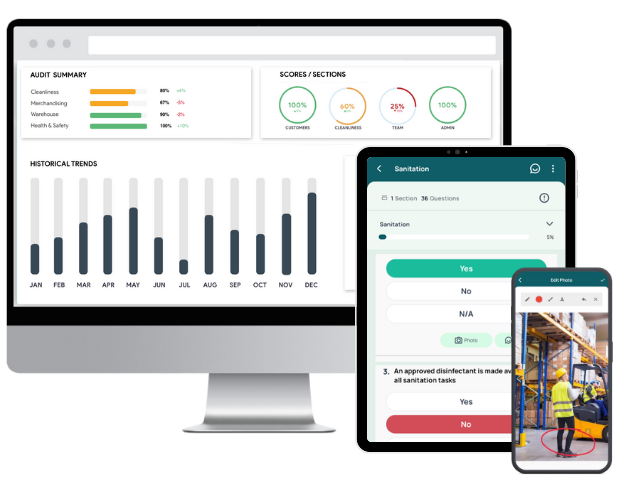
GoAudits is an all-in-one audit management software designed to streamline inspections, compliance checks, and quality assurance. It replaces fragmented spreadsheets and manual reporting with a unified, mobile-first workflow. You can capture field data accurately and access instant, actionable insights. With customizable checklists, automated reports, and real-time dashboards, you gain better visibility across locations, faster issue resolution, and stronger operational consistency.
Key Features & Benefits of GoAudits:
- Access a library of ready-to-use templates, create your own forms, or let the GoAudits team build your checklists at no extra cost.
- Conduct audits up to 5x faster, and attach photos, add notes, and capture timestamps, e-signatures, and geolocation data.
- Inspection reports are created the moment an audit is completed. Reports include photos, comments, scores, corrective actions, and metadata. You can set rules to automatically share audit reports with relevant people.
- During inspections, assign corrective actions to internal or external team members with priority, due date, and clear accountability to ensure nothing gets missed.
- Monitor audit progress, follow-up actions, and completion status across sites, teams, or locations in one centralized place.
- Dashboards visualize audit scores, performance, trends, and recurring issues by site or department.
- Receive daily, weekly, or monthly summary emails with audit results, overdue actions, and key updates.
- Export detailed or summary audit data in various formats for reporting, analysis, or integration into your existing systems.

2. ComplianceQuest Cloud-Based Audit Software
ComplianceQuest offers AI-driven functionalities that connect audit workflows across quality and risk functions, and provide clear visibility into findings and performance trends. It offers a structured, traceable, and highly efficient audit process that ensures organizational governance and regulatory readiness.
Main Features:
- Automated scheduling and workflows to streamline audit cycles
- Risk-based prioritization to focus on high-impact areas
- Centralized document control for audit evidence and records
- Real-time collaboration across teams and locations
- Customizable reports for fast, regulator-ready insights
3. Workiva Audit Management Software
Workiva consolidates planning, testing, reporting, and monitoring into a single platform. Its embedded AI accelerates analysis, automates evidence collection, and streamlines workflows. Real-time dashboards and end-to-end data lineage offer clarity and control needed to strengthen assurance and maintain audit readiness across environments.
Main Features:
- Automates evidence gathering, testing, and reporting
- Centralizes fieldwork and workpapers in one platform
- Enables full-population audit analytics with no coding
- Supports seamless collaboration across all audit teams
- Delivers real-time dashboards and always-accurate linked data
4. Archer Audit Management Software
Archer integrates planning, scoping, execution, issue tracking, and reporting. It delivers consistent audit governance and real-time visibility into risks and controls. Its structured workflows and data-driven insights elevate audit quality, reduce manual overhead, and strengthen coordination with risk and compliance functions.
Key Features:
- End-to-end audit workflow in a single system
- Risk-based audit scoping to prioritize critical areas
- Central issue tracking across audit, risk, and compliance
- Organized workpapers and evidence in one repository
- Dashboards showing audit status and key risks
5. Qualio Audit Management Software
Qualio connects documents, processes, and quality data, ensuring audit readiness. It consolidates internal and external audit activities, accelerates evidence retrieval, and strengthens compliance posture across the entire quality system. It helps you demonstrate traceability, document control, and drive continuous improvement.
Key Features:
- Automated audit scheduling, tasks, and reminders
- Instant access to audit evidence via structured templates
- Full traceability for findings, CAPAs, and NCRs
- Cloud-native support for efficient remote audits
- Integrated workflows to close gaps and track improvement
| Key highlights | Pricing | Free trial & demo | |
| GoAudits | Reports generation automatically after each audit, easy-to-use mobile app that requires no training, customizable checklists to match your processes, quick follow-up through assigned corrective actions, and real-time visibility into performance across all locations | $10 per user per month (billed annually) | 14-day free trial and personalized demo |
| ComplianceQuest | AI-driven audit automation, integration with enterprise quality and risk systems, cloud-native accessibility and security, and quick configuration | Contact for pricing | Demo available |
| Workiva | AI for real-time decision support, audit-ready transparency with end-to-end data traceability, and a scalable structure that adapts to any audit program | Contact for pricing | Demo available |
| Archer | Purpose-built audit workflows, consolidated audit and risk data, improved audit quality and speed, enhanced visibility into risks and issues | Contact for pricing | Demo available |
| Qualio | Centralized compliance control, continuous audit readiness, automated evidence organization, quick retrieval of audit data, and lifecycle traceability across QMS | Contact for pricing | Demo available |
Free & Customizable Internal Audit Templates
You can sign up for free and start using these checklists tailored for different industries, including food, manufacturing, healthcare, hospitality, construction, retail, and more.
- SOP Checklists
- Hygiene Audit Checklists
- Workplace Inspection Checklists
- OHS Inspection Checklists & Templates
- Quality Control Checklists Template
- PPE Inspection Checklists & Forms
- Construction Safety Checklists
- Hotel Maintenance Checklists
- Restaurant Opening Checklists & Restaurant Closing Checklists
- GMP Audit Checklists
- CQC Inspection Checklists & Templates
- HACCP-Based SOP Templates
- Food Safety Audit Checklist Templates
- OSHA Checklists & Audit Templates
- ISO Audit Checklists & Templates

What is Audit Management Software?
Auditing software is a powerful tool designed to assist businesses in conducting efficient and accurate audits. It streamlines the entire auditing process, from risk assessment and data collection to reporting and analysis. By leveraging auditing software, you can enhance the accuracy and efficiency of your audits, leading to improved compliance and overall business performance.
What are the Benefits of Using Audit Software?
Auditing software offers a multitude of benefits that can transform your business operations.
- Enhanced Accuracy: Auditing software minimizes human errors and ensures the accuracy of your audits by automating calculations and data analysis.
- Increased Efficiency: Streamline your auditing processes by automating repetitive tasks, allowing your team to focus on higher-value activities.
- Real-Time Reporting: Gain access to real-time audit reports and insights, enabling you to make informed decisions promptly.
- Improved Compliance: Ensure adherence to industry regulations and standards by using the auditing software’s compliance features.
- Cost Savings: By improving efficiency, auditing software can lead to significant cost savings for your business.
Essential Audit Management Software Features
Here are the top auditing software features you must consider when looking for auditing management software.
Desktop and Mobile Auditing App
Modern audit teams need flexibility. Auditing software that offers both desktop and mobile access enables inspectors to start, complete, and delegate audits anywhere. Mobile capabilities simplify capturing, annotating, and attaching photos as evidence, while desktop dashboards provide real-time progress tracking and analytics. A clean, intuitive interface reduces training time and supports fast checklist completion.
Instant Audit Reports
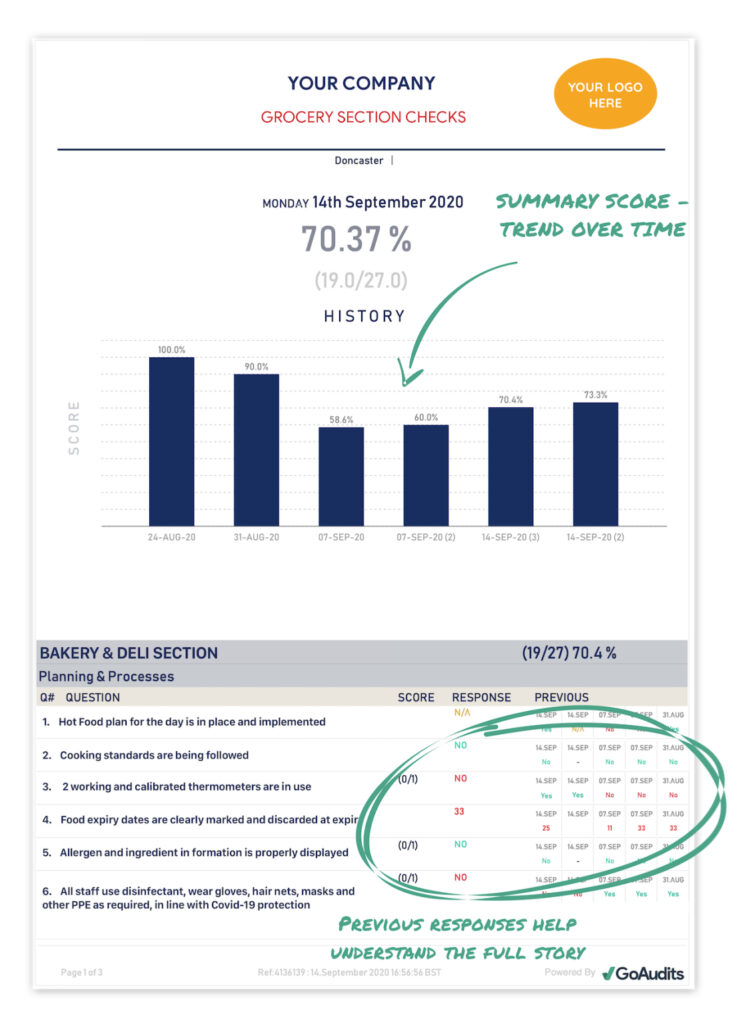
Audit software should eliminate manual report writing. Instant, customizable reports let teams share clear findings immediately after each inspection. Look for audit management software that supports smart scoring, automated input, real-time insights, trend analysis, and corrective action summaries. Reports should support photos, timestamps, user details, and geo-location for stronger documentation and faster decision-making.
Here’s a sneak peek of a report that our customers can create with the GoAudits auditing software. It allows you to add photos, geo-location of the auditor, user name, and time stamps to save valuable time.
Corrective and Preventive Action (CAPA)
A strong CAPA module ensures issues are assigned, tracked, and resolved without delay. Effective audit management systems allow you to delegate actions to internal or external stakeholders, set priorities and due dates, and define user roles and permissions. This improves accountability and creates a structured environment for both immediate remediation and long-term improvement.

Tasks and Workflow Automation
Automation reduces administrative burden and keeps audits on schedule. Choose auditing software that lets you assign tasks across departments or to external partners without requiring them to log in. Robust workflow rules should handle report distribution, approvals, reminders, and notifications, ensuring the right people stay informed and accountable.
Real-Time Analytics
Analytics should offer a clear, comprehensive view of audit performance across sites, teams, and categories. Real-time dashboards help decision-makers identify trends, recurring issues, and high-risk areas. Immediate visibility into each inspection supports faster, data-driven decisions and more efficient resource allocation.

Scheduling
Built-in scheduling features streamline recurring audits and workforce coordination. Your auditing management software should support bulk scheduling, assignment by location or team member, and configurable reminders. This keeps audits consistent, reduces missed inspections, and strengthens organizational accountability.
Audit Checklists & Templates
An extensive library of audit templates accelerates audit setup and promotes consistency. Predefined checklists tailored to specific industries or regulations reduce preparation time and ensure comprehensive coverage. The ability to customize and maintain your own audit library standardizes processes, minimizes errors, and reinforces compliance across the organization.

How to Choose the Best Audit Management Software?
Choosing the best audit software requires a pragmatic lens: clarity of use, reliable support, and real-world credibility. Evaluating these factors early protects your implementation from hidden complexity and long-term inefficiencies.
Look for Easy-to-Use Audit Management Apps
Look for audit management apps that reduce learning curves rather than add to them. Prioritize interfaces that make navigation obvious, automate routine checkpoints, and surface key controls without forcing users through complex menus. The right software should let you capture evidence, assign tasks, and track issues in real time with minimal clicks, keeping teams focused on risk and compliance rather than system mechanics.
Compare the Best Budget-Friendly Audit Management Systems
To choose the best audit software, cost-effectiveness is a crucial factor. You want audit management software that provides value for your investment and doesn’t strain your budget. Look for software that offers flexible pricing options, such as subscription-based models or tiered pricing plans, allowing you to choose the features that best suit your needs and budget.
Ensure Dedicated Customer Support
Ensure the vendor provides responsive and knowledgeable customer support that goes beyond generic ticket handling. Strong providers offer onboarding assistance, clear documentation, and fast troubleshooting so teams can keep audits moving without disruption. When questions arise, you should be able to reach specialists who understand the product’s workflow and can quickly guide you through configuration or process challenges.
Read Customer Reviews and Testimonials
Read customer reviews and testimonials to understand how the auditing software performs in real audit environments. Focus on comments that address reliability, usability under tight deadlines, reporting accuracy, and the vendor’s support quality. Feedback from peers will help you validate claims, spot recurring issues, and measure how well the tool aligns with the operational demands of your audit program.
Look for Cloud-Based Audit Software with Offline Functionality
Cloud-based audit software gives teams immediate access to audit data, tools, and documentation from any device. This supports seamless collaboration, enabling auditors to share findings, notes, and files in real time, even when working across multiple locations. Subscription-based deployment also reduces upfront investment and offloads maintenance, while modern cloud environments provide strong security through encryption, access controls, and routine audits.
Offline capability is equally important. When auditors work in remote areas or environments with weak connectivity, the ability to continue inspections without interruption is essential. Offline data automatically syncs once the device reconnects, ensuring all findings are preserved, and the audit record remains complete.
Leverage Free Trials and Demos
Consider auditing software that provides a free trial or a demo version. This enables you to thoroughly evaluate the software’s functionality, user interface, and compatibility with your systems before committing to a purchase. A free trial or demo allows you to test the software in your specific environment and ensure it meets your requirements.