Toolbox Talk Form Templates
Template Library > Safety Inspections > Toolbox Talk Forms
Standardize Safety Meetings With Ready-to-Use Toolbox Talk Forms
Use a toolbox talk form to record every short safety briefing: the topic, who led it, who attended and what needs to happen next. Supervisors and site leads fill one in at the start of a shift or before a higher-risk task, then keep it as proof the briefing took place.
These templates cover the main variants:
- Toolbox meeting form: the record of each talk, with attendance log, sign-in, absentees and follow-up actions.
- Toolbox talk format: how to plan and deliver the talk, from opening to close.
- Safety meeting template: for longer, scheduled safety committee or team meetings.

With the GoAudits Safety Inspection App, you can:
- Eliminate paperwork: conduct efficient digital audits, add photos from mobile device
- Customize this template or easily create your own
- Save time with instant reports & assign corrective actions
13 questions in 2 sectionsInteractive preview: try the answers
Section 1 of 2 · 8 questionsPrior To Startup
Have you been properly trained on this piece of equipment?
Have you checked the fluid levels (engine oil, hydraulic oil, coolant) and tires (use a daily checklist if available)?
Are there fluids or puddles under the equipment?
Are any safety shields damaged or missing?
Are warning signs (including slow moving vehicle triangle) in place?
Is there any damage to the equipment?
When was the last time the equipment was serviced?
Does preventative maintenance need to be done?
Section 2 of 2 · 5 questionsAfter Startup
Are there any warning lights?
Are the gauges within normal operating ranges?
Are there any new leaks or unusual sounds coming from the equipment?
Are safety lights/alarms working properly?
Are the brakes and steering working properly?
Checklist by GoAudits. This checklist is an example: we do not guarantee compliance with the laws applicable to your territory or industry. Seek professional advice to adapt it to your workplace or jurisdiction.
Save Time with Digital Inspections
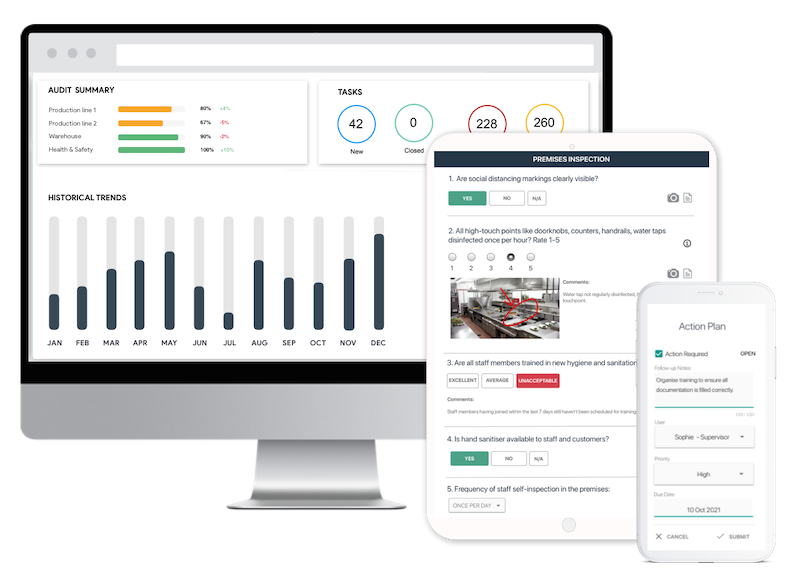
- Easily capture & attach photos, directly on your mobile device.
- Instantly generate and share detailed reports after the inspection.
- Track corrective actions, view historical trends, improve standards.


What Are Toolbox Talk Forms?
Toolbox talk forms are structured records of short safety meetings held on worksites. Unlike generic safety meeting notes, these forms are specifically designed to document toolbox talks, which focus on a single safety topic such as equipment use, protective gear, or site hazards.
The form captures key details like the subject of the talk, attendees, discussion points, and any agreed actions. This makes the session not just a conversation, but a documented process that teams can refer back to.
When to Use a Toolbox Talk Form
Use a toolbox talk form every time a toolbox talk takes place, whether that is daily, weekly or before a specific task. How often that happens depends on your industry, the risks on site and any rules that apply to your work.
General Frequency Guidelines
- Weekly talks are the most common across industries. They’re short enough to fit into a regular schedule and frequent enough to keep teams engaged.
- Daily talks may be necessary in high-risk industries like construction, oil and gas, or mining, where hazards change daily and risks are significant.
- Monthly talks may be suitable in lower-risk environments, but they should be supplemented with other reminders or updates in between.
Safety and Compliance Considerations
Some rules set a minimum interval. In California, the Cal/OSHA Construction Safety Orders (Title 8, section 1509) require supervisors to hold toolbox or tailgate meetings with their crews at least every 10 working days, and the Tunnel Safety Orders (section 8406) require them weekly. Federal OSHA sets no interval, but some contracts and company policies do. A dated form for every talk is the simplest way to show the interval was met.
Tailoring Frequency to Worksite Risks
Worksites with rotating crews, frequent contractor involvement, or rapidly changing conditions benefit from more frequent toolbox talks. Even if formal talks are weekly, supervisors might hold quick tailgate meetings at the start of each shift to review that day’s specific hazards.
Consistency Matters More Than Length
Toolbox talks don’t need to be long. A 10 to 15-minute focused discussion delivered regularly is more effective than an hour-long session held once in a while. The key is consistency and relevance—keeping topics aligned with current tasks, weather, or equipment being used.
👉 Toolbox Talks, Tailgate Meetings and Other Names
Toolbox talk, tailgate meeting, tailboard, pre-start meeting and toolbox meeting (TBM) all describe the same thing: a short safety briefing before work starts. “Toolbox talk” is used widely in the US, UK and Australia, and Cal/OSHA’s construction rules name both toolbox and tailgate meetings. “Tailgate” comes from crews gathering at the back of a truck, “tailboard” is common with utility line crews, and “pre-start” is the usual term on Australian sites.
Whichever name your site uses, the form records the same things: topic, attendees and follow-up actions.
What Should Be Included in Toolbox Talk Templates?
A well-structured toolbox talk template must ensure that key safety messages are covered and that there is a written record of what was discussed. Here are the main elements every template should include:
- Topic or theme – The specific hazard, task, or safety issue being addressed (e.g., working at height, PPE use, manual handling).
- Date, time, and location – To track when and where the talk took place.
- Facilitator details – The name of the supervisor or team leader delivering the talk.
- Attendee list and signatures – To confirm who was present and accountable for the information shared.
- Discussion points – Key safety instructions, reminders, or examples related to the topic.
- Hazards and controls – The hazards the task involves and the controls the crew agreed to use.
- PPE required – The protective equipment needed for the work discussed.
- Questions and feedback – Space for workers to raise concerns or share input.
- Follow-up actions – Notes on issues raised that need further investigation or action.
By including these elements, toolbox talk templates make safety conversations more structured and ensure that important details aren’t missed.
What Goes on a Toolbox Talk Sign-In Sheet?
A toolbox talk sign-in sheet, also called an attendance sheet or sign-off sheet, lists everyone who attended a talk with a signature next to each name. It is the part of the record that proves who heard the briefing, so it matters most when an incident, audit or client asks for evidence.
A sign-in sheet that holds up includes:
- The topic, date, site and presenter at the top, so signatures can’t be reused for another talk.
- A printed name and signature for each attendee, plus their employer if subcontractors attend.
- The presenter’s own signature.
- A note of anyone absent and when they will be briefed.
Keep the sign-in sheet with the talk record rather than in a separate binder. When every record lists the topic, date and attendees, building a toolbox talk register is straightforward: it shows which crews have covered which topics and who has missed a briefing.
Should You Use a Paper or Digital Toolbox Talk Form?
Paper works for a single crew on one site. Once talks run across several crews, sites or subcontractors, a digital toolbox talk form removes the chasing, scanning and filing, and puts every talk in one place.
What changes when the form moves to a phone or tablet:
- The supervisor signs off on the device, and the signed attendance sheet is photographed and attached.
- The app works offline, so talks on sites with no signal are still recorded and sync later.
- Photos of the hazard being discussed are timestamped and attached to the record.
- Questions raised in the talk become actions with an owner and a due date, tracked through corrective action software instead of a notebook.
A printed form is still a sensible backup for sites where phones are not allowed.
Examples of Common Topics Covered in Toolbox Meeting Forms
The most useful topic is usually last week’s problem. Pick topics from your latest near miss incident report, failed items on your workplace inspection checklist and recent safety observation reports, then use the lists below for planned talks by industry. Record the topic on every form so you can see which subjects each crew has covered.
Office and General Workplaces
- Ergonomics and workstation setup
- Fire drills and emergency exits
- Slips, trips, and falls in corridors
- Stress management and mental health awareness
- Reporting hazards or near misses
Construction and Trade Work
- Fall prevention and working at heights
- Scaffolding and ladder safety
- Trenching and excavation hazards
- Electrical safety on site
- Hazard communication: labels and safety data sheets (SDS)
Manufacturing and Industrial
- Lockout/tagout procedures for machinery
- Machinery guarding and safety checks
- Chemical handling and storage
- Noise exposure and hearing protection
- Hazardous material spills and containment
Transportation and Logistics
- Vehicle pre-use inspections
- Safe loading and securing cargo
- Forklift and warehouse vehicle safety
- Pedestrian traffic management
- Fatigue management and rest breaks
Healthcare and Care Facilities
- Infection control and hygiene practices
- Safe handling of sharps and waste
- Lifting and moving patients safely
- Violence prevention and de-escalation
- Fire safety and evacuation drills
Retail
- Safe handling of stock and deliveries
- Customer safety in high-traffic areas
- Cash handling and security awareness
- Dealing with difficult customers safely
- Display setup and trip hazard prevention
Hospitality and Food Service
- Food hygiene and cross-contamination prevention
- Kitchen equipment and knife safety
- Spill management and slip prevention
- Chemical handling for cleaning agents
- Guest safety and security awareness

How Tailgate Meeting Forms Support Compliance and Accountability
Tailgate meeting forms can support compliance for industries where regulatory bodies require evidence of training and briefings.
While OSHA doesn’t explicitly mandate toolbox talks, OSHA requires employers to provide safety training relevant to workplace hazards. Toolbox talks are widely recognized as a best practice to meet this requirement. The UK HSE also highlights toolbox talks as a practical way to reinforce risk assessments and safe systems of work.
By keeping detailed records, companies can:
- Demonstrate compliance with OSHA, HSE, or industry-specific safety regulations.
- Show accountability by documenting attendance, topics covered, and action items.
- Track trends in recurring safety issues or incidents discussed over time.
- Protect against liability, as forms act as evidence that workers were made aware of hazards and procedures.
These forms create a transparent system where both management and workers can be confident that safety isn’t just discussed, but consistently monitored and recorded.

What to Watch Out for When Filling In a Toolbox Talk Form
Weak toolbox talk records tend to fail in the same few ways. Check a sample of completed forms each month for these warning signs:
- Signatures collected before the talk starts, or on a sheet passed around while people work.
- A blank or vague topic, such as “safety” or “general”.
- The same topic repeated for weeks while new hazards go undiscussed.
- Questions written down with no action, owner or date.
- Actions from last week’s talk still open with nobody following them up.
- Identical wording on every form, a sign the record was copied rather than written up.
If the same problems keep appearing, check how much time supervisors get to run the talk and whether the topic is chosen before the crew gathers.
How GoAudits Helps Teams Run and Record Toolbox Talks
For safety managers running toolbox talks across several crews, sites or contractors, GoAudits turns each talk into a signed, dated record that is easy to pull up later.
- Schedule recurring talks for each crew or site, with reminders when one is due, so a weekly or 10-working-day interval doesn’t slip.
- Supervisors run the talk on any phone or tablet with the auditor app, and every completed form becomes a PDF report through GoAudits’ inspection report software.
- Give site managers access to their own sites while head office sees talks across the whole portfolio on one inspection dashboard.
- Run the same toolbox talk form in each crew’s language, so mixed-language crews follow the version they understand.
- Export records to PDF or Excel when a client, insurer or auditor asks for proof.
Toolbox Talk Form FAQs
What Is the Difference Between a Toolbox Talk Form and a Safety Meeting Form?
A toolbox talk form records a short briefing on one topic, usually held on site before work starts. A safety meeting form records a longer scheduled meeting, such as a monthly safety committee, with an agenda, several items and minutes. Many teams use both: toolbox talks for crew briefings, and safety meetings to review incidents, EHS reports and trends across sites.
Is There a Word or Excel Version of the Toolbox Talk Form?
The toolbox talk form is available as a free PDF and as an editable template in the GoAudits app, not as a Word file. You can change the questions and add your own topics in the app. Completed talks export as PDF or Excel reports, which covers what most teams use spreadsheets for: sorting talks by date, site or topic.
Can Clients Require Contractors to Hold Toolbox Talks?
Yes. Clients and project owners often write toolbox talk requirements into contracts, separate from any legal rule. The New Jersey Schools Development Authority, for example, requires its prime contractors and each subcontractor to hold weekly toolbox safety meetings and report them on its own form. If you work for several clients, put the client, site and date on every record so you can pull the evidence each one asks for.
Does a Toolbox Talk Form Replace a Job Safety Analysis?
No. A job safety analysis (JSA) breaks a specific task into steps and records the hazards and controls for each step before work begins. A toolbox talk form records the briefing where those controls are explained to the crew. On higher-risk jobs, the JSA usually comes first and the toolbox talk walks the crew through it on the day.
✅ Ensure Consistent Safety Communication and Training with GoAudits
Paper or PDF forms can get lost and are hard to track across multiple sites. With GoAudits, safety talks and inspections are recorded digitally: with mobile-friendly templates, instant sign-offs, and auto-recordkeeping. Stay audit-ready at all times with clear, compliant reports.
Other Popular Safety Checklists:

Digitize your Safety Inspections
- Easily perform audits anywhere on the site using a mobile device, even offline
- Attach photos to document issues or prove compliance
- Assign tasks, set deadlines and track progress - all within a single app
- Analyze data from audits to identify trends, pinpoint recurring issues, and assess compliance levels.