
Key Takeaways
- A store visit report is the scored record a district or area manager produces during a store walk, covering standards, photo evidence, and the fixes the store owes.
- Most store visit reports have seven sections: visit header, score summary, exterior, sales floor, backroom and safety, people, and the action list.
- Retail usually scores visits red, amber, and green rather than pass or fail, with a written comment required on every red.
- Every failed item needs three things attached to it: a photo, a named owner, and a date.
- GoAudits generates the finished report the moment the walk ends, so the store manager has the action list before the district manager leaves the car park.
A store visit report is a structured record of what a district or area manager found during a store walk, scored against a fixed set of standards, with every failed item attached to a photo, an owner, and a deadline. Head office usually has a less complete picture of its own stores than it thinks.
In a study published in Manufacturing & Service Operations Management, researchers tracked around 15,000 promotional displays across about 5,000 stores of a Fortune 500 chain. Twenty-nine percent never reached the sales floor at all, and the displays that did make it were in place for only 62% of the campaign.
A store visit report is how the head office finds out which stores those are, and how store operations teams turn that into a fix with an owner and a date.
- What is a Store Visit Report, and How is It Different From a Store Audit?
- What Should a Store Visit Report Include?
- Free Store Visit Report Sample (PDF)
- How to Write a Store Visit Report in 7 Steps
- How Do You Score a Store Visit?
- What to Do After the Store Visit
- How GoAudits Helps With Store Visit Reporting
- Frequently Asked Questions
What is a Store Visit Report, and How is It Different From a Store Audit?
A store visit report records one manager’s visit to one store on one day, scored against the standards that store is expected to hold. It is written by whoever runs the patch: a district manager in the US, an area or regional manager in the UK, sometimes a brand or vendor rep checking their own fixtures. Depending on the market, you will also hear it called a retail store visit report, a shop visit report, or a store observation report.
A store audit covers more ground, runs less often, and usually exists to prove a standard was met to someone outside the store team.
| Store visit | Store audit | |
| Frequency | Weekly to monthly, per store | Quarterly to annually |
| Who runs it | District, area, or regional manager | Internal audit, compliance, QA, or a third party |
| Depth | 30 to 60 checks across the trading floor and back of house | 100+ checks, often including financials and documentation |
| Scoring | RAG (Red-Amber-Green) or a weighted percentage, built for speed | Formal scoring tied to certification or policy |
| Output | A short action list the store manager works through this week | A full report filed as evidence |
| Purpose | Fix the store and coach the team | Prove the standard was met |
Many retailers run both. Retail audits tell you whether the chain met the standard. Store visits tell you why one store missed it.
That distinction matters because standards drift store by store. The same chain will run one shop where the opening routine is followed to the minute, and another where it depends on which supervisor is on shift that morning. Visits catch that variation while it is still a habit, before it shows up in the numbers.
What Should a Store Visit Report Include?
A store visit report has seven sections: a visit header, a score summary, and one section each for the exterior, the sales floor, the back of house, and the team, closing with a consolidated action list. The first six capture what you saw. The seventh is the only part the store manager acts on.
Most templates get that last point wrong. A full audit ends in a completed report. A store visit should end in a filtered list of every noncompliance, pulled from across all six sections, so the store manager receives a work order rather than a 60-question document to comb through.
| Section | What it captures | What it produces |
| Visit header | Store, date, time in and out, auditor, visit type, who was on duty | A timestamped record of who saw what, and when |
| Score summary | Overall score or grade, plus a breakdown by section | A comparable number across stores and visits |
| Exterior and entrance | Signage, windows, car park, forecourt, first impression | Facilities and landlord issues |
| Sales floor | Planograms, end-caps, pricing, outs, housekeeping, fitting rooms | Merchandising and replenishment actions |
| Back of house and safety | Stockroom, deliveries, fire exits, cash and safe controls, equipment | Safety and loss prevention actions |
| People and service | Staffing to footfall, uniform, product knowledge, service observed | Coaching notes and training needs |
| Action list | Every failed item, consolidated | The store manager’s week |
The usual retail store visit report format is a numbered checklist per section, each item scored, with a comment box that opens automatically on anything marked red. If you are building one from scratch, start from the store audit checklists retail teams already run and cut rather than add. The Store Visit Checklist covers the six zones above and makes a workable baseline.
Did you know? Researchers at Texas McCombs tracked about 15,000 promotional displays across 4,786 stores of a Fortune 500 chain. Twenty-nine percent never reached the shop floor, and only 2% were both put out and taken down on schedule. The displays least likely to appear were the large and complex ones, and those arriving too early or at the weekend. Staff described them as a hassle that cluttered the backroom and the floor.
A Filled-In Store Visit Report Example
A good store visit report example is specific enough to act on without having been there. The wording does most of that work.
| Section | Weak entry | Usable entry |
| Sales floor | Stock levels were low | Three core SKUs at zero facings on bay 4 since Tuesday’s delivery short-shipped |
| Merchandising | Planogram not followed | End-cap 2 running last month’s promotion, current POS still in the stockroom |
| Back of house | Stockroom untidy | Fire exit in the stockroom blocked by two roll cages, cleared during the visit |
| People | Team seemed unsure about the new range | Two of three associates could not name the new range’s key benefit |
| Pricing | Some pricing errors | Shelf edge labels on the seasonal bay still showing pre-markdown prices |
Each usable entry names the location, the quantity, and the time frame, which makes it checkable on the next visit. The consolidated action list that closes a retail store visit report example should then read as a work order:
- Clear roll cages from the stockroom fire exit. Owner: store manager. Due: immediately, verified during the visit.
- Swap end-cap 2 to the current promotion and post current POS. Owner: assistant manager. Due: before trade tomorrow.
- Reprint and replace shelf edge labels on the seasonal bay. Owner: supervisor. Due: 48 hours, photo required.
- Run the new range briefing with all associates. Owner: store manager. Due: end of week.
Free Store Visit Report Sample (PDF)
Below is a store visit report sample generated from a completed audit. It shows the scored sections, the photo evidence, and the action list exactly as the store manager receives them, so you can see the finished output before building your own.
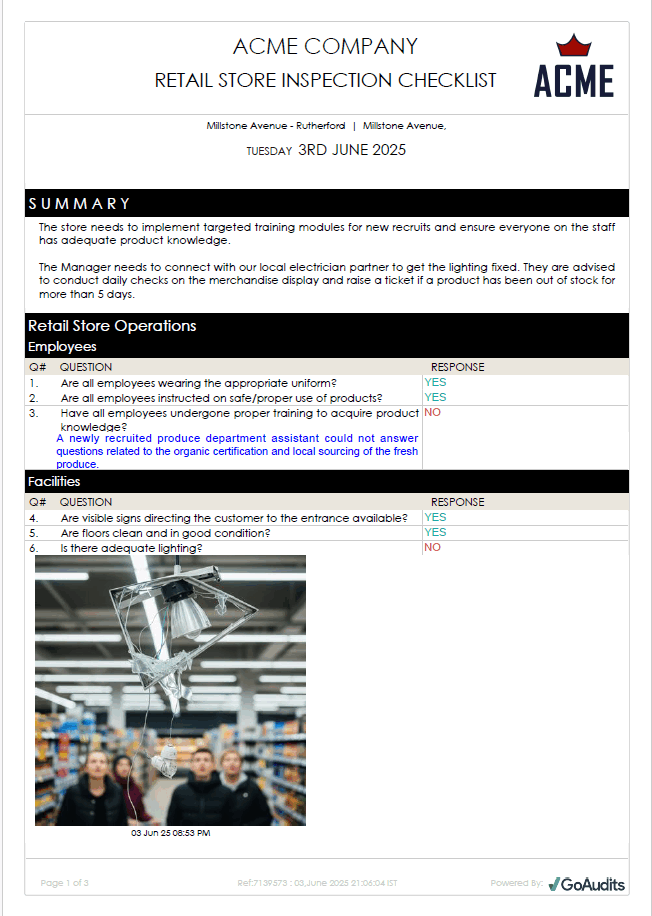
Scroll to the final page, and you will see the action plan: every failed item pulled out of the checklist, each with an assignee, a priority, and a due date.
👉 Quick Tip: If you want a blank store visit report template rather than a finished example, start from the Store Visit Checklist and adapt the sections to your own standards. A retail store visit report template works best when it mirrors the order you actually walk the store, rather than the order the categories appear in head office.

How to Write a Store Visit Report in 7 Steps
Writing a store visit report is less about the form than about when you fill it in. The reports that change anything are finished before the manager leaves the building.
- Read the last report first. Open the previous visit and check what was raised. Anything still open goes to the top of today’s conversation. A store that fixed four of five items is a different problem from a store that fixed none.
- Walk in customer flow order. Start outside and move the way a customer would. It keeps the report consistent between visits and between managers.
- Score as you go. Record each item where you are standing. Scores written from memory in the car park are the single biggest source of disagreement later.
- Photograph every fail. A noncompliance without a photo is an opinion. With a photo, it is a fact that survives a conversation with someone who was elsewhere that day.
- Name the specifics. Location, quantity, and duration. “Bay 4, three SKUs, since Tuesday” can be checked. “Low stock” cannot.
- Debrief on site. Walk the issues with the store manager before you leave, in the store, in front of the problem. Agree on the owner and the date there, rather than by email afterwards.
- Share the report before you leave. The report should reach the store manager and your regional lead the same day. A report that lands a week later describes a store that has already changed.
Goodwill Industries of Middle Tennessee runs this across 100+ stores, outlets, donation centers, and warehouses, with the daily safety walk as the backbone of the program.
Before GoAudits, says Chief Operating Officer Leisa Wamsley, store managers completed a checklist on the walk and then returned to the office to key in the results, which created admin work and made it harder to spot trends or follow up. Now the walks and inspections are completed directly in GoAudits on an iPad.

What a District Manager Checks on a Store Walk
A district manager store visit covers six zones in walk order, each with its own failure modes. The sequence matters more than the item count.
| Zone | What to check |
| Exterior and entrance | Signage lit and clean, windows, car park and trolleys, entrance mats, first three feet of the store |
| Sales floor | Planogram compliance, end-caps, outs and OOS counts, housekeeping, fitting rooms |
| Pricing and promotions | Shelf edge labels against current prices, promotional POS in place and in date, markdown execution |
| Stockroom and receiving | Delivery process, put-away, aisle clearance, returns and salvage |
| Safety and cash | Fire exits and extinguishers, spill response, till and safe controls, loss prevention in retail stores procedures |
| People and service | Staffing against footfall, uniform and presentation, product knowledge, service observed on the floor |
Retail walks also capture live numbers rather than just ticks: stock counts, conversion against footfall, basket size, even decibel readings where store music is part of the brand standard. A form built only for yes or no answers will lose them.
The zone list changes by format. Convenience and grocery swap fitting rooms for food-to-go, cold chain logs, and forecourt checks, with cash and safe controls carrying far more weight. Luxury adds client advisor standards. Fast fashion leans on replenishment speed and floor resets.
Four retail checklists cover most of the ground:
- Retail Store Inspection Checklist for the general walk
- Visual Merchandising Checklist for the floor
- Loss Prevention Audit Checklist for cash and stock
- Store Safety Checklist for the back of house
Running them digitally keeps the zones in the same order for every manager on the team.
How Do You Score a Store Visit?
Retailers pick the scoring model that matches what the score has to do. In many chains, that score feeds a store manager’s bonus, so how it is calculated and how consistently it is applied matter well beyond the report itself.
The Four Scoring Methods Retailers Use
| Method | How it works | What it suits | Where it breaks |
| Pass or fail threshold | A single percentage decides the outcome; for example, 85% and above passes | Simple standards with few critical items | Treats a blocked fire exit and a crooked shelf label as the same weight |
| RAG score ranges | Percentage bands map to red, amber, or green, each with its own grade label | Most retail visits, where the color communicates faster than the number | Falls apart without a mandatory comment on every red |
| Weighted arithmetic | Questions carry different point values; N/A items are excluded from the calculation | Mixed checklists where some items matter far more | Needs upkeep. Weights drift out of date as standards change |
| Auto-fail | One critical question failing fails the whole report, whatever the total | Non-negotiables: safety, food handling, cash controls | Overused, it turns every visit into a pass or fail, and the score stops informing anything |
RAG is retail’s default language rather than pass or fail, and a red should force a written comment before the auditor moves on.
Retail scoring is also more arithmetic than most industries. Outs carry fractional penalties tied to lost sales, so ten missing items on a bay might cost exactly five points. Some chains add bonus points for commercial performance after the walk. Others skip a total score entirely, running pure RAG with every issue collected on one page.
Auto-fail overrides everything else, so it is worth setting up carefully. In GoAudits, an inspection scoring 86.67% still returns a failed report if a critical question fails, and those reports are marked and filterable on the dashboard.
» GoAudits Report Templates: Browse our templates to see the layouts retail teams pick from, including summary reports for head office and single-store reports for the manager.
Why N/A Is the Most Abused Answer on a Checklist
N/A exists so that a question that genuinely does not apply to a store avoids dragging its percentage down. It is also the quickest way past a question someone would rather skip.
Retailers raise this constantly. The vocabulary varies by market (pencil whipping in the US, tick and flick in the UK and Australia), but the behavior is the same: checklists completed at the auditor’s convenience rather than in the store, N/A selected to clear a mandatory field, reports written from memory afterwards. A time clock proves someone was on site. It proves nothing about what they looked at.
The controls that work are unglamorous:
- Camera-only photos, so an image has to be taken during the walk rather than pulled from a camera roll.
- Timestamps and GPS on each submission, so the report shows where and when it was completed.
- Mandatory comments on every red and every N/A, which makes the lazy option slower than the honest one.
- Locked reports after submission, so scores stay fixed once the number becomes uncomfortable.
- N/A rates reviewed by a manager, which surfaces the pattern faster than reading any individual report.
Body Energy Club saw average audit scores move from 75% to above 90% across its 17 stores over six months, while halving audit times.
GoAudits brought us speed and efficiency, and helped us drive our results. We cut our audit times in half. We improved our average audit results, from 75% to above 90% over a 6-month period. A great improvement for store operations, accountability, and historical tracking!
Myles Blue, Area Manager, Body Energy Club
What to Do After the Store Visit
The visit produces corrective actions, and the report earns nothing until those close. The consolidated action list is the handover: every noncompliance from every section, in one place, each with a named owner and a date.
Three things make the difference between a list and a result.
- Severity drives the deadline. Safety and legal items are fixed during the visit or the same day. Merchandising and pricing run to 48 hours. Coaching and training items run to the next visit. A list where everything is due “ASAP” is a list where nothing is.
- Verification is by photo, not by reply. A corrective actions workflow where the store uploads evidence and the district manager approves the closure takes longer to set up and is considerably harder to game than an email saying it is done.
- The next visit starts with the last list. Comparison audits are common in retail for this reason: the store completes a self-audit, and the district manager re-scores the same checklist on the next visit. The gap between the two scores tells you more about a store than either number alone.
👉 Case Study: How Goodwill drives operational improvements across 500+ retail locations
Twelve independent Goodwill organizations across the US and Canada now run GoAudits across 500+ locations, covering 35,000+ audits in the last 12 months, with district manager visits and area manager visits among the top checklists in use. In its first year, Goodwill of North Georgia logged more than 4,000 corrective actions.
“Using GoAudits saves us at least 20 hours a week across different teams, especially when it comes to writing action plans, because everything is now done in one place,” says Kartella Fuller, Sr. Director of Operations & Guest Experience. That works out at over 1,000 hours a year and an estimated $20,000 in direct savings.
» Read Full Story: How Goodwill conducts store audits and visits across 12 organizations and 500+ sites.
Last visit’s data should also decide where you go next. Rather than rotating the patch evenly, pull the stores with falling scores, repeat findings, or a high N/A rate to the front of the schedule. Multiple store management gets cheaper when the schedule follows the risk. The Store Manager Checklist covers what the store runs between visits, which is where most of the standard is held.
How to Use Analytics to Prioritize Store Visits and Audits?
While scheduling in advance is good, scheduling strategically is better. Instead of defaulting to a fixed rotation, advanced retail auditing platforms allow you to leverage data to focus resources where they are needed most. This practice of using analytics to prioritize retail visits and audits allows headquarters (HQ) to be proactive, not just reactive.
Key ways to prioritize retail store site visits using data include:
- Low-Score Targeting: Automatically flag stores that consistently fall below a set compliance or operations threshold. These sites need immediate intervention and a high-priority visit.
- High-Impact Categories: Identify patterns where a specific operational area (e.g., loss prevention or merchandising execution) is failing across multiple stores. HQ can then schedule targeted visits focusing only on that area.
- Performance vs. Audit Correlation: Compare a store’s financial performance (sales, average transaction value) against its audit scores. If a store has great audit scores but poor sales, the audit may need to be adjusted to focus on customer experience or inventory issues. Conversely, a store with low scores but high sales might indicate an efficiency opportunity.
- Follow-Up Scheduling: Use the data on outstanding corrective actions. Suppose a previous audit revealed a major safety issue that was assigned a fix date. In that case, the system should automatically flag the store for a follow-up retailer visit past the deadline.
How to Measure Whether Store Visits Are Working
Three numbers tell you whether the visit program is doing anything:
- Visit schedule adherence. Planned visits completed, as a percentage. A program running at 60% is a sampling exercise rather than a standards program.
- Action closure rate. Actions closed within their deadline, as a percentage. This is the number that tracks whether reports turn into fixes.
- Repeat non-compliance. The share of findings that appeared on the previous visit too. Rising repeat rates mean actions are being closed on paper rather than on the floor.
Track all three by store and by manager. Retail monitoring across a chain is mostly a matter of watching those three move.
Why Store Visit Reports Fail to Change Anything
Most store visit reports fail for one of five reasons, and each has a fix that costs nothing.
- The write-up happens after the visit. Score in the store, on the device, and share before leaving.
- Scoring is uncalibrated between managers. Walk one store together as a team each quarter, score it independently, and compare. The variance is always wider than anyone expects.
- Findings arrive without photos. Make evidence mandatory on every red.
- Last visit’s actions go unreviewed. Open the previous report first, every time.
- Findings describe rather than diagnose. “Housekeeping poor” is a description. “No cleaning rota posted since the supervisor left” is a cause, and only one of them can be fixed.
How GoAudits Helps With Store Visit Reporting
GoAudits is retail audit software built for store walks rather than desk audits, used by 10-store groups and 500-site networks alike, with onboarding and template building included rather than sold as an enterprise tier.
- The finished report generates the moment the walk ends, with no write-up, retyping, or drive back to the office.
- Scoring bends to your own rulebook: weighted questions, subsection scores, RAG ranges by percentage or raw score, auto-fail on critical items, and N/A excluded from the calculation.
- Camera-only photos with annotation, timestamps, GPS, mandatory comments, and reports locked after submission keep the evidence honest.
- Store managers receive, update, and close their actions as free users, which matters when every district manager has a dozen stores reporting in.
- The app runs offline in the stockroom on iOS or Android, phones or tablets, and syncs when the device is back in range.
With a rating of 4.8 stars on Capterra, GoAudits is trusted by some of the biggest names in the industry.
» GoAudits Reviews: Read how companies leverage GoAudits to meet standards in their operations and quality.
Frequently Asked Questions
Frequency should follow risk and performance, not a fixed rotation. Flagship and underperforming stores usually need a weekly visit until scores stabilize, stable stores monthly, and new stores more often in their first few weeks. Add visits around promotional launches, refits, and peak trading.
Use both. Scheduled visits suit coaching, standards reviews, and anything that needs the store manager’s full attention. Unannounced visits show the store on an ordinary trading day, which matters most for underperforming sites and after an incident or a bad mystery shop.
Close out the actions from the last report first, because that is where the conversation starts. Have evidence ready for anything already fixed, know the store’s numbers (footfall, conversion, basket, outs), and be clear on which open issues are blocked by head office rather than by the store.
The store manager should have the report before the district manager leaves the car park, and the regional lead the same day. Anything slower and it describes a store that has already moved on. Safety findings should route to whoever owns safety immediately, rather than in a weekly roll-up.
A store visit report is an internal assessment of operational standards by a field manager who identifies themselves. A mystery shopper report is an external assessment of the customer experience by someone posing as a shopper. The first says whether the store is running correctly; the second says how that feels from the other side of the counter. Many retailers run both, on different cycles.
The structure holds; the zones change. Convenience and grocery formats replace fitting rooms and visual merchandising with food-to-go standards, cold chain logs, date code checks, forecourt condition, and heavier cash and safe controls. Age-restricted sales checks usually sit as auto-fail items.
Partly. Photo-based self-audits completed by the store and reviewed by the district manager keep head office informed between visits, and they work well for merchandising and promotional compliance. They verify what the store chooses to show you, which is why a comparison audit on the next physical visit matters.