Environment, Health, and Safety (EHS) is a framework that covers a broad range of practices aimed at ensuring the well-being of employees and maintaining safe workplace conditions. EHS addresses potential hazards, ensuring compliance with regulations, and fostering a culture of safety. However, organizations often face significant challenges when integrating EHS practices into existing workflows, particularly in diverse and dispersed operations. Engaging employees in EHS initiatives can also be difficult, as it requires creating a culture of safety where every employee feels responsible and committed to maintaining a safe workplace. Additionally, the shift towards remote work has introduced new challenges, such as ensuring safety standards are maintained in decentralized environments and adapting safety protocols to virtual settings.
That’s why choosing the right EHS app can make a real impact on your workplace safety procedures.
Top 5 EHS Apps in 2026
Let’s look at the top 5 EHS apps for businesses in 2026.
1. GoAudits EHS Mobile App
GoAudits EHS app is an all-in-one digital solution that enables businesses to streamline and simplify workplace safety management processes. It helps organizations improve compliance, safety, and operational efficiency by eliminating their reliance on manual, paper-based methods. Available on web, iOS, and Android platforms, GoAudits safety inspection software supports offline functionality, making it accessible and convenient for field teams. GoAudits EHS audit software caters to various industries, including food & beverage, hospitality, healthcare, manufacturing, construction, retail, and more.
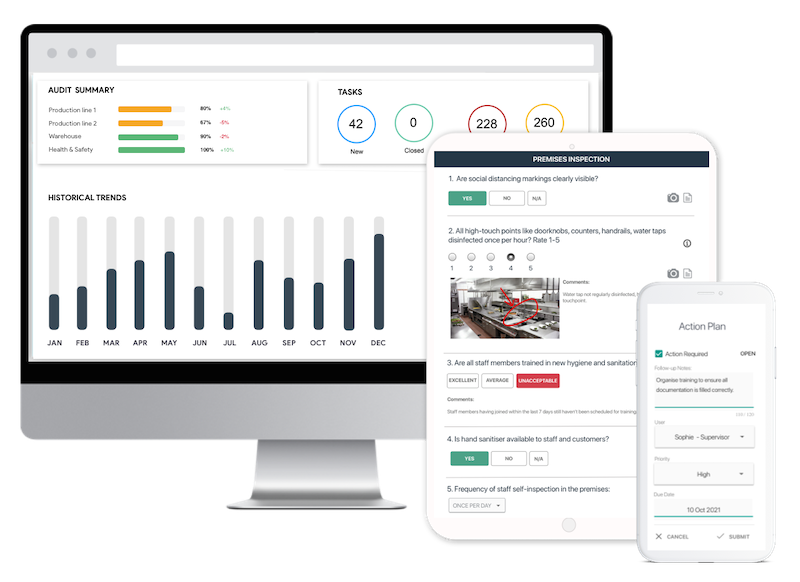
Key Features and Highlights of GoAudits EHS App:
- GoAudits’ mobile app allows users to conduct inspections on the go, capturing data efficiently and accurately even when you’re offline.
- GoAudits allows users to create and customize checklists to align with their specific safety and compliance requirements.
- GoAudits automatically generates comprehensive EHS reports following each inspection. These reports provide detailed insights into identified issues, corrective actions, and historical trends, facilitating informed decision-making.
- GoAudits facilitates the assignment and tracking of corrective actions, ensuring the timely resolution of identified issues.
- GoAudits’ interactive dashboards provide real-time visibility into safety performance across the organization. Users can track key metrics, identify trends, and drill down into specific data points to gain deeper insights.
- GoAudits EHS app is available in six different languages, including English, Spanish, French, German, Turkish, and Mandarin Chinese.

2. NeoEHS EHS Inspection App
NeoEHS is designed to enhance workplace safety, streamline compliance, and promote sustainability. This all-in-one EHS app integrates various EHS functions, offering a comprehensive solution tailored to meet diverse organizational needs. It serves various industries, including chemical, construction, logistics, oil and gas, manufacturing, shopping malls, ports, maritime, and more.
Key Features of NeoEHS:
- Consolidate all EHS data in one place for efficient management.
- Proactive risk management with real-time monitoring and reporting.
- Track and report workplace incidents, including injuries and spills.
- Facilitate comprehensive EHS audits and inspections.
- Centralize and automate work permits and safety procedures.
- Prepare your organization for emergencies and ensure compliance.
- Identify and mitigate air pollution sources.
3. Safetymint EHS Mobile App
The Safetymint EHS Mobile App offers a solution for managing EHS tasks efficiently on mobile devices. This EHS app is designed to enhance safety management efficiency, reduce risks, and ensure regulatory compliance through its comprehensive features and user-friendly interface.
Key Features of Safetymint:
- Real-time incident, near-miss, and hazard reporting with status tracking.
- Digital permit-to-work management with task assignment and progress monitoring.
- Customizable inspection checklists with automated workflows.
- Safety dashboards, detailed reports, and performance analytics.
- Secure cloud-based document storage with anytime access.
4. VelocityEHS Mobile App
The VelocityEHS Mobile App is a user-friendly platform for EHS management, accessible on both iOS and Android devices. It helps organizations streamline and improve their EHS and ESG initiatives through mobile functionalities. It ensures high employee engagement and compliance, provides dashboards and key EHS metrics, seamlessly functions offline with data sync, and covers all essential EHS functions.
Key Features of VelocityEHS:
- Log and manage incidents, near misses, and hazards quickly.
- Conduct JSAs and hazard analyses.
- Run real-time audits using checklists, photos, and voice-to-text.
- Capture data and assign & track corrective actions, even offline.
- Schedule safety meetings with agendas and action tracking.
5. KPA EHS Mobile App
The KPA EHS Mobile App offers a comprehensive suite of features that help organizations maintain a safe working environment, ensuring that employees are always connected and informed, regardless of their location. It is tailored to support a proactive approach to safety, making it a vital tool for modern workforce safety management.
Key Features of KPA EHS:
- Report incidents quickly with photos and GPS for accurate documentation.
- Create and complete audits using customizable checklists.
- Capture data offline with automatic sync when reconnected.
- Track and manage corrective actions to maintain compliance.
- Access built-in training and safety resources.
- Get real-time notifications on critical safety issues.
Free Health & Safety Checklists
Sign up for free and customize the EHS Audit checklist to get started. GoAudits also offers the following health and safety audit checklists.
- Electrical Safety Inspection Checklist
- Near Miss Incident Report
- Pest Control Inspection Checklist
- Ergonomic Risk Assessment Template
- Worksite Incident Report Checklist
- Office Hazards Checklist
- Workplace Inspection Checklist
- Workplace Safety Checklist
- Workplace Fire Safety Checklist
- PPE Inspection Checklists
- OSHA Checklists & Templates
- OHS Inspection Checklists

What is an EHS App?
EHS apps are digital tools designed to enhance the management of workplace safety and compliance. They integrate various functionalities that support EHS inspections, ensuring that businesses can maintain a safe and compliant working environment. EHS apps facilitate real-time data collection, incident reporting, and compliance tracking, making them indispensable in modern workplace safety management.
EHS apps digitize and automate EHS inspections, allowing for quicker and more accurate inspections. Inspectors can use mobile devices to record findings, capture photos, and generate reports on the spot, which reduces the time and effort required to complete inspections. This not only enhances productivity but also ensures that issues are identified and addressed promptly, minimizing risks and preventing workplace incidents.
What are the Benefits of EHS Inspection Apps?
Here are some of the major benefits of using EHS apps.
Real-Time Data Collection
EHS apps enable instant data capture through mobile devices, sensors, and IoT tools. Unlike manual methods, they provide accurate, time-stamped data that updates automatically. This improves decision-making and supports immediate action on safety hazards and compliance issues.
Increased Employee Engagement
EHS apps make safety tools, such as incident reporting, training modules, and checklists, accessible on mobile devices. This ease of use boosts participation, reinforces accountability, and builds a stronger safety culture across the organization.
Improved Efficiency and Productivity
By automating audits, inspections, and reporting, EHS inspection apps reduce administrative work. Real-time synchronization eliminates redundant data entry, while automated reminders ensure timely compliance tasks. This frees up time for higher-value activities and reduces operational delays.
Mobility and Accessibility
Mobile access allows employees to report incidents, perform inspections, and follow safety procedures from any location. Offline functionality ensures data is not lost in low-connectivity areas, improving reliability and response times for field and remote teams.
Proactive Risk Management
Built-in analytics help identify hazards and detect risk trends early. EHS audit apps use historical data and predictive algorithms to flag potential issues before they escalate. This proactive approach lowers incident rates and supports continuous improvement in safety compliance.
Enhanced Communication and Collaboration
Centralized dashboards, real-time notifications, and messaging tools keep all stakeholders aligned. Teams can track safety progress, share updates, and coordinate responses effectively, reducing silos and improving organizational transparency.
How to Choose the Best EHS Mobile App?
Choosing the right EHS app is crucial for enhancing workplace safety. Let’s find out how you can do so.
Identify Your Business Needs and Goals
Before selecting an EHS app, thoroughly understand your business needs and safety goals. Conduct a comprehensive assessment to pinpoint specific safety challenges your organization faces. Determine your primary objectives, whether it’s reducing workplace incidents, improving compliance, or enhancing overall safety culture.
Ease of Use and Integration
An effective EHS app should be user-friendly and intuitive, allowing employees at all levels to navigate and use it without extensive training. Additionally, the EHS app should integrate seamlessly with your existing systems, like HR, ERP, or CRM, to ensure smooth data flow and minimal operational disruption.
Customizability and Scalability
Your EHS processes and requirements will evolve as your business grows, so it’s essential to choose an EHS app that is both customizable and scalable. Look for solutions that allow you to tailor features and workflows to match your specific requirements. Ensure the EHS app can scale to accommodate increasing data volumes and additional users without compromising performance.
Cost and Pricing Structure
Evaluate the total cost of ownership of the EHS app, including setup fees, subscription costs, and any additional charges for extra features or support. Compare pricing plans from different vendors to ensure you get the best value for your investment. Consider both your current budget and future financial commitments to make a financially sound decision.
Vendor Support and Training
Reliable vendor support and comprehensive training are crucial for the successful implementation and use of an EHS app. Investigate the level of support offered by the vendor, such as 24/7 customer service, dedicated account managers, and extensive training programs. Effective support can resolve issues promptly, while thorough training ensures your team can fully utilize the EHS app’s features, maximizing its potential.
Reporting and Analytics
The ability to generate detailed reports and analyze safety data helps identify trends, pinpoint areas for improvement, and make informed decisions. Look for an EHS app that offers customizable reporting options, real-time data visualization, and advanced analytics tools to enhance transparency and drive continuous improvement in workplace safety.
User Reviews and Ratings
User reviews and ratings provide valuable insights into the real-world performance and reliability of an EHS app. Explore feedback from current users to understand their experiences and satisfaction levels. Pay attention to both positive and negative reviews to get a balanced perspective.
Look for Essential Features
Ensure the EHS app offers essential features such as incident reporting and management, Corrective and Preventive Actions (CAPA), tasks and workflow automation, instant report generation, audit trails, historical data and trend analysis, and customizable pre-built checklists. These features streamline safety processes, enhance compliance, and improve overall safety performance, addressing various safety needs efficiently.
Ask for Free Trials and Demos
Request free trials and demos from potential vendors before committing to an EHS app. Hands-on experience allows you to assess the app’s usability, functionality, and suitability for your organization. During the trial period, key stakeholders and end-users will be involved in gathering feedback and ensuring the EHS app meets your requirements.
FAQs
EHS mobile apps replace paper forms and manual processes with digital checklists, real-time data capture, and automated reporting, letting field teams complete safety audits and inspections right from their smartphones or tablets. This reduces administrative overhead, improves data accuracy, and enables instant compliance tracking. Teams can follow up on issues quickly and maintain audit trails that support regulatory requirements.
GoAudits is a popular EHS mobile app for audits and inspections. It offers intuitive design, offline capability, and customizable digital checklists that let you capture photos, annotations, and corrective actions right in the field.
The most effective EHS mobile apps for construction and field operations include customizable inspection checklists for different job sites, offline data capture and sync so audits continue without cellular access, push notifications and reminders for safety tasks and follow-ups, real-time dashboards and analytics for trend monitoring, and incident and corrective action tracking to close the loop on safety issues.
Yes. GoAudits is an affordable option that combines mobile access, smart dashboards, and real-time analytics without bulky implementation or extensive training, making it suitable for small and medium businesses. It lets teams digitize inspections, assign and track corrective actions, and view performance trends without high upfront costs.
GoAudits helps organizations with mobile data collection and analytics, and consolidates inspection data into actionable safety metrics. captures field inspection data on iOS, Android, and web devices with customizable checklists. Automatic reporting and interactive dashboards make trend analysis and issue tracking easier.