Visual inspections are essential for verifying asset condition, product quality, and workplace safety, but their value depends on how clearly findings are recorded and acted upon. A well-structured visual inspection report turns observations into documented evidence, risk insights, and corrective actions that support compliance and operational decisions. With digital tools, teams can standardize inspections, capture data in real time, and generate reports instantly, improving accuracy while reducing administrative effort.
This article explores the ins and outs of visual inspection reports, including their components, steps to prepare them, free inspection checklists to simplify inspections, and more.
What is a Visual Inspection Report?
A visual inspection report is a document that records the findings of a physical inspection carried out using direct observation, photos, or optical tools. It documents the condition of equipment, structures, products, or sites, highlights visible defects or safety concerns, and confirms whether the inspected item meets required standards or specifications.
The report is evidence of inspection, a communication tool for stakeholders, and a decision-making reference for maintenance, acceptance, or corrective action.
Visual inspection reporting is widely used wherever physical assets must be verified for safety, quality, or compliance. Major sectors include:
- Manufacturing and production facilities (for vehicle safety checks, weld quality verification)
- Construction and infrastructure projects (structural assessments of buildings and infrastructure)
- Oil & gas, energy, and utilities
- Aerospace and aviation maintenance
- Automotive and heavy equipment industries
- Food, pharmaceutical, and healthcare environments
These industries rely on visual inspection reports to detect defects early, ensure regulatory compliance, and maintain operational reliability.
Why Are Digital Visual Inspection Reports Better?
Digital inspection reports accelerate workflows. Inspectors can capture photos, tag defects, and submit reports directly from the field, eliminating manual paperwork delays. Supervisors, engineers, and clients can review findings almost instantly, speeding up approvals, maintenance decisions, and corrective actions.
They also improve data quality and traceability. Digital forms standardize inputs, reduce errors, and store inspection histories in searchable databases. This makes retrieving past reports simple during audits, warranty claims, or incident investigations, while also strengthening long-term asset management.

Who Should Prepare and Review Visual Inspection Reports?
- Qualified inspectors and engineers: Professionals trained to identify defects, assess risks, and interpret compliance requirements.
- Third-party inspection agencies: Independent bodies that provide objective verification for contracts, safety standards, or regulatory approvals.
- Internal quality and safety teams: In-house personnel responsible for ongoing compliance, maintenance planning, and operational risk management.
When is a Visual Inspection Report Required?
Here are times when a visual inspection report is required:
| Inspection type | When it’s performed |
| Pre-operation inspections | To confirm that equipment or sites are safe before use |
| Routine maintenance checks | To detect wear, corrosion, or defects during normal operation cycles |
| Post-incident assessments | To document damage or determine root causes after failures or accidents |
| Regulatory audits and inspections | To demonstrate compliance with safety, environmental, or industry standards |
| Project handover and acceptance stages | To verify that work meets contractual and technical specifications before approval |
Download a Free Visual Inspection Report Template
Looking for visual inspection report samples? GoAudits offers a free library of quality control and visual inspection templates: simply pick your preferred report format, then generate a fully branded and formatted inspection report with a click. Here is a visual inspection report example:
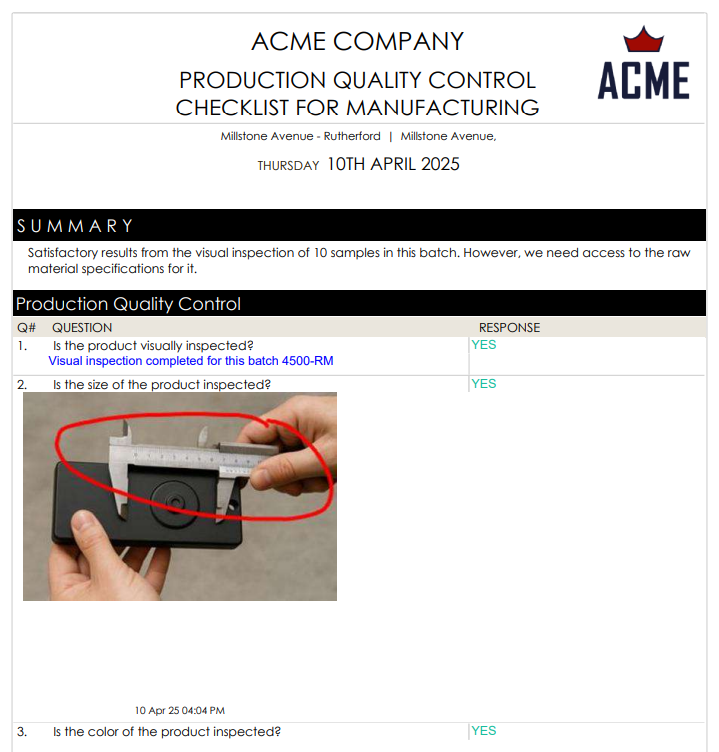
Free Visual Inspection Checklists & Reports
You can sign up for free and start using this visual inspection report template, choose from a range of manufacturing audit checklists, or even digitize your current manufacturing SOPs.
- Production Quality Control Checklist for Manufacturing
- Manufacturing Safety Audit Checklist
- Manufacturing Quality Control Checklist
- Equipment Validation Template
- OSHA Welding, Cutting, and Brazing Checklist
- Welding Risk Checklist – OSHA
- Electrical Safety Inspection Checklist
- PCB Visual Inspection Checklist
- Electrical Visual Inspection Checklist
- Welding Visual Inspection Checklist

Key Sections in a Visual Inspection Template
A strong visual inspection template ensures observations are consistent, traceable, and actionable. The following sections form part of an effective report structure.
Inspection Overview
This section captures the essential context of the inspection. It identifies what asset, product, or site was inspected, the inspection date and time, location, and the responsible inspector or team.
The overview establishes accountability and traceability, allowing stakeholders to link the findings to a specific inspection event and verify that the review was conducted by qualified personnel.
Inspection Criteria and Scope
Here, the report defines the applicable standards, codes, drawings, or specifications, as well as any limitations such as restricted access, incomplete documentation, or visibility constraints during visual inspections.
Environmental factors like lighting, weather, cleanliness, or operational status should also be documented, since these conditions can influence what defects are detectable.
Inspection Methodology
This section explains how the inspection was performed. It may describe whether the inspection was conducted visually unaided, with magnification tools, cameras, drones, or borescopes, and whether sampling or full coverage was applied.
Documenting methodology ensures the inspection can be reproduced, audited, or challenged if disputes arise.
Observations, Findings, and Common Defects
This is the core technical section of the report. It lists observed conditions and defects in a structured manner.
Typical elements include:
- Common visual defects: Cracks, corrosion, dents, leaks, misalignment, contamination, wear, or missing components
- Defect categorization: Based on the severity (impact on product safety and usability) and the nature or type
- Severity ratings: Minor, major, or critical (or numeric scoring systems)
Clear categorization allows stakeholders to prioritize repairs and allocate resources effectively.
Risk Assessment and Impact Evaluation
This section interprets the findings rather than just listing them. Observations are compared against acceptance criteria, regulatory limits, or engineering specifications.
It should indicate pass/fail status where applicable, highlight deviations from standards, and explain the operational, safety, or financial impact of the defects. This analysis turns raw inspection data into decision-ready information.
Photographic Evidence
Images provide objective proof of inspection findings. This section includes labeled photos showing the inspected area, identified defects, and contextual views for orientation.
Each photo should be referenced in the findings section so readers can quickly validate observations and understand defect severity.
👉 With GoAudits, you can easily attach and annotate photos from your device during inspections. You can also add timestamps, geolocation, and e-signatures. Providing visual evidence ensures accountability and transparency.
Recommended and Required Actions
This section converts findings into next steps. It should distinguish between:
| Required actions | Recommended actions |
| Mandatory repairs, shutdowns, or corrective measures needed for compliance or safety | Preventive maintenance, monitoring, or improvements that reduce future risk |
Conclusion and Overall Summary
The conclusion provides a concise summary of the inspection outcome. It states the general condition of the inspected item, confirms compliance status where relevant, and highlights any critical risks or immediate actions required. Many visual inspection reports also include inspector sign-off, approvals, or digital signatures to formally verify findings and support regulatory or contractual compliance.
A clear summary allows decision-makers to understand the inspection outcome quickly without reviewing the full technical report.
How to Prepare a Visual Inspection Report?
Preparing a reliable visual inspection report requires a structured process that ensures observations are documented accurately and translated into actionable outcomes.
Use Visual Inspection Checklists to Perform Inspections
Start with a standardized checklist tailored to the asset, process, or site being inspected. Checklists help inspectors follow consistent criteria, reduce the chance of missing defects, and ensure compliance with technical or regulatory requirements.
They also make visual inspections more objective by guiding inspectors through predefined checkpoints instead of relying on memory or ad-hoc observations.
Gather All Relevant Inspection Data
During the inspection, collect complete and verifiable information. This includes notes, measurements (if applicable), environmental conditions, defect descriptions, timestamps, and supporting photographs.
Accurate field data is essential, as weak documentation at this stage can lead to unclear conclusions, delayed approvals, and disputes later.
Compile the Visual Inspection Report
Once the inspection is complete, assemble the report so it covers all essential elements: inspection overview, criteria, methodology, findings, risk interpretation, evidence, and recommended actions.
👉 Ideally, using visual inspection software like GoAudits can simplify this step. It offers inspection checklists that can help inspectors perform audits up to 5x faster, capture photos directly from mobile devices, and generate shareable inspection reports instantly, reducing paperwork and improving consistency.
Review and Share with Relevant Stakeholders
Before finalizing the report, conduct a technical review to verify that findings are accurate, severity levels are justified, and recommended actions are realistic. The completed report should then be shared with project managers, safety officers, maintenance teams, or clients as required, ensuring everyone responsible for follow-up actions has clear visibility of the findings.
Manual and paper-based reporting often slows the process, introduces transcription errors, and limits visibility into recurring issues. Digital reporting platforms like GoAudits automate report generation and centralize inspection data, enabling faster decisions and clearer accountability. Let’s find out how.
Generate Visual Inspection Reports Instantly with GoAudits
GoAudits digitizes inspections and produces professional visual inspection reports the moment an audit is completed. You don’t have to compile notes, photos, and corrective actions manually.
You can perform quality checks, safety inspections, compliance audits, and operational reviews across industries. By centralizing inspection data and automating reporting, GoAudits offers real-time visibility into performance, risks, and recurring issues.
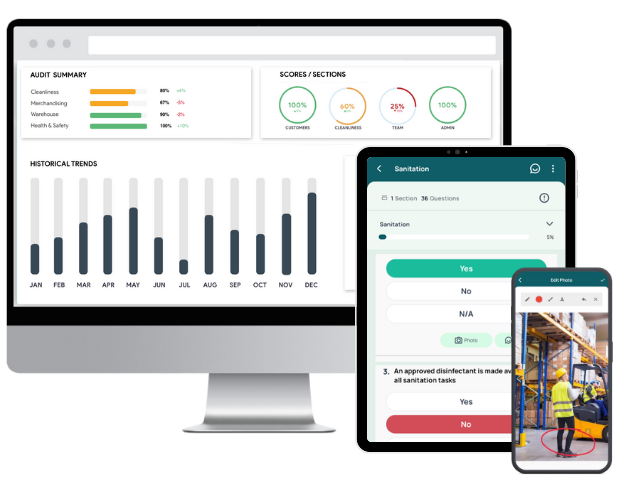
- Access ready-to-use digital inspection forms, customize them, build from scratch, or let the GoAudits team digitize your existing forms at no additional cost.
- Conduct inspections on phones, tablets, or desktops, even without internet access.
- Generate branded inspection reports immediately after completing an inspection.
- Attach photos, timestamps, and geolocation data directly during inspections for complete traceability.
- Assign issues to responsible team members during inspections and monitor completion through dashboards and notifications.
- Automatically send reports, reminders, and approval requests to stakeholders so nothing gets overlooked.
- Analyze scores, trends, and recurring defects across sites or teams to improve quality and compliance decisions.
FAQs
A visual inspection checklist should cover inspection scope, asset details, checkpoints, acceptance criteria, common defect indicators, safety risks, and evidence fields for notes and photos. It must guide inspectors step-by-step so findings are consistent, measurable, and aligned with standards or operational requirements.
Digital checklists guide inspectors through predefined steps. Inspectors record responses, capture photos, log issues, and assign actions during the inspection. This ensures consistent data collection, faster completion, and immediate availability of results for review and follow-up.
Inspection results should be recorded in a structured digital report with observations, defect severity, evidence, and corrective actions. Using an inspection platform like GoAudits allows inspectors to capture findings, attach photos, and generate professional reports instantly for sharing and traceability.
Visual inspection reports are used by quality inspectors, safety officers, engineers, maintenance teams, auditors, and project managers. They support compliance verification, defect tracking, operational safety decisions, and acceptance approvals across industries such as manufacturing, construction, logistics, and facilities management.
Common mistakes include vague defect descriptions, missing photographic evidence, inconsistent severity ratings, delayed reporting, and failing to link findings to standards or corrective actions. Visual inspection reports should be precise, timely, and actionable to prevent misinterpretation or compliance gaps.
GoAudits is the best software for generating visual inspection reports on mobile devices. It allows inspectors to complete inspections offline, capture and annotate photos, and automatically generate structured PDF reports from the field. It offers standardized templates, built-in scoring, digital signatures, and corrective action tracking. For teams that need consistent, multi-site reporting and centralized inspection records, GoAudits streamlines the entire inspection-to-report workflow.