Key Takeaways
- A non-conformance report (NCR) documents when a product, process, or service fails to meet a defined requirement. It’s not a general defect log.
- Every NCR needs six blocks: identification, description, reference, containment, disposition, and verified closure.
- An NCR and a CAPA report are different documents. The NCR records what happened; a CAPA records how it got fixed.
- Tools like GoAudits can generate a non-conformance report automatically from an inspection finding, so nobody has to retype details into a blank template.
Most non-conformance reports fail on the same three fields when a customer or auditor asks about them months later: a description that isn’t measurable, a missing spec reference, or no record of who verified the fix. Those are template problems, not people problems.
This guide covers the six field blocks a non-conformance report needs, a filled sample you can copy, examples from manufacturing and construction, and where the NCR hands off to corrective action.
What is a Non-Conformance Report (NCR)?
A non-conformance report is a document that records when a product, process, or service fails to meet a specified requirement: a customer spec, an internal standard, or a regulatory clause.
ISO 9001 splits this into two requirements. Clause 8.7.1 says nonconforming outputs must be identified, controlled, and dealt with by correction, containment, informing the customer, or authorized acceptance under concession. Clause 8.7.2 says you have to retain a document that records the nonconformity, the actions taken, any concessions obtained, and the authority who decided what to do about it.
That second clause is the reason a non-conformance report exists as a distinct document. If you’re audited against ISO 9001, or against a customer requirement built on it, a filled NCR is usually the evidence an auditor asks to see.
Who Typically Raises an NCR?
In practice, an NCR gets raised by whoever spots the deviation first:
- A QA inspector during in-process or final inspection
- An internal or third-party auditor during a scheduled ISO audit
- A site engineer or supervisor reviewing installed work against drawings
- Sometimes the operator or installer who notices the problem directly
This isn’t exclusively a quality department’s document. The earlier a non-conformance gets written down, the less detail gets lost.
Internal, Customer-Raised, and Supplier NCRs
An internal NCR is one your team raises about your own product or process. You own the description, the disposition, and the closure.
A customer-raised NCR arrives already written: they’ve set the requirement and made the finding. You propose a disposition instead of deciding one, and their deadline applies. Disputing the finding is legitimate, but only against the referenced spec, so a vague reference field on an incoming NCR is worth challenging before you accept it.
A supplier NCR runs the other way. You raise it against the supplier whose material or work caused the problem, and it escalates to a Supplier Corrective Action Request when you want a documented investigation back, not just a replacement.
What’s the Difference Between a Non-Conformance Report and a CAPA Report?
An NCR is the record that something failed to meet a requirement. A CAPA report is the record of how that failure got fixed.
They get confused because the same event can trigger both, and some organizations combine them into one non-conformance and corrective action report. But the NCR answers “what happened, and how severe was it?” The CAPA answers “why did it happen, and what’s changing?”
Not every NCR needs a full CAPA. A minor, one-off non-conformance can close on an “accept as-is” or “repair” disposition without a formal corrective action. A major or recurring one usually does trigger one, because the goal at that point is stopping the pattern, not just fixing this instance.
If you’re past identification and need the corrective-action side, our corrective and preventive action report guide and CAPA audits post cover root cause analysis and CAPA report format in full.
Related checklists: Moving into the corrective-action phase? GoAudits’ Root Cause Analysis Checklist and 8D Analysis Template pick up right where this NCR template leaves off.

Non-Conformance Report Template: Fields and Format
A non-conformance report template needs six field blocks. Five of them are not editorial preference; they map directly onto what ISO 9001 Clause 8.7 requires you to record. Here’s what to put in each one, and why it actually matters rather than just what to type in it.
- Identification: NCR number, date raised, who raised it, location or department (clause 8.7.2 d)
- Description: what happened, stated as a measurable fact, not an opinion. For example, “Bracket hole spacing measured at 250mm against a 200mm ± 5mm spec.” (clause 8.7.2 a)
- Reference: the exact spec clause, drawing number, or standard that was actually violated. This is the field that gets skipped most often, and it’s the one that causes disputes later. (clause 8.7.2 a)
- Containment: what got stopped, quarantined, or flagged immediately, before the non-conformance could spread to more product or more completed work. (clause 8.7.1 b)
- Disposition: the decision to accept as-is, repair, rework, or scrap, with a stated justification for whichever one gets picked, not just the outcome on its own. (clauses 8.7.1 a), d) and 8.7.2 c)
- Verification and closure: the re-inspection result, supporting evidence, and sign-off. (clause 8.7.1)
The concession requirement is the one most templates get wrong. “Accept as-is” is a concession under 8.7.1, which means it needs a named authority who granted it, not just a ticked box.
It’s worth adding a numbering system from day one too. Something as simple as NCR-DEPT-YEAR-### keeps multi-site teams from reusing numbers or losing track of what’s still open.
GoAudits auto-populates most of these fields directly from an inspection finding, so you’re not retyping identification and description details into a separate non-conformance report template doc after the fact.

Free Non-Conformance Report Sample
Here’s a filled, realistic NCR sample PDF, not a blank template. It was generated from GoAudits’ Supplier Non-Conformance Report checklist on the mobile app.
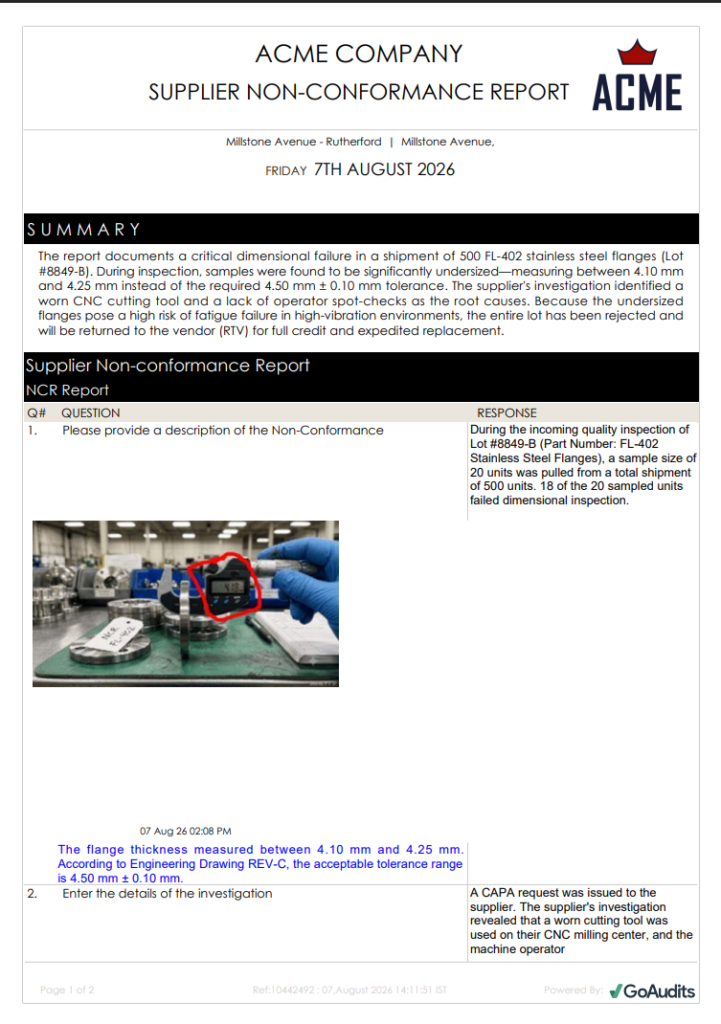
The problem with paper or spreadsheet-based templates is that they work for one report, but break down at volume. Paper-based non-conformance reports get filed (or worse, lost!), so nobody sees whether the same defect keeps recurring across shifts or sites. QA managers often spend hours writing up findings after a walk-through, then emailing each one out individually.
That’s the exact problem HTS, a US heat-treating and metallurgy provider, ran into before switching to GoAudits. Paper-based non-conformance tracking meant issues sometimes went unnoticed until they became critical, because nobody had an easy way to look across the stack of forms and spot a pattern.
The operators are now able to take pictures of non-conformances, so the QA team see the non-conformance as the operator does. This has helped with clarity and improved communication.
Katie Day, QA and Metallurgy Manager, HTS
Non-Conformance Report Examples by Industry
The fields stay the same across industries. What changes is what typically fills them.
Manufacturing Non-Conformance Report Example
Poor quality is expensive before it’s ever measured in scrap cost. The American Society for Quality estimates that quality-related costs run 15% to 20% of sales revenue for many manufacturers, mostly in rework, scrap, and warranty costs tied to non-conformances that weren’t caught early.
A typical manufacturing NCR reads close to the sample above: a dimensional defect caught at final inspection, quarantined, and dispositioned as rework. The fields that matter most here are the reference (which drawing, which tolerance) and the verification step, since that’s what proves the rework actually worked. See our manufacturing inspection software and factory audit checklist for the rest of a manufacturing QA program.
Construction Non-Conformance Report Template Example
Construction rework has its own version of this cost problem. The Construction Industry Institute puts average direct rework costs at 5% of total project value, with a range of 2% to 20% depending on project type and how well quality is managed on site.
A construction non-conformance report template example usually centers on a spec or drawing deviation caught during a site walk, like rebar spacing that doesn’t match the structural drawing. Containment might mean holding a pour until it’s corrected, and closure means a re-inspection against the drawing. See our construction inspection checklist and construction inspection software for the rest of a site QA program.
Non-Conformance Reports in Food Safety and Quality Settings
The same document works outside manufacturing and construction too. In food safety programs, an NCR might document a temperature excursion during storage or a batch that failed an in-house quality check rather than a customer’s own inspection. The fields don’t change.
What changes is the reference, a food safety standard or HACCP checklist instead of an engineering drawing, and how fast containment needs to happen, since a temperature or contamination issue usually can’t wait for a scheduled weekly review the way a dimensional defect sometimes can. See our food safety software for the rest of a food safety QA program.
How to Write a Non-Conformance Report?
Writing an NCR comes down to five steps, done in that order, so nothing gets lost between spotting the issue and closing it out:
- Identify the non-conformance. State exactly what deviated from the requirement, not just that something’s wrong.
- Describe it with evidence. Use measurements, photos, or test results, not impressions like “looks off.”
- Classify severity. Minor, major, or critical, based on actual impact rather than how urgent it feels in the moment.
- Contain it. Stop the affected work or quarantine the material before it spreads to more product or more of the job.
- Route for disposition. Send it to whoever actually has the authority to decide accept-as-is, repair, rework, or scrap.
Most reports that fall apart later do so at step 2 or step 5. The recurring mistakes are vague descriptions that can’t be verified after the fact, missing spec references that leave nobody able to confirm what was actually violated, and reports closed out without any verification evidence to back up the claim that the fix worked.
Common Non-Conformance Report Challenges and Best Practices
Even a good NCR report template runs into the same handful of problems once it’s used at real scale, across shifts, sites, or a growing team.
Challenge 1: Pencil-Whipping (Signing Off Without Real Inspection)
Pencil-whipping is signing off on an inspection or an NCR closure without actually re-checking the work. It’s easy to do with a paper form, and it’s almost impossible to catch after the fact, once the form is filed and everyone’s moved on to the next thing.
The fix:
- Require a photo attached to every finding, not just a checkbox marked pass or fail.
- Capture geolocation automatically, so the report shows where the inspection actually happened.
- Require a personal signature tied to the closure, not a shared login, so it’s clear exactly who signed off.
Challenge 2: NCR Backlog With No Visibility Across Sites
When non-conformance reports live in separate spreadsheets or filing cabinets per site, nobody at the company level can see how many are open, how old they are, or whether the same defect keeps showing up at three locations instead of one.
The fix:
- Keep every NCR in one central log instead of separate spreadsheets or folders per site.
- Use a consistent numbering format, like NCR-DEPT-YEAR-###, across every location.
- Add a dashboard view that shows open NCRs by age, severity, and site, so nothing sits quietly for months without anyone noticing.
Challenge 3: Corrective Actions Promised but Never Verified (“Open Loop”)
An NCR gets closed, a corrective action gets promised in the disposition field, and then nobody actually checks whether it happened. The loop never closes, and the same non-conformance shows up again a few months later, sometimes at a different site with a different name on the form.
The fix:
- Make verification a required field, not an optional note someone can skip.
- Require a re-inspection result or supporting evidence before an NCR can move to “closed.”
- Assign the corrective action to a specific person with a due date, rather than a general note in the disposition field.
Challenge 4: Inconsistent Severity Classification Across Teams or Sites
One inspector’s “major” is another inspector’s “minor,” especially across different sites or shifts, which makes it close to impossible to compare non-conformance trends across the business with any confidence.
The fix:
- Write down what separates minor, major, and critical in plain terms, based on impact to safety, function, or the customer.
- Share those definitions across every site and every shift, not just with the team that originally wrote them.
- Reference the criteria directly in the template itself, so classification isn’t left to individual judgment report by report.
Non-conformance reporting software like GoAudits supports all four fixes directly, with features like photo, GPS location, and signature capture. Every NCR across all sites can be accessed on a dashboard, showing what’s open, how old it is, and where it happened.
Verification can be built in as a required step before an NCR is marked closed, so a promised fix doesn’t just disappear. And severity options can be built directly into the checklist itself, so classification stays consistent no matter who’s filling it out or which site they’re at.
How GoAudits Helps With Non-Conformance Reporting
GoAudits is an inspection and auditing tool that helps you catch issues, assign corrective actions, and track them to completion. During inspections, you can flag non-conformities, immediately assign corrective and preventive actions to the right people, set priorities and deadlines, and generate an NCR report instantly.
With GoAudits, you can:
- Document the non-conformance on the spot, with evidence attached automatically.
- Instantly generate NCR reports from the findings as they’re captured and share them with all stakeholders immediately.
- Assign corrective actions to a specific person with a deadline and ensure they’re tracked to completion.
- View open, closed, and recurring non-conformances across all sites on a dashboard.
- Log a non-conformance without signal, and it syncs automatically once you’re back online.
With a rating of 4.8 stars on Capterra, GoAudits is trusted by some of the biggest names in the industry.
» GoAudits Reviews: Read how companies leverage GoAudits to meet standards in their operations and quality.
FAQs
Not quite. A SCAR is a corrective action request sent to a supplier when their product or process caused the non-conformance, asking them to investigate and respond in writing. An internal NCR can exist without ever becoming a SCAR. It only escalates when the root cause traces back to a supplier.
The core fields stay the same. What changes is formality: an internal audit non-conformance report format often skips a formal customer sign-off, while an external or customer audit typically requires documented closure evidence the customer can review.
There’s no universal number, but most programs tie it to severity: a minor non-conformance might get a 30-day review cycle, while a major one gets a hard deadline measured in days with automatic escalation. What matters most is that the timeline is written down and applied consistently.
Typically neither, alone. The person who caused it, or their supervisor, usually owns the corrective action, but closure sign-off belongs to quality or whoever can verify the fix actually worked.
Yes. A minor, one-off non-conformance dispositioned as “accept as-is” or fixed with a simple repair doesn’t always need a formal corrective action. A CAPA gets triggered when the non-conformance is major, safety-related, or recurring.
The same six fields apply. Instead of a measurement, the description might reference a missed SLA, a skipped step in a procedure, or a customer complaint tied to a service standard.
Options range from dedicated quality platforms like SimplerQMS to broader inspection tools like GoAudits and SafetyCulture. The right fit depends on whether you need deep ISO-specific document control or a faster way to capture and close non-conformances across sites.