Key Takeaways
- Audit software split into two categories: operational mobile apps for field and multi-site checks, and internal audit or GRC platforms for assurance programs. Pick the category before the vendor.
- Mobile audit software runs on mobile devices, works offline, scores against a checklist, and assigns corrective actions on the spot.
- Internal audit platforms handle audit planning, workpapers, controls testing, and regulatory reporting. They are rarely mobile-first.
- Pricing ranges from free tiers to quote-only enterprise contracts. Most operational audit software publishes per-user pricing; most GRC platforms do not.
- GoAudits is operational audit and inspection software with true offline mode, instant branded reports, and corrective action tracking across sites.
Auditing and inspection are critical tasks that help businesses remain compliant, identify potential risks, and optimize daily operations. However, manual paper or Excel auditing can be tedious and have a high margin of error.
That’s where digital auditing software comes in, making the process faster while cutting the transcription errors that creep into paper and spreadsheet audits. Not to mention features that quickly detect areas for improvement and generate insightful reports with a click.
Choosing the best audit software for your team can be a challenge. The right choice depends on which of two categories you need. The best audit and inspection software runs checks in the field on mobile. Internal audit and GRC platforms plan and document formal audit programs. Below are ten tools in both categories, with features, pricing, and limitations for each.
- The 10 Best Audit and Inspection Software in 2026
- Operational Audit Software
- Internal Audit and GRC Platforms
- What is Audit Software, and How is It Different From Audit Management Software?
- What is the Best Mobile Audit Software for Onsite Audits?
- How to Choose the Right Audit Software?
- Why GoAudits is the Best Auditing Software for Your Business
- FAQs
The 10 Best Audit and Inspection Software in 2026
This list of audit software groups ten tools by category so the comparison is like-for-like. The first six are operational audit software tools. The last four are internal audit and GRC platforms, included so you can rule them in or out quickly.
| # | Tool | Starting Price | Best For | Mobile App | Offline Functionality | Instant Reporting | Corrective Actions |
| 1 | GoAudits | $10/user/mo | Multi-site operational audits | ✅ | ✅ | ✅ | ✅ |
| 2 | Mitti | $24/user/mo | Largest template library | ✅ | ✅ | ✅ | ✅ |
| 3 | Lumiform | From $112/month per team | AI-assisted multi-site workflows | ✅ | ✅ | ✅ | ✅ |
| 4 | PULSE | $18 per user/mo | EHS and quality control | ✅ | ✅ | ✅ | ✅ |
| 5 | SALUS | Custom quote | Construction safety compliance | ✅ | ✅ | ✅ | ✅ |
| 6 | monitorQA | $24/user/mo | Regulated multi-location estates | ✅ | ✅ | ✅ | ✅ |
| 7 | Workiva | Custom quote | SOX and financial reporting | ⚠️ | ⚠️ | ✅ | ✅ |
| 8 | MetricStream | Custom quote | Enterprise integrated risk | ✅ | ⚠️ | ✅ | ✅ |
| 9 | TeamMate+ | Custom quote | Internal audit departments | ❌ | ⚠️ | ✅ | ✅ |
| 10 | Optro (AuditBoard) | Custom quote | Connected audit, risk, compliance | ❌ | ⚠️ | ✅ | ✅ |
Operational Audit Software
1. GoAudits: Best for Multi-Site Operational Audits
GoAudits is audit software built for teams running recurring checks across multiple locations. It covers the full cycle: build a checklist, run the audit on mobile, including offline, generate a branded report on submission, assign corrective actions, and compare results across sites.
Key Features
- True offline mode. Start a new audit, capture photos, collect signatures, and tag GPS coordinates with no connection. Data syncs automatically on reconnect.
- Instant branded reports with scores, photos, and e-signatures generated the moment you submit.
- Corrective action workflows with assignment, deadlines, photo evidence, and escalation, tracked from one dashboard.
- Cross-site analytics including trend reports and matrix reports that flag consistently underperforming sites or questions.
- A library of 1,500+ ready-made audit checklist templates, plus a team that will digitize your existing checklists for you.
- AI checklist builder to create a custom checklist instantly using AI for quality checks, safety walks, operational audits, or site inspections.
- Support with an under one-minute response time.
- Available in 6 languages: English, French, Spanish, German, Chinese, and Turkish, for teams spread across regions.
Best For
Operations, quality, facilities, and safety teams in hospitality, food, retail, healthcare, manufacturing, and facility management running scheduled audits across several sites.
Pricing
GoAudits starts at $10 per user per month on the Starter plan billed annually, with an Enterprise plan at $30 per user per month for larger teams needing roles, scheduling, and advanced analytics.
A 14-day free trial gives full access with no credit card. The team also builds your existing checklists into the system for free during onboarding. Check out the pricing page for all plans and volume discounts.
Limitations
Report layouts have customization limits, and complex bespoke formats may need post-processing in Excel. Photo uploads are capped per checklist item. Each user account is limited to a set number of devices.
What Users Say About GoAudits
With GoAudits, we consolidated various compliance checks and audits in one single app that works online and offline. This allowed us to reduce the time we spend on these checks, increase quality of care, and most importantly, to reduce our response time if anything needs addressing
Danielle Ruane, Training, Compliance & IT Manager at Northern Healthcare
👉 Read the full story: How Northern Healthcare runs 46,000 audits a year across 15 locations. See how it rates on Capterra.
How to Get Started
Book a demo or start a 14-day free trial. The team configures your checklists for you, and most teams are running inspections within a day.

2. Mitti: Best for Template Breadth
Mitti (formerly SafetyCulture) is an established inspection platform with the largest public template library in the category, extending beyond inspections into training, sensors, and team messaging.
Key Features
- Public template library covering most common inspection types.
- Offline audit creation with photo and signature capture.
- Corrective actions with assignment and tracking.
- Analytics across sites and teams.
- Wide integration support and an open API.
Best For
Teams that want the widest choice of ready-made templates, and larger organizations that want inspections bundled with training and communications in one platform.
Pricing
Free tier for small teams. Paid plans start around $24 per user per month.
Limitations
The platform’s breadth adds overhead if inspections are all you need, and per-seat costs climb quickly on larger rollouts. The free tier’s five-template cap becomes restrictive fast.
» Mitti (formerly SafetyCulture) Alternatives: For a deeper breakdown, read our full comparison.
3. Lumiform: Best for AI-Assisted Multi-Site Workflows
Lumiform is an audit and inspection platform aimed at mid-market and enterprise multi-site operations, with AI-assisted form building and deep configuration options.
Key Features
- Form builder with AI-generated forms, form upload, conditional logic, scoring, and repeatable sections.
- Mobile app with offline mode, image capture, e-signatures, and voice-to-text.
- Actions with workflows, chat, attachments, and logs.
- Workflow automation including scheduling, reminders, QR-triggered forms, and automatic report sharing.
- A library of more than 12,000 ready-made templates.
Best For
Mid-market to enterprise teams in retail, logistics, food manufacturing, and hospitality that need to map complex organizational structures and want audit data flowing into existing BI or ERP systems.
Pricing
Packages start at $112 per month per team. Multi-site deployments are quoted by their sales team.
Limitations
The AI features and full multi-site capability sit in higher tiers, so the entry price is rarely what larger teams pay. Setup takes longer than a simpler audit tool because of the depth of configuration available.
» Lumiform Alternatives: Check out how Lumiform compares with other similar software.
4. PULSE: Best for EHS and Quality Control Audits
PULSE is a cloud-based inspection and audit platform focused on environment, health, safety, and quality control, with an offline mobile app.
Key Features
- Mobile app with offline capability.
- Checklist builder that does not require a specialist to configure.
- Corrective and preventive action planning.
- Reporting and analytics across outlets or sites.
- AI image analysis, billed separately through a prepaid credit wallet.
Best For
Multi-outlet operators and EHS or quality teams that want remote visibility across sites without the weight of an enterprise EHS suite.
Pricing
From $18 per user per month billed annually, or $22/month. A 14-day free trial with no card required. AI features sit outside the subscription and run on prepaid credits, with 50 starter credits included.
Limitations
AI features are metered separately, so heavy image analysis adds a variable cost on top of the license. Smaller vendor than the market leaders, with a correspondingly smaller integration ecosystem.
5. SALUS: Best for Construction Safety Compliance
SALUS is a safety compliance platform built specifically for construction, covering audits alongside certificates, subcontractors, and worksite documentation.
Key Features
- Digital forms with mobile signing and submission.
- Certificate and competency tracking.
- Subcontractor management and portal access.
- Asset management.
- Corrective actions tied to worksites, with integrations to Procore and AuditSoft.
Best For
Construction and contracting businesses that need safety audits alongside subcontractor compliance and certificate tracking in one system.
Pricing
SALUS scopes each quote around user count, the safety workflows you want to run, setup and integration needs, and rollout support, then issues a written proposal after a discovery call.
Limitations
Purpose-built for construction, so teams running audits in hospitality, retail, or healthcare will find much of the model does not apply. Less suited to organizations that want a general-purpose app across mixed sites.
Running audits on site? See our guide to construction safety software.
6. monitorQA: Best for Regulated Multi-Location Estates
monitorQA is an audit and inspection platform aimed at regulated organizations operating across many locations, with an emphasis on proving that controls were carried out rather than just recorded.
Key Features
- AI-assisted audit template builder, plus prebuilt customizable templates.
- Mobile app with photo, signature, GPS, and timestamp capture.
- Corrective action monitoring with follow-ups tracked to completion.
- Issue and incident reporting.
- Dashboards showing gaps, overdue audits, and emerging risks across sites.
- Audit record retention of seven years or more for regulated industries.
Best For
Regulated multi-location organizations where a missed control carries financial, operational, or reputational consequences, and where proof of execution matters as much as the score.
Pricing
The Compliance tier is $24 per user per month, and the Full Suite is $29. Billing is per active login rather than per site; read-only guest access is not billable, and organizations with 50 or more users qualify for volume pricing. A free trial is available with no card required.
Limitations
The compliance-first framing adds configuration overhead for teams running lighter operational checks.
Internal Audit and GRC Platforms
These four platforms serve internal audit, risk, and compliance functions rather than field teams. They are strong at audit planning, workpapers, and controls testing, and weak at mobile field capture. Included here so you can rule them in or out quickly.
For a full comparison of this category, see internal audit management software.
7. Workiva
Workiva connects internal audit work to financial reporting, ESG disclosure, and regulatory filing on one platform. It suits organizations where audit findings feed directly into SOX or published reporting.
Best For: Enterprises where internal audit collaborates closely with finance and external auditors.
Pricing: Custom quote.
Limitation: Built around documentation and reporting rather than field execution, so teams needing mobile audits and operational follow-up will find it a poor fit.
8. MetricStream
MetricStream provides integrated risk management with internal audit as one module alongside compliance, cyber risk, and operational risk.
Best For: Large enterprises unifying audit with a wider risk program.
Pricing: Custom quote.
Limitation: Implementation is a project rather than a setup, and the platform is oversized for organizations that only need audits.
9. TeamMate+
TeamMate+ from Wolters Kluwer is a long-established internal audit management system used widely in financial services and the public sector.
Best For: Established internal audit departments with a defined audit methodology.
Pricing: Custom quote.
Limitation: Designed around the internal audit lifecycle, with limited value for operational teams running recurring site checks.
10. Optro (formerly AuditBoard)
Optro connects audit, risk, infosec, and compliance workflows with AI-assisted documentation and real-time dashboards.
Best For: Assurance teams wanting audit, SOX, and compliance in one connected system.
Pricing: Custom quote.
Limitation: Reviewers cite cost as the most common complaint.
What is Audit Software, and How is It Different From Audit Management Software?
Audit and inspection software is a digital tool used to carry out audits and inspections in the field on a phone or tablet, usually against a structured checklist. Audit management software is a desktop platform used to plan, document, and report on a formal audit program.
The difference is where the work happens. Audit software is built for the person walking a site with a device in hand. Audit management software is built for the person planning the audit calendar and reporting findings upward.
These software tools fall into two broad types, and each suits different buyers.
- Operational auditing software serves operations, quality, safety, and facilities teams running recurring checks across locations. It scores checklists, captures photo evidence, generates reports on submission, and assigns corrective actions. Examples include GoAudits, Mitti, and Lumiform.
- GRC platforms serve internal audit functions, risk teams, and compliance officers. They handle risk-based audit planning, workpaper management, controls testing, issue tracking, and regulatory reporting. Examples include Workiva, MetricStream, and TeamMate+.
Vendors use the labels interchangeably. You will see the same tools sold as audit applications, auditing applications, or audit and inspection software, so judge a product by what it does rather than what it calls itself.
What Features Should Audit Software Tools Have?
Six features separate working audit software from a digital form. Use these as your evaluation checklist, whether you are buying a full audit platform or a simpler audit checklist app.
- Mobile and desktop access. The inspection runs on mobile; the administration runs on desktop. Check that the mobile app is a native app rather than a web page, since native apps handle photos, signatures, and offline storage far better. Also check how many devices each user license covers, because some vendors cap this.
- Automatic audit reports. Good audit reporting software produces a finished report the moment the audit is submitted, with scores, photos, comments, timestamps, and signatures already in it. This is the single biggest time-saver in most deployments. Ask whether reports can carry your own branding, since client-facing teams usually need this.
- Corrective action tracking. This is the feature that separates an audit platform from a form builder. You should be able to raise an action during the audit, assign it to a person, set a deadline, attach photo evidence, and track it to closure from a dashboard. Ask whether actions can go to people outside your organization, such as contractors or franchisees, and whether overdue items escalate automatically.
- Multi-site analytics. A single-site view tells you how one audit went. A cross-site view tells you where to send help. Look for matrix reports that put locations against checklist questions, so you can see whether a failing score is one bad site or one bad question everywhere.
- Photo capture and annotation. Photos turn a subjective finding into evidence. The auditor photographs the issue, draws on the image to highlight it, and it lands in the report against the relevant item. Check the photo limit per item, whether images are timestamped and GPS-tagged, and whether they embed in the PDF or arrive as separate attachments.
- Scheduled and recurring audits. Set a checklist to recur daily, weekly, or monthly, assign it to a person or a site, and get alerted when it is missed. This matters most for compliance-driven checks where the evidence of having run the audit is as important as the result.
Can You Use Excel or Spreadsheets for Audits?
You can run audits in Excel, and many teams start there, but spreadsheets stop working once audits become recurring or multi-site.
Excel is free, already installed, and everyone knows it. For a single checklist run occasionally by one person, it does the job. The problems arrive with scale. Data gets typed in twice, once on paper and again at a desk. Photos cannot be attached to a row. Versions multiply across inboxes. Reports have to be built by hand. Nobody can see whether a finding from last month was ever fixed.
Teams looking for alternatives to spreadsheet-based audits usually want three things Excel cannot provide: data capture on mobile at the point of inspection, corrective actions with an owner and a deadline, and trend analysis across sites without manual consolidation.
If your audits are occasional and single-site, a spreadsheet is fine. If they recur, span locations, or need evidence attached, audit software will pay for itself in report preparation time alone.
What is the Best Mobile Audit Software for Onsite Audits?
The best mobile audit software for onsite audits is one that works fully offline, generates the report before the auditor leaves the site, and lets corrective actions be assigned during the audit rather than afterwards. GoAudits and Mitti both meet all three conditions.
Onsite audits have constraints that desk-based audit software ignores. The auditor is in the field holding a phone one-handed, sometimes in a basement or a cold store with no signal. Anything that requires typing long notes or returning to a desk to finish the job will be abandoned within weeks.
Three things to test on a trial, in the actual environment your team works in:
- Can the auditor start a brand new audit with no connection, not just open a form downloaded earlier?
- Does the finished report reach the site manager before the auditor has driven away?
- Can a corrective action be raised, assigned, and dated without leaving the audit?
Auditing and inspection software that passes all three changes the working pattern. Software that fails any of them becomes a second system that people fill in later from paper notes. Ask for the trial on your own site rather than a demo environment. Audit software that feels quick in a meeting room can be unusable in a chiller or a plant room.
Field teams working across sites with patchy connectivity may also want our comparison of mobile inspection apps, which covers offline behavior in more depth.
Do Audit Apps Work Offline?
Most audit and inspection mobile software claims offline support, but there is a real difference between caching a form and true offline creation.
- Cached offline means you download a checklist while connected, complete it offline, and sync later. That works only if you know which audit you’re running before you leave.
- True offline creation means starting a new audit from scratch with no connection at all: choosing a template, completing it, capturing photos, collecting signatures, and tagging GPS. Everything syncs when the device reconnects.
GoAudits works truly offline. When evaluating any offline audit tool, ask the vendor directly whether you can create a new audit offline with photos and signatures, rather than asking whether the tool works offline. Refer to our guide on how to select the best offline inspection software.
How to Choose the Right Audit Software?
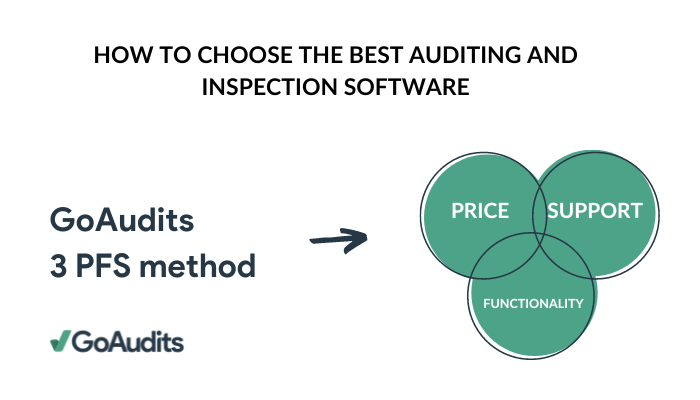
Once you have picked a category, three factors decide the vendor. We call it the 3 PFS method: Price, Functionality, and Support.
Price: How Much Should Audit Software Cost?
When selecting an auditing application, find a balance between cost and features. Choosing the lowest-priced option often means compromising critical functions, while the highest price doesn’t guarantee quality or good support. To get maximum value, weigh usability, compatibility with existing systems, and customer service offerings.
Free audit apps exist and can work for a single team or a pilot. Many audit software platforms offer a free tier, but they generally cap users, storage, or report volume, so treat them as a trial rather than a destination.
Functionality: What Features Do You Actually Need?
List the features you will use in the first ninety days, then test only those. Most teams need mobile capture, scoring, photo evidence, instant reports, corrective actions, and scheduling. Everything beyond that is worth having but should not decide the purchase.
Run the trial on a real checklist with real auditors at a real site. Demo environments hide the problems that show up on a cold morning in a car park.
Support: What Level of Support Should You Expect?
Ask about response times, whether support builds templates for you, and what onboarding includes. Setup is where most audit software deployments stall, and a vendor that will digitize your existing checklists removes the largest single barrier.
Check reviews for support specifically rather than overall score. A product with strong features and slow support will cost you more in internal time than the license saves.
Should You Build Your Own Audit Software or Buy One?
Buying is usually cheaper than building unless your audit process is genuinely unlike anyone else’s. Teams that build tend to underestimate ongoing costs: mobile app maintenance across two operating systems, offline sync, report generation, and user support all continue indefinitely after launch.
Building makes sense when audit data must live inside a proprietary system, or when your scoring model cannot be expressed in any off-the-shelf tool. Otherwise, the configuration depth in modern audit software covers most requirements at a fraction of the cost. Here’s a complete discussion on the build-vs-buy debate for inspection software.
Why GoAudits is the Best Auditing Software for Your Business
Choose the best auditing software to streamline the inspection process without paperwork and a heavy admin workload. Our comprehensive auditing software helps you automate many of the manual tasks involved in the inspection process:
- Easier data collection in the field with smart forms.
- Instant reporting to share audit information quickly, pinpointing every non-conformance or highlighting critical ones.
- Smart dashboards for real-time analysis.
- Corrective actions can be assigned to specific team members, internally or externally.
- A vast library of audit checklist templates that can be customized to get started as quickly as possible.
With a rating of 4.8 stars on Capterra, GoAudits is trusted by some of the biggest businesses to simplify inspection workflows
» GoAudits Reviews: Read how companies leverage GoAudits to meet standards and deliver consistent services across locations.
FAQs
The best software for operational audits is an app with mobile capture, checklist scoring, corrective action tracking, and cross-site analytics. GoAudits, Mitti, and Lumiform all meet that definition. Operational audits differ from internal audits in that findings need fixing on the ground rather than reporting to a committee, so prioritize corrective action workflows and instant reporting over audit planning features.
For operational audit engagements across sites, GoAudits and Mitti are the strongest mobile options, because both handle scheduling, offline execution, and follow-up in one app. For formal audit engagements involving workpapers, controls testing, and regulatory documentation, TeamMate+ and Workiva are better suited, though neither is mobile-first.
Yes. GoAudits offers a free tier, and several audit apps run free trials of 14 to 30 days. Free audit software plans usually limit the number of users, the volume of audits, or the storage available for photos and reports. They work well for piloting a process, but most teams outgrow them once audits become recurring across multiple sites.
GoAudits, Mitti, Lumiform, and monitorQA all support scheduled recurring audits with trend tracking across sites. Look for scheduling that assigns an audit to a person or a location on a daily, weekly, or monthly cycle, alerts you when a scheduled audit is missed, and plots scores over time so you can see whether a site is improving or slipping.
Auditing software with corrective action management lets you raise an action during the audit, assign it to a named person, set a deadline, attach photo evidence, and track it to closure on a dashboard. Form builders generally do not include this, so follow-up moves to email or a separate task tool. Ask whether actions can be assigned to external parties such as contractors, and whether overdue items escalate automatically.
Auditing tools like GoAudits that support multiple languages at the checklist level are the right fit for multilingual field teams, so an auditor can run the same audit in their own language while head office reads results in one. Check whether translation applies to the checklist itself, the app interface, and the generated report, since some vendors translate only the interface.