Quality issues in manufacturing drive scrap, rework, warranty claims, and lost customer trust. Visual inspection software helps manufacturers detect defects earlier, standardize quality checks, and document compliance across production lines and facilities. From mobile audit apps for quality teams to AI-powered defect detection systems, modern tools replace paper-based inspections with structured workflows, image capture, and real-time reporting.
In this article, we compare the top visual inspection software in 2026 and explain how to choose the right system for your manufacturing operation.
Top 5 Visual Inspection Software in 2026
Here are our top 5 picks of visual inspection software:
1. GoAudits Visual Audit App
GoAudits is a practical visual inspection and audit solution designed for structured quality and safety checks without complex implementation. It combines mobile inspections, automated reporting, and corrective-action tracking into a single app, helping teams capture visual evidence, standardize processes, and act on issues quickly.
Unlike heavyweight visual inspection systems that require long deployments or advanced technical setup, GoAudits enables managers to spot recurring problems, monitor compliance, and maintain consistent standards across locations quickly and easily. For companies looking for an affordable alternative to enterprise-grade inspection software, GoAudits offers a mix of functionality, simplicity, and fast rollout.
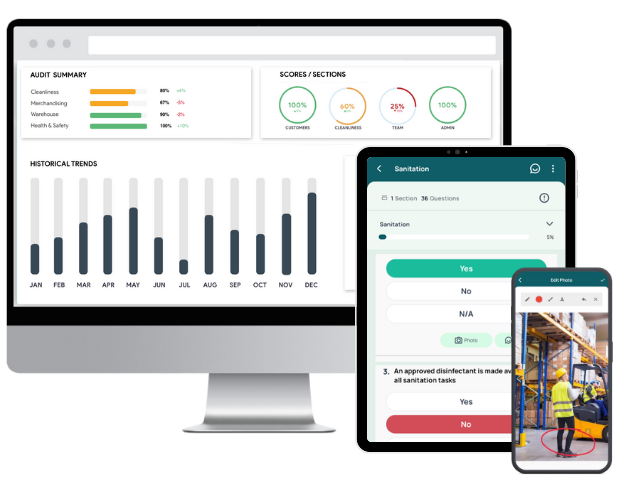
Main features of GoAudits:
- Efficient mobile visual inspections with offline capability for field teams working across sites or facilities
- Photo capture, annotations, timestamps, and geolocation for reliable visual documentation
- Ready-to-use audit templates or a drag-and-drop form builder to customize checklists based on operational needs
- Automatic visual inspection reports are generated instantly after each inspection
- Task assignment and corrective-action tracking with deadlines and ownership
- Smart dashboards showing trends, scores, and recurring issues
- Automated notifications, reminders, and report distribution workflows
- Historical audit data tracking for performance monitoring and compliance evidence
- Configurable company hierarchy, approvals, and escalation rules
👉 Best for: Manufacturing teams that need structured inspections, photo evidence, instant reports, and corrective action tracking across multiple facilities without deploying complex AI infrastructure. Especially suitable for small to mid-sized organizations.

2. monitorQA
monitorQA is a quality inspection and audit platform designed for industries that require standardized inspections and compliance tracking. It focuses on structured evaluation workflows, scoring, and reporting to help organizations maintain consistent quality across locations.
Key features:
- Configurable inspection templates with scoring logic
- Photo capture and evidence tagging during audits
- Cloud reporting dashboards with performance insights
- Multi-auditor collaboration in real time
- Centralized compliance and inspection history tracking
3. Xenia
Xenia is an operations and inspection management platform that combines inspections, maintenance workflows, and frontline communication. It is built for facilities, hospitality, and retail teams that need real-time visibility into operational quality and safety checks.
Key features:
- Digital inspections with automated corrective actions
- Work order and maintenance tracking linked to findings
- Mobile alerts for failed inspections or safety risks
- SOP and checklist automation for frontline teams
- Performance dashboards for multi-location oversight
4. TrueContext
TrueContext is a mobile workflow automation platform designed for field inspections, service reporting, and compliance documentation. It enables organizations to digitize complex inspection processes and integrate captured data into enterprise systems.
Key features:
- Mobile forms with validation rules and logic flows
- Image capture, GPS tagging, and digital signatures
- Workflow automation with conditional routing
- Integration with CRM, ERP, and asset systems
- Real-time data sync and reporting
5. Averroes
Averroes is an AI visual inspection platform built for manufacturing quality control. It uses computer vision models trained on production data to automatically detect defects, reduce manual inspection workloads, and improve yield consistency across assembly lines.
Key features:
- Automated defect detection using deep-learning vision models
- Real-time monitoring of production lines and components
- Model training with plant-specific image datasets
- Integration with factory cameras and MES workflows
- Continuous learning to improve detection accuracy over time
| Visual audit software | Best for | Pricing | Free trial & demo |
| GoAudits | Low entry cost with real mobile inspection capabilities, free checklist setup handled by the GoAudits team, fast rollout, works fully offline for field audits, and more | $10 per user per month when billed annually | 14-day free trial and personalized demo |
| monitorQA | Weighted scoring for measurable quality, strong compliance reporting focus, scalable for multi-site retail or manufacturing audits | Price available on request | Free trial and demo |
| Xenia | Strong automation of corrective workflows, combines inspections with maintenance ops, optimized for frontline workforce productivity | Price available on request, and it can vary based on the location counts | Free trial and demo |
| TrueContext | Enterprise-grade integrations, strong data governance controls, designed for highly regulated industries like utilities and telecom | $25 per license per month; billed annually | Free trial and demo |
| Averroes | Automated AI visual inspections, deployment on existing camera infrastructure, advanced and scalable across multiple plants | Based on your specific requirements | Demo |
Free Checklists Included in GoAudits Visual Audit Software
Sign up for free and start using this visual inspection report template or customize it to match your organizational needs.
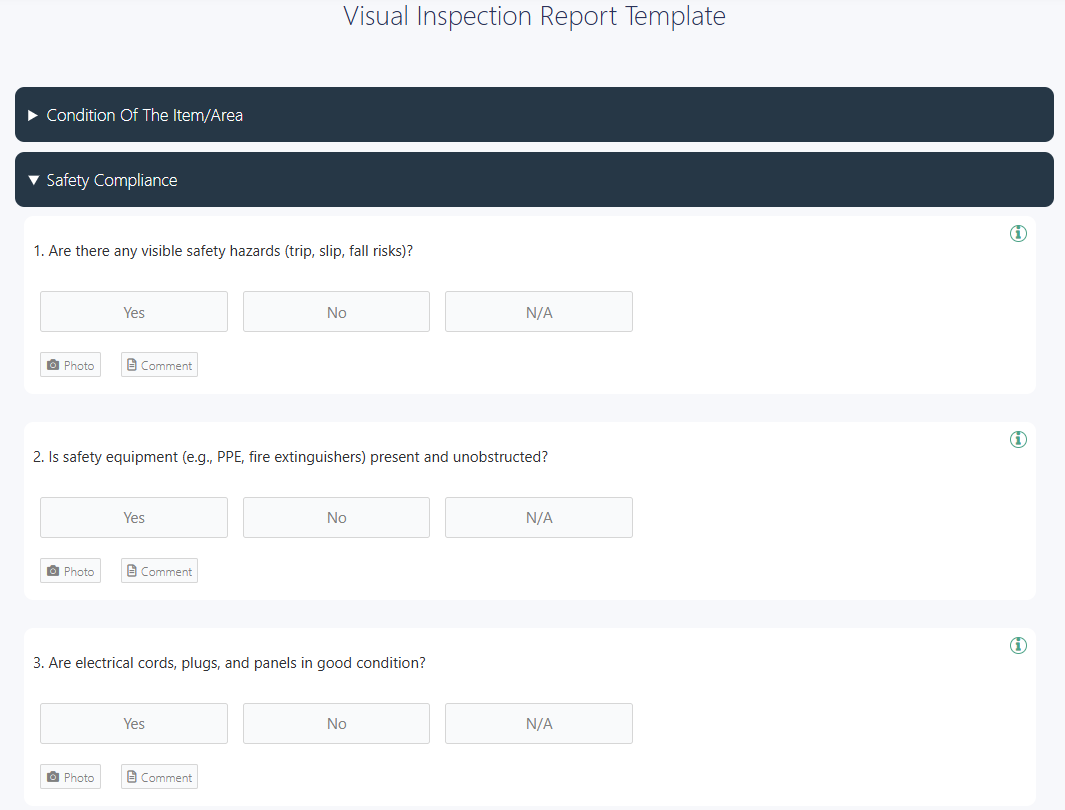
You can also choose from a range of manufacturing audit checklists below, or digitize your existing manufacturing SOPs.
- Production Quality Control Checklist for Manufacturing
- Manufacturing Safety Audit Checklist
- Manufacturing Quality Control Checklist
- Equipment Validation Template
- Welding Risk Checklist – OSHA
- OSHA Welding, Cutting, and Brazing Checklist
- Electrical Safety Inspection Checklist
- PCB Visual Inspection Checklist
- Electrical Visual Inspection Checklist
- Welding Visual Inspection Checklist

What is Visual Inspection Software?
Visual inspection software is a digital inspection system that captures and analyzes visual evidence (photos, videos, or live camera feeds) to detect defects, safety risks, and compliance deviations. The system replaces paper checklists with structured digital workflows, image documentation, and automated reporting, enabling organizations to document findings and act on them faster.
Modern visual inspection systems often combine mobile apps, cloud reporting, and computer vision technology to standardize inspections and improve decision-making across teams and locations.
Traditional vs Automated Visual Inspection Software
Traditional inspection relies heavily on human observation, manual checklists, and written reports. Inspectors visually check equipment or products and record issues themselves. While this method is simple, it can be slow, inconsistent, and prone to human error or missed defects due to fatigue or subjectivity.
Automated visual inspection uses cameras, image processing, and AI models to analyze visual data and detect defects or anomalies in real time. They compare images against predefined standards and classify defects automatically, improving speed, consistency, and accuracy.
Automation also enables continuous monitoring, predictive maintenance insights, and integration with enterprise systems, helping organizations scale inspections without increasing manpower.
Why Do You Need Visual Audit Software?
Here are some reasons you need a visual inspection tool:
- Quality control: Standardize checklists and scoring, and prevent defective output from reaching customers
- Defect detection: Identify subtle flaws using image analysis, reduce rework and scrap rates
- Operational efficiency: Eliminate paper-based workflows, accelerate inspection reporting
- Cost control: Reduce scrap and downtime, lower manual inspection labor
- Compliance & reporting: Store timestamped visual evidence, maintain centralized audit trails across sites, and compare inspection scores across locations
Essential Features of a Visual Inspection Software
Essential features of visual inspection software determine how effectively manufacturers detect defects, standardize audits, and scale quality control across facilities. The following capabilities define modern inspection systems:
Automated Defect Detection & Classification
A strong inspection system should automatically detect flaws, anomalies, or deviations from standards using image analysis. Advanced tools go further by classifying defect types, such as scratches, missing components, or surface inconsistencies, so teams can prioritize corrective actions quickly.
Automation reduces reliance on manual reviews and helps ensure consistent inspection outcomes across shifts and locations.
Real-Time Analytics & Monitoring
Real-time analytics dashboards convert inspection data into actionable quality insights instead of static PDF reports. Visual inspection software displays defect trends, inspection completion rates, and performance benchmarks in centralized dashboards.
No-Code / User-Friendly Configuration
Inspection workflows should be easy to deploy and modify without coding expertise. Intuitive interfaces allow teams to configure rules, set thresholds, and update inspection templates quickly.
This shortens deployment time, reduces IT dependency, and enables operations teams to adapt inspection processes as products or standards evolve.
AI and Machine Learning Capabilities
AI-driven inspection tools learn from visual data to improve accuracy over time. Machine learning models can recognize patterns, detect new defect types, and adapt to natural variations in materials or production conditions. This makes AI-enabled inspection systems far more reliable in complex or high-volume environments than rule-based systems.
Advanced Image Processing Features
High-quality inspection relies on sophisticated image processing. Essential capabilities include pixel-level analysis, feature extraction, anomaly detection, and region-based inspection.
These features enable the system to identify subtle defects that may be invisible to the human eye, especially in high-precision manufacturing or safety-critical environments.
Integration Capabilities
Inspection software should connect seamlessly with enterprise tools such as ERP, MES, or asset management systems. Integration ensures inspection data flows directly into production workflows, maintenance systems, and compliance reports. This eliminates manual data transfer and creates a unified view of quality performance across the organization.
Scalability and Flexibility
Visual inspection software should scale from a single inspection station to global multi-plant operations by enforcing standardized checklists, scoring logic, and evidence requirements. Enterprise manufacturers use scalable platforms to maintain consistent quality benchmarks across sites.
How to Choose the Best Visual Inspection Software
Selecting the right visual inspection software means finding a solution that fits your operations, budget, and long-term quality goals. Here’s a structured evaluation process that can help you avoid costly implementation mistakes and ensure the software delivers measurable value.
Understand Business Requirements
Start by defining what you actually need to inspect and why. Identify defect types, inspection frequency, reporting needs, and compliance requirements.
Clear requirements help you shortlist tools that match your workflows, rather than adapting your processes to fit the software. Documenting inspection criteria and tolerances early also improves deployment success and accuracy.
Analyze the Overall Cost of the Visual Inspection Software
Look beyond the license price. Include implementation costs, integrations, training, maintenance, and upgrades in your evaluation. A cheaper solution may become expensive if it requires heavy customization or manual workarounds, while a higher upfront investment may generate stronger ROI through reduced defects and labor costs.
Read Customer Reviews and Testimonials
Vendor credibility matters. Research user feedback, case studies, and industry references to understand how the software performs in real environments.
Reviews often reveal practical insights about usability, support quality, and system reliability that sales materials don’t mention.
Choose a User-Friendly Visual Inspection System with Data Security
Inspection tools should be easy for frontline teams to use with minimal training. Complex interfaces slow adoption and increase data entry errors.
At the same time, the software must provide secure data storage, access controls, and audit trails to protect inspection records and support compliance requirements.
Prioritize Visual Audit Apps with Offline Functionality
Inspections often happen in factories, warehouses, construction sites, or remote facilities. Mobile-first platforms allow inspectors to capture photos, complete checklists, and log issues directly from the field.
Offline functionality ensures work continues even without connectivity, with automatic syncing once the device reconnects.
Look for Free Trials and Personalized Demos
Never rely solely on marketing demos. Test the software using real inspection scenarios, real products, and actual workflows.
Trials reveal whether the system can handle your inspection complexity, integrate with your equipment, and deliver accurate results under real operating conditions.
FAQs
Visual audit software is used across manufacturing, pharmaceuticals, food production, construction, retail, and logistics. It helps teams document inspections, verify quality standards, monitor safety compliance, and track defects using photos, checklists, and structured reports across facilities and production lines.
Visual audit software and visual inspection software both refer to digital tools that document visual checks using structured forms, photo evidence, and standardized reports. The terms are often used interchangeably. However, the term ‘audit’ emphasizes scoring and compliance, while ‘inspection’ emphasizes defect detection and operational verification.
Yes. Many visual inspection apps work offline, so teams can work in remote sites. For example, GoAudits allows inspections to be completed without connectivity, syncing data automatically once the device reconnects.
Yes. Modern tools automatically create reports as soon as an inspection is completed. GoAudits generates branded inspection reports instantly with photos, scores, and timestamps immediately after submission, helping teams act on findings without delays.
For manufacturing teams needing mobile inspections, photo documentation, and instant reporting, GoAudits is a great option. It supports quality checks, safety audits, and standardized workflows across production environments.
Small teams often need a simple, fast-to-deploy solution. GoAudits is a popular option because it requires minimal setup, offers inspection checklists, and reduces paperwork while providing reporting, analytics, and compliance tracking.
Yes. Most inspection platforms allow photo capture directly within checklists. GoAudits enables users to attach and annotate photos, ensuring inspections include clear visual proof for audits, compliance, and corrective actions.
GoAudits is widely used for manufacturing inspections because it digitizes SOPs, enables photo-based defect reporting, and generates automated audit reports. It supports standardized quality checks across teams while improving traceability and compliance.