Key Takeaways
- Senior care software is the broad category; senior living software is built for residential communities such as independent living, assisted living, memory care and CCRCs.
- Most communities run one system per department and connect them, instead of running everything on a single platform.
- Compare vendors on total cost, data migration, integrations and how quickly frontline staff pick up the tool.
- GoAudits moves the operational checks that clinical systems leave on clipboards, from daily rounds to room turnovers, onto a phone or tablet with photos and follow-up tasks.
Choosing senior care software starts with an inventory: which departments need a system, and which ones still run on paper. A typical community needs software for resident records and medications, billing and census, move-ins, staff scheduling, resident engagement, dining, maintenance and operational checks. Most operators cover those needs with several connected systems rather than one.
The pressure to get this right is rising. Senior housing occupancy reached 89.9% in the second quarter of 2026, a level last seen at the end of 2015, according to NIC MAP data. Fuller buildings leave less room for slow move-ins, missed charges and open shifts.
- What Is Senior Living Management Software?
- What Types of Senior Living Software Do Communities Use?
- Should You Choose an All-in-One Platform or Best-of-Breed Tools?
- How Much Does Senior Living Software Cost?
- How to Evaluate Senior Living Software: A Buyer's Checklist
- How Do You Switch Senior Living Software Without Disrupting Operations?
- Frequently Asked Questions
What Is Senior Living Management Software?
Senior living management software is the set of systems that runs a senior living community’s care and business operations: resident records, billing, census and occupancy, staffing and reporting.
Communities adopt it to stop entering data twice, bill every service delivered and see how each building performs without chasing spreadsheets. Interest is high. In the 2026 McKnight’s State of Technology Survey of more than 600 senior living and care leaders, 55% of senior living respondents called technology extremely important to their goals over the next one to two years. The most common stage among senior living operators was piloting or rolling out select tools, not full deployment.
Is Senior Care Software the Same as Senior Living Software?
Senior care software is the wider term. It covers home care agencies as well as senior living communities, while senior living software is built for residential settings where people live on site. Buyers also search for elder care software or a senior care management system when they mean the same tools. If you run a home care agency, visit scheduling and EVV matter more, and our guide to caregiver software covers that market. Senior care management software for communities focuses on residents, units and shifts instead.
What Software Does Each Type of Senior Living Community Need?
Each type of senior living community needs a different mix of software, because care levels and licensing differ. Independent living needs the least clinical software; memory care and CCRCs need the most.
- Independent living and retirement communities are usually not licensed for care, so independent living software centers on billing, CRM, resident engagement and maintenance.
- Assisted living is licensed by the state and needs an EHR with eMAR, level-of-care billing, CRM and scheduling, plus operational checks as the community grows.
- Memory care is usually licensed alongside assisted living. Memory care software adds dementia care planning, family communication and wander management.
- CCRCs and life plan communities need one resident record that follows people between care levels, plus contract billing. The skilled nursing wing often adds nursing home compliance software.
What Types of Senior Living Software Do Communities Use?
Senior living communities use eight main types of software, each owned by a different department. The table shows what each type runs, who uses it and vendors known for it.
| Software type | What it runs | Main users | Vendors known for it |
|---|---|---|---|
| EHR and eMAR | Assessments, care plans, medication records | Wellness director, caregivers | Netsmart myUnity |
| Billing, census and accounting | Resident billing, level-of-care charges, census | Business office | Eldermark |
| CRM and move-in | Inquiries, tours, move-in paperwork | Sales and marketing | WelcomeHome |
| Staff scheduling and workforce | Shifts, time and attendance, call-offs | Schedulers, department heads | OnShift |
| Resident engagement and family communication | Activities, resident portal, family updates | Life enrichment, families | LifeLoop |
| Dining and nutrition | Menus, diet orders, meal production | Dining director, dietitian | MealSuite |
| Maintenance and facility management | Work orders, preventive maintenance, assets | Maintenance director | Maintenance Care |
| Operational checks | Rounds, room turnovers, housekeeping, dining and maintenance checks, follow-up tasks | Executive director, department heads, regional leads | GoAudits |
EHR and eMAR Software
An EHR (electronic health record) holds each resident’s assessments, care plans and notes. An eMAR (electronic medication administration record) documents every medication pass. Vendors in this category include Netsmart myUnity, known for keeping one resident record across independent living, assisted living, memory care and skilled nursing.
Billing, Census and Accounting Software
Senior living billing software turns services delivered into accurate invoices, including charges that change with a resident’s level of care. Senior living census software tracks who lives where and at what rate. Eldermark is known for linking clinical tasks to billing, so a change in care reaches the invoice without manual re-entry.
CRM and Move-In Software
Senior living CRM software tracks every inquiry from first call to signed agreement, and move-in software collects the paperwork and signatures. Together they act as occupancy management software for senior living. WelcomeHome is known for a CRM built for senior living, with referral tracking and automated follow-up.
Staff Scheduling and Workforce Software
Senior living staffing software builds schedules, tracks time and attendance, and fills open shifts. OnShift is known for workforce management built only for long-term care and senior living, with a mobile app for managers and frontline staff.
Resident Engagement and Family Communication Software
Senior activity management software plans calendars, tracks attendance and keeps families informed. LifeLoop is known for activity calendars, a resident and family portal, and transportation and maintenance requests in one system.
Dining and Nutrition Software
Senior living diet office software stores each resident’s diet orders, allergies and preferences, then drives menus and meal production. MealSuite is known for diner profiles and a library of more than 9,000 regular and therapeutic recipes curated by registered dietitians.
Maintenance and Facility Management Software
Facility management software for senior living, often called a CMMS, handles work orders, asset records and preventive maintenance schedules. Maintenance Care is known as a CMMS designed for senior care for recurring tasks and day-to-day repairs.
Operational Checks Software
Operational checks software records the recurring checks that keep a community running to its own standards: daily and leadership rounds, room turnovers before move-in, housekeeping and dining checks, maintenance walk-throughs and regional site visits. Operators we speak with often find that care plans went digital years ago, while these checks still sit on clipboards and in binders.
GoAudits is a mobile app built for operational checks in senior care. Department heads run them on a phone or tablet, attach photos, and turn every failed item into a task with an owner and a deadline. For the licensed side of care, see our guide to assisted living compliance software.

Related checklists: Free templates your department heads can run in the GoAudits app and edit to fit your community:
Aged Care Infection Control Checklist
Assisted Living Assessment Checklist
Nursing Home Rounds Checklist
Nursing Home Room Readiness Checklist
Housekeeping Checklist for Nursing Home
Weekly Dining Audit
Laundry Audit
More healthcare audit templates
What Senior Living Apps Do Staff, Residents and Families Use?
Senior living apps fall into two groups: staff apps that move daily work onto a phone, and resident and family apps that give people outside the office a direct line to the community.
Staff apps cover most departments. Schedulers fill open shifts from the OnShift X app, caregivers chart at the point of care in their EHR’s mobile app, and sales teams update the CRM between tours. Department heads use an auditor app for rounds and other operational checks, so findings are recorded where they happen instead of typed up later.
A senior living app for residents and families usually handles activity calendars, meal choices, payments and maintenance requests.
👉 Careville, a UK nursing and care staffing provider, cut report time from half a day to 10 minutes after moving its checks into the GoAudits app. “GoAudits enabled us to really simplify our auditing process and make it less of an admin burden. Reports are ready in 10 minutes – instead of maybe half a day previously,” said Ibi Akinola, Registered Manager.
Should You Choose an All-in-One Platform or Best-of-Breed Tools?
Choose an all-in-one platform if you run one or a few communities and want fewer systems to manage. Choose best-of-breed tools if specific departments need more depth than a platform module offers and you have people to maintain the integrations.
- An all-in-one platform puts EHR, billing and CRM with one vendor. It suits single communities and small teams with no IT staff, though modules outside the core are often weaker.
- A core platform plus specialist tools pairs an EHR and billing platform with two or three focused apps. It suits growing operators willing to manage a few more vendors.
- Best-of-breed means choosing a separate leader in each category and connecting them. It suits large, multi-state operators that can pay for integration upkeep.
The best senior living software for a 40-unit community is rarely the right choice for a 30-community operator. Most growing operators end up with the middle option. Specialist tools such as GoAudits run alongside the platform you already have, with no resident data to migrate.
What Do Multi-Community Operators Need From Senior Living Software?
Multi-community operators need senior living software that shows every building side by side and can be set up once, then copied. Look for:
- Portfolio dashboards for census, occupancy, labor and revenue by community
- Templates and settings that copy to new buildings in hours, not weeks
- Billing and admissions forms that handle each state where you operate
- Role-based access, so regional teams see their buildings and site staff see their own
A senior living analytics platform should answer leadership’s questions without manual exports. Regional directors using GoAudits run site visits on a tablet and compare buildings on one inspection dashboard.
How Much Does Senior Living Software Cost?
Senior living software pricing depends on the pricing model, the modules you turn on and the number of communities. Most platform vendors quote on request after a demo.
Common pricing models include:
- Per resident or per bed: common for EHR and billing platforms
- Per community: a flat fee per building, often with module add-ons
- Per user: common for staff apps and specialist tools; GoAudits pricing starts from $10 per user per month
The subscription is only part of the cost. Budget for implementation, data migration, training, integrations with your pharmacy or payroll provider, and add-on modules.
How to Evaluate Senior Living Software: A Buyer’s Checklist
Evaluate senior living software against your own daily workflows, not the vendor’s feature list. Use this checklist in demos and in any senior living software RFP.
| Criterion | Question to ask the vendor |
|---|---|
| Fit for your care levels | Which care levels and states do current customers like us run on your system? |
| Integrations | Which pharmacy, payroll and accounting systems do you connect to today, and is there an open API? |
| Data migration | What data do you migrate from our current system, and who checks it? |
| Pricing and contract terms | Which fees are one-time, which are recurring, and what is the minimum contract length? |
| Implementation support | Who runs our rollout, and how long did it take for a community our size? |
| Mobile use | Can frontline staff complete daily tasks on a phone or tablet, including in areas with weak Wi-Fi? |
| Ease of use | How long does a new caregiver need before using the system unassisted? |
| Reporting across communities | Can we compare buildings without exporting to spreadsheets? |
| Security and access | How is resident data protected, and how do we control who sees what? |
| References | Can we speak to two operators with a similar size and mix of care levels? |
How Do You Switch Senior Living Software Without Disrupting Operations?
Switch senior living software in stages, with a fixed cutover date and both systems running side by side for a short period. These four steps keep billing and care records intact:
- Set the cutover date. Avoid peak move-in weeks, and give each department a deadline for its last entries in the old system.
- Clean the data before migrating it. Reconcile census, resident rates and open balances first, so errors don’t move into the new system.
- Run both systems for one billing cycle. Compare invoices line by line before switching off the old system.
- Roll out department by department. Start with the business office and clinical team, then add the other departments.
👉 Quick tip: Go live on the first day of a billing cycle. Every invoice for that month then comes from one system, which makes reconciliation far simpler.
Frequently Asked Questions
Is There Free Senior Living Software?
Free senior living software with full EHR and billing features is rare; most vendors offer demos or time-limited trials instead. Free long term care software and spreadsheets can cover basic tracking, but they don’t connect care to billing. Free templates are a practical starting point: the GoAudits clinical audit checklist library is free, and the app comes with a 14-day free trial.
How Do You Get Caregivers to Adopt New Senior Living Software?
Caregivers adopt new senior living software when it removes a step from their shift instead of adding one. Train one super-user on every shift, keep training focused on the five or six tasks each role does daily, and set a date when the paper version stops. Tools that work on a phone at the resident’s door get used; tools that need a desk get skipped.
How Do You Measure the ROI of Senior Living Software?
Measure the ROI of senior living software against a baseline taken before go-live. Track hours spent on documentation, missed level-of-care charges, time from inquiry to move-in and overtime hours. Compare the same figures 90 days after launch, when staff have settled into the new routine.
Should Senior Living Communities Use AI-Powered Software?
Senior living communities can use AI-powered software, but most are still testing it on narrow tasks rather than rolling it out everywhere. The 2026 McKnight’s survey found persistent hesitation about full-scale AI and strong concern about cybersecurity. Start with low-risk uses such as drafting notes or flagging trends, and ask every vendor where resident data goes when AI features run.
How Long Does It Take to Implement Senior Living Software?
Implementing senior living software can take a few weeks for a single app or several months for an EHR and billing rollout across several communities. The main drivers are data quality, the number of integrations such as pharmacy connections, and how many buildings go live at once. Ask each vendor for the actual go-live timeline of a customer similar to you.
Run Every Operational Check From One App
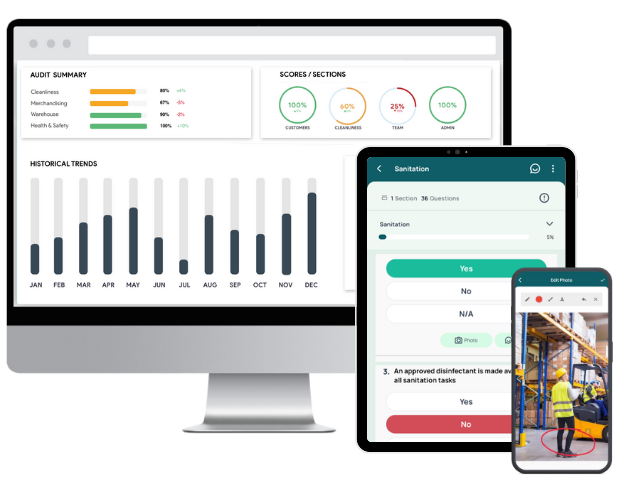
GoAudits gives senior living teams one place to run their daily checks and follow up on what they find, alongside the EHR and billing systems you already use.
- Ready-made templates for rounds, room turnovers, housekeeping, dining and maintenance, or your own paper forms converted for free
- A mobile app that works offline in stairwells, basements and detached buildings
- Reports with photos and timestamps as soon as each check ends
- Follow-up tasks with owners and deadlines, and dashboards that compare communities
Book a demo or start a 14-day free trial.