

Many construction teams adopt Fieldwire to streamline drawings, punch lists, and jobsite task coordination. For small to mid-size projects, it delivers quick plan access, simple task tracking, and strong field communication. However, as projects scale and compliance requirements increase, many contractors begin searching for Fieldwire alternatives that offer stronger inspection workflows, deeper reporting, broader integrations, or better cost control at scale.
Whether you are evaluating software before committing or actively looking to switch, this guide compares the top Fieldwire competitors in 2026. You can compare the features and pricing to choose the best alternative to Fieldwire software.
Fieldwire Reviews: Why Construction Teams Look for Alternatives
Fieldwire is widely recognized for simplifying task tracking, plan viewing, and field-to-office coordination. However, user feedback across software review sites, including G2, Software Advice, etc., reveals a recurring pattern: many teams eventually outgrow the platform.
Here’s where Fieldwire reviews most often point to limitations.
- Missing Business Management Features: Fieldwire falls short of full construction operations management. Teams frequently report needing separate tools, and as projects grow, the overhead of maintaining multiple disconnected systems becomes a major inefficiency.
- Expensive Scaling Model: Fieldwire’s costs rise quickly as companies expand. For fast-growing contractors, it can shift from an affordable coordination tool to a significant operational expense.
- Limited Integrations: Another frequently cited limitation is Fieldwire’s relatively narrow integration ecosystem. Without strong integrations, Fieldwire often functions as a standalone field tool rather than a central project platform.
- Weak Advanced Scheduling: Fieldwire includes task scheduling, but many reviewers say it lacks depth for complex construction timelines. For straightforward projects, this is manageable. For multi-phase builds with tight sequencing requirements, teams often move to platforms with more sophisticated planning controls.
- Mobile Syncing Friction Because Fieldwire is heavily field-focused, mobile performance matters, and this is where some teams report friction. While not deal-breaking, these issues slow down workflows in environments where crews rely on instant access to updated drawings.
- Mixed Usability Feedback Fieldwire’s interface is often praised for clarity, but reviews show the experience isn’t consistent for all users. Field users often like the simplicity, while managers sometimes find the platform restrictive.
Top 5 Fieldwire Competitors for Construction Businesses
| Apps like Fieldwire | Best for | Pricing | Free trial & demo |
| Fieldwire | Task tracking, plan viewing, punch lists, and field-to-office coordination | $39 per user per month; billed annually | ✅ |
| GoAudits | Structured inspections, compliance tracking, audit trails, and multi-site reporting Bonus: Support for digitizing your existing checklists | $10 per user per month; billed annually | ✅ 14-day free trial and personalized demo |
| Xenia | Role-based workflows, operational analytics, SOPs, compliance-focused data capture | Per-user and per-site pricing models available | ✅ |
| Raken | Payroll-friendly reporting data, strong compliance documentation, labor visibility | Contact the team for pricing | ✅ |
| VLX | Strategic decision support, predictive analytics, portfolio-level insights | $29 per user per month | ✅ |
| CompanyCam | Client-friendly documentation, strong insurance dispute support, simple onboarding for crews | $79 per month (includes 3 users + $29 for every additional user) | ✅ |
1. GoAudits
GoAudits is an all-in-one audit and inspection platform designed for teams that need to conduct structured site checks, track compliance, and generate standardized reports (potentially across multiple sites). Unlike traditional construction task tools, GoAudits helps capture high-quality field data, convert it into structured insights, and ensure follow-ups actually happen.
It replaces paper forms and fragmented spreadsheets with customizable digital workflows, and guides inspectors through audits, generates reports instantly, and pushes corrective actions to responsible teams.
For teams managing safety programs, quality audits, or compliance requirements across several sites, GoAudits removes a significant amount of administrative work.
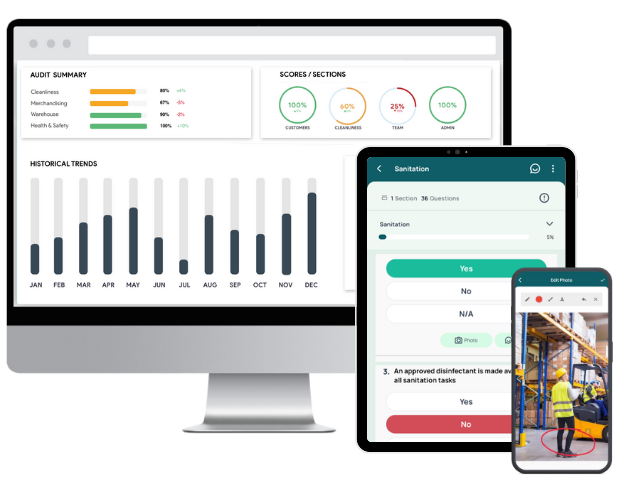
Main features & benefits of GoAudits:
- Access a library of ready-to-use audit templates or create fully customizable digital inspection checklists that standardize how audits are performed across teams and sites.
- Perform inspections up to 5x faster directly on mobile devices, even offline, capturing photos, signatures, timestamps, and location for transparency.
- Automatically generate professional, shareable inspection reports instantly after each audit.
- Assign, track, and verify issue resolution within the same system to prevent follow-ups from being missed.
- Automatically route reports, approvals, and reminders so the right people act on findings without manual coordination.
- Monitor compliance performance, recurring issues, and task completion in real time from a centralized dashboard.
- The GoAudits app is available in six different languages, including English, Spanish, German, Turkish, Mandarin Chinese, and French.
How GoAudits Compares with the Fieldwire Software
Fieldwire is primarily a jobsite coordination and task management tool focused on drawings, punch lists, and field communication.
GoAudits, by contrast, is purpose-built for structured inspections, compliance workflows, and accountability tracking. Teams that need formal audit trails, automated reporting, and risk visibility often find it more suitable for governance-heavy environments than Fieldwire’s construction execution focus.


2. Xenia
Xenia is built for frontline teams that need structured workflows rather than just project coordination. It focuses on inspections, checklists, SOP execution, and operational compliance across multi-site environments. For construction firms managing distributed crews, it functions more like a field operations system than a drawing management tool.
Key features:
- Digital inspections and checklists with automated workflows
- Task tracking tied to SOPs and compliance requirements
- Real-time issue reporting with media attachments
- Audit trails for operational accountability
- Analytics dashboards for site performance tracking
Compared with Fieldwire: Xenia emphasizes operational process control, whereas Fieldwire centers on drawings, punch lists, and coordination. Teams needing structured inspections and repeatable workflows often find Xenia more suitable.
3. Raken
Raken is purpose-built for capturing field data and turning it into clean documentation. It’s widely used for daily reports, safety logs, and productivity tracking. Instead of managing plans or design coordination, Raken’s strength lies in documenting what actually happens on site.
Key features:
- Automated daily reports with weather, manpower, and notes
- Time tracking integrated with job costing workflows
- Safety toolbox talks and incident logging
- Production tracking tied to quantities installed
- Voice-to-text field reporting for faster updates
Compared with Fieldwire: Raken is stronger for field reporting and compliance records, while Fieldwire focuses more on plan viewing and task coordination. Firms prioritizing documentation over drawing workflows often lean toward Raken.
4. VLX
VLX is a data-driven construction intelligence platform. It combines project data, workflows, and analytics to help teams track performance and risks. Rather than acting as a simple field collaboration tool, it aims to provide predictive insights across projects.
Key features:
- AI-assisted project analytics and forecasting
- Centralized data environment for project performance
- Workflow automation tied to project milestones
- Risk detection through historical trend analysis
- Executive dashboards for portfolio visibility
Compared with Fieldwire: VLX is more strategic and analytics-oriented, while Fieldwire is operational and field-execution focused. Companies seeking data intelligence rather than just task coordination may see VLX as a stronger fit.
5. CompanyCam
CompanyCam is designed for visual documentation rather than project management. It centralizes jobsite photos, timestamps them, and organizes them by project automatically. Many contractors use it primarily for communication with clients and for maintaining visual records.
Key features:
- Auto-organized photo capture by project and location
- Built-in annotations for marking issues on images
- Shared timelines for client and team visibility
- Offline photo capture with later sync
- Photo-based reports for project updates
Compared with Fieldwire: CompanyCam excels at visual documentation, whereas Fieldwire manages drawings, tasks, and coordination. Contractors focused on proof-of-work imagery rather than plan workflows often prefer CompanyCam.
How to Choose the Best Fieldwire Alternative?
Choosing a replacement for Fieldwire should involve selecting software that actually fixes the workflow gaps affecting your projects, reporting, and field productivity. The best alternative is the one that removes friction from daily operations rather than simply adding another system to manage.
Start with the real problem you want to solve
Identify what’s not working for you. Some teams struggle with inconsistent inspections, others with slow reporting cycles, and some with weak coordination between office and field teams. If compliance tracking is the issue, you need structured inspection workflows. If communication and scheduling cause delays, collaboration tools may matter more. The right software becomes obvious once the underlying problem is clearly defined.
Check for workflow automation, not just task tracking
Many construction tools digitize forms but still rely on manual follow-ups, approvals, and report distribution. Strong alternatives should reduce administrative effort by automatically routing reports, triggering notifications, and ensuring corrective actions are tracked without constant supervision. Automation is what turns software into an operational improvement.
Evaluate ecosystem connectivity
Construction software rarely exists in isolation. A new platform should connect smoothly with accounting systems, document storage, or analytics tools already used by your company. When integrations are weak, teams end up exporting data, duplicating entries, or maintaining parallel systems. Over time, this erodes efficiency and reduces the value of the software investments.
Prioritize mobile usability and field adoption
Field-ready software must work reliably offline, upload information quickly, and feel intuitive to workers who may not be tech-focused. Adoption determines success far more than feature depth. If the system slows people down onsite and site teams avoid using it, they will revert to familiar tools regardless of management mandates.
Match the tool to your company’s scale
The right solution for a small contractor is rarely the right one for a multi-project enterprise firm. Smaller teams benefit from tools that deploy quickly and require little training, like GoAudits, while growing companies need analytics, integrations, and structured workflows to maintain control. Selecting software that fits your current scale while supporting near-term growth prevents costly migrations later.
Consider the total cost, not only the subscription price
Subscription fees tell only part of the story. Real cost includes implementation effort, training time, and the productivity impact of manual processes that the software fails to eliminate. A platform that reduces reporting delays, prevents errors, and consolidates tools often delivers better value than a cheaper product that still requires workarounds.
Which Fieldwire Alternative is Right for You?
Choosing a Fieldwire alternative depends less on feature lists and more on how your team actually works in the field. Different tools solve different operational problems, so the best choice is the one aligned with your workflow, not just your industry label.
| Determining factor | Alternative app/software | Best fit for |
| Structured inspections, compliance tracking, and repeatable audit workflows | GoAudits | Teams that need standardized inspections, automated reports, and accountability across multiple sites, especially small to mid-size operations |
| Operational control beyond audits, including tasks, maintenance, and performance tracking | Xenia | Organizations managing distributed teams or facilities that need visibility into execution, not just reporting |
| Construction-focused field reporting, crew tracking, and jobsite documentation | Raken | Contractors and project managers who need strong daily logs, safety records, and workforce visibility |
| Enterprise-level project oversight and structured execution across portfolios | VLX | Large construction firms requiring high-level project visibility, coordination, and performance insights |
| Visual jobsite documentation with organized photo timelines | CompanyCam | Contractors prioritizing proof of work, client transparency, and simple field documentation rather than workflow automation |
FAQs
It depends on project complexity. Fieldwire is easier to adopt and works well for task coordination and drawings, while Procore offers deeper financial controls, reporting, and enterprise integrations. Smaller teams often prefer Fieldwire’s simplicity; large contractors usually need Procore’s broader ecosystem.
Yes. Fieldwire offers a limited free plan with basic plan viewing, task management, and checklists for small teams. Advanced reporting, custom workflows, and integrations are only available on paid tiers.
Fieldwire focuses on field coordination, drawings, and punch lists. JobTread emphasizes budgeting, client communication, and project finances. If your priority is on-site execution, Fieldwire fits better. If you need cost tracking and client-facing workflows, JobTread is usually the stronger option.
Pricing ranges from a free plan to paid tiers starting at $39 per user monthly and going up to $89 per user monthly, with higher plans adding BIM tools, integrations, and API access. Enterprise pricing varies by company needs and scale.
Switch from Fieldwire when your team is regularly working around it: running compliance checks in spreadsheets, chasing reports over email, or paying for multiple tools to cover gaps Fieldwire doesn’t fill. Cost is also a common trigger: at scale, Fieldwire’s per-user pricing adds up fast, and teams start asking whether they’re getting value proportional to spend.
GoAudits is the strongest Fieldwire alternative for inspections and audits. It’s built specifically for structured checklists, compliance documentation, corrective action tracking, and instant report generation. Teams managing safety audits, quality checks, or regulatory compliance across multiple sites tend to find it easier to standardize around GoAudits than to retrofit Fieldwire.
Small construction teams often benefit from the GoAudits inspection app because it’s simpler to deploy, mobile-first, and reduces admin time through automated reports and templates. It works well when teams need inspections, safety checks, and documentation without paying for a full project management platform.
For inspection and compliance workflows, GoAudits stands out due to offline data capture, photo evidence, timestamps, and instant report generation from the field. It’s designed for quick adoption by crews who need to document work rather than manage complex project structures.


